Showing posts with label online business. Show all posts

Sunday, 24 April 2016

30 Quick and Easy SEO Tips for Small Businesses

For the uninitiated, SEO can seem to be a complex and foreign landscape, but it doesn’t have to be too complicated.
Indeed, there’s a lot that small businesses (and anyone) can do without any great SEO knowledge, and without spending too much money.
With the help of some search experts, I’ve compiled a list of tips (in no particular order)…

1. Set up a Google My Business account

Set this up and get all of your business details uploaded. It’s totally free and will enable you to appear in local search results for queries specific to your area of operation.
Even broad queries with large volumes are now showing local results which is something small business owners can capitalise upon.
/IMG/127/336127/girl-goat-chicago

2. Build a fast, mobile-friendly website

Developing mobile sites can now be done easily with simple plugins for your CMS, such as WordPress, meaning that making all of your content mobile-friendly can be done quickly and cheaply.
Optimising it for fast load-speed (again through plugins where available) will help you stand out from the competition in terms of performance.

3. Conduct extensive keyword research to identify gaps in the market

Targeting the same keywords as your bigger competitors won’t see you make much ground as they are more established and have more coverage online.
Using keyword research tools such as Google’s Keyword Planner to spot gaps in the market will enable you to capitalise upon these – they may even convert at a better rate too.
Tips 1-3 by Jamie White, Head of Technical SEO at Search Laboratory.

4. Start using Google Search Console

It’s a free tool that gives a wealth of information about your website’s performance in Google search, as well as any errors on your site and issues you should address.
Improving your website without Search Console is like running a marathon without any shoes on. With Search Console you can find out what keywords Google thinks your website is relevant for, whether there are problems crawling your website, if your site is mobile friendly, and much more. It’s the starting point for most of your improvement efforts.

5. You need to understand your online audience through and through

Who is your typical online customer? What are they looking for? How do they spend their time online? What kind of content do they like to consume?
When you completely understand your audience, you will understand what you need to do online to grab their attention.
If your audience spends a lot of time on Facebook, you should focus effort there. If your audience reads online tutorials about topics relevant to your niche, maybe you need to produce your own tutorial content.
Without a thorough understanding of your audience’s needs and requirements, you won’t be able to make effective use of the online channels at your disposal – you’ll just be trying out different things at random, and that’s a terrible waste of your precious resources.

6. Look at how search engines are displaying results in your niche

Too often, small businesses have no idea who or what they are actually competing with in search.
For example, if you want to focus on a keyword that has a lot of huge international companies ranking on the first page, you should realise that perhaps your expectations need to be tempered.
Another example: if search engines show a lot of images or videos in their results for keywords you want to be visible for, you should consider producing that sort of content rather than just focus purely on text.
Also, often search engines will show local business results – if that’s the case, your efforts need to be adjusted to focus on achieving visibility in those types of results.
cake
Tips 4-6 by Barry Adams, Polemic Digital

7. Get ScreamingFrog and check your site for possible onsite issues

Watch for security issues too – Sucuri site check is free and while it won’t be able to see all possible issues it can catch some of the most widespread ones.
This may seem unrelated to the topic of this article but compromised sites do lose their traffic and visibility.

8. Claim your physical address on Google Maps

If it’s a local business which a physical location and offline customers, make sure you claim your physical address on Google Maps.

9. Whatever you do, be genuine

Hiring somebody on the cheap to run  your Twitter account or build links for you may seem like a tempting  idea but it can – and probably will – backfire.
If you haven’t got  much of a marketing budget, take one step at a time but do it yourself as nobody knows your business and your customers better than you. Connect with them personally, do not count on somebody else spamming them on your behalf resulting in any positive outcome.
Tips 7-9 by Julia Logan, Irish Wonder

10. Beware of agencies that promise the earth

Unless you’re prepared to buy PPC ads, then there is no way to guarantee a page one listing (even then it can be tricky on competitive terms).
If an agency or salesperson promises you this, ignore them. They’re lying and will likely do a lot of damage to your long-term search visibility.
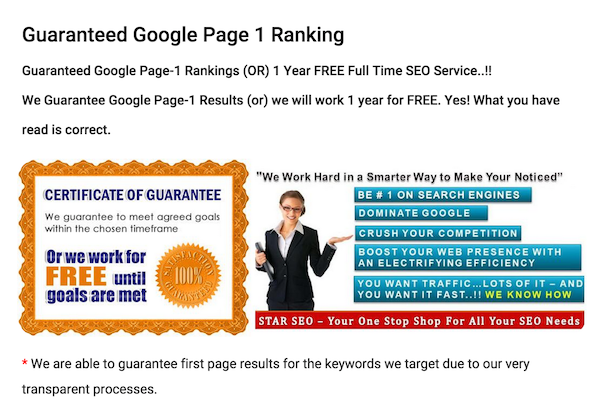
page one guaranteed
Also, if you’re just getting started, you don’t necessarily need an agency to improve your SEO efforts. See what you can do yourself first.

11. If you do hire an agency, keep an eye on them

Agencies using the wrong methods can do a lot of damage.
Often by dodgy link-building which may achieve some short-term results but will expose your site to the risk of penalties long-term.

12. Keep up with industry news

Things can change fairy quickly in SEO, so things that work for a while can become against Google’s rules over time.
As with the recent penalties for bloggers reviewing products, Google will rarely spell things out. It will give advice and hints, but it won’t contact you. You’ll often only know you’ve done something ‘wrong’ when you login to Google Search Console and receive a notice like this:
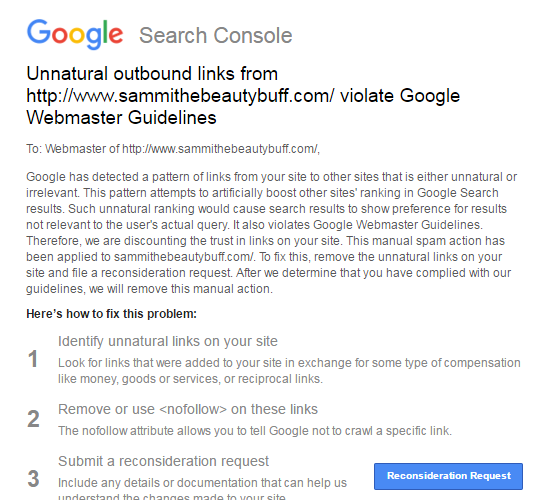
Google penalty

13. Try not to rely too much on Google

Yes, it’s well worth working to improve your rankings, and search traffic is valuable, but don’t put all of your eggs in one basket.
Google can change the way it ranks sites, the way it display results at any time, in ways which could adversely affect your search traffic.
Look to build email lists, use social media etc so that you’re attracting customers from a range of sources.

14. Launch a blog / create content

Content is what will help you rank for your target terms. This means content on product pages, homepages and everywhere around the site, but a blog can also help.
It shouldn’t be done just for SEO reasons, as blogs present an opportunity for you to talk about your product and services and the issues around them.
It means you can create the kind of content that people interested in your product or service would appreciate, and begin to build an audience.

15. If you blog, do it regularly

You don’t have to write five articles a day, but regular updates mean your visitors have something to read, and you’ll also be creating fresh content for the search engines.

16. But don’t go keyword-crazy

Yes, you want to target the terms that your customers are likely to search for, but you have to write for humans first of all, or your content will be weak.

17. Aim for evergreen content

Look to create quality content that addresses customers issues and has a longer shelf-life. This‘evergeen content’ is more likely to achieve search rankings over a longer period of time.

evergreen

18. Use a clear URL structure

People should be able to guess the topic of a page just by looking at the URL.

19. Use internal linking to optimise your site

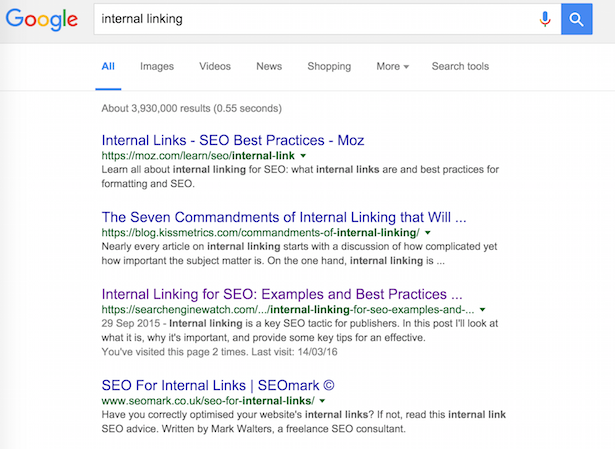
Effective internal linking is about linking topics and themes together in a more sensible way, for readers and for search engines.
For example, if you are providing cake-decorating services, you’ll have lots of articles using that phrase. They’re not all going to rank for that, so choose the page you’d most like to rank for that term and point the links at that.
It can be very effective, as this internal linking example from the Daily Mail website shows.
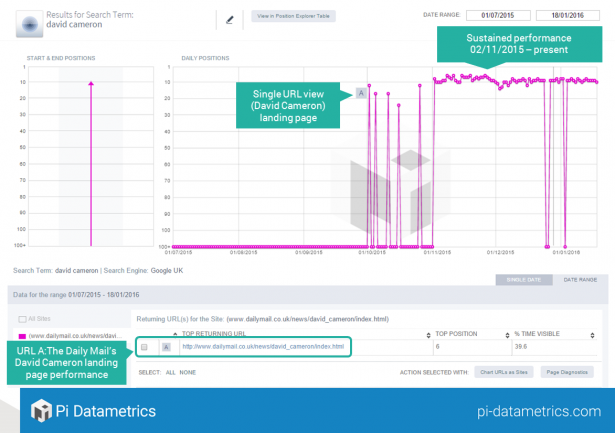
David Cameron landing page

20. Use your site search data to find terms to target

You can view the terms your visitors search for on site by looking into your analytics data.
You can learn a lot from this site search data, which can help in many ways.
For search, the keywords that people use on your site could be terms that you aren’t currently targeting via SEO or PPC.
If so, analysing site search data is a great way to find more relevant terms to target. They also tell the the kind of language that customers use.
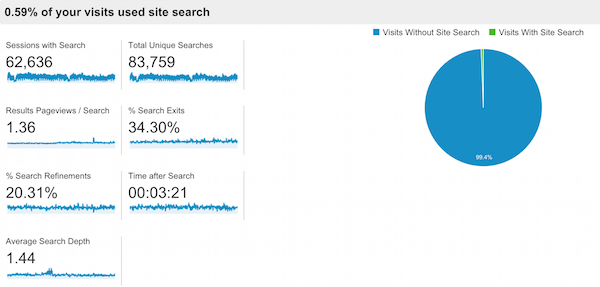
/IMG/908/333908/clickz-site-search-usage

21. Encourage reviews

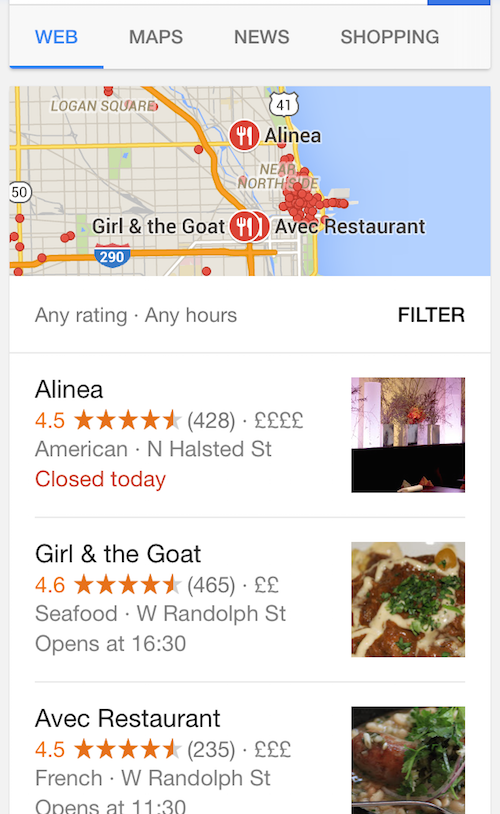
Reviews will help to drive conversions but, from an SEO perspective, they help to drive your local SEO visibility.
/IMG/955/335955/chicago-rest

22. Optimize images

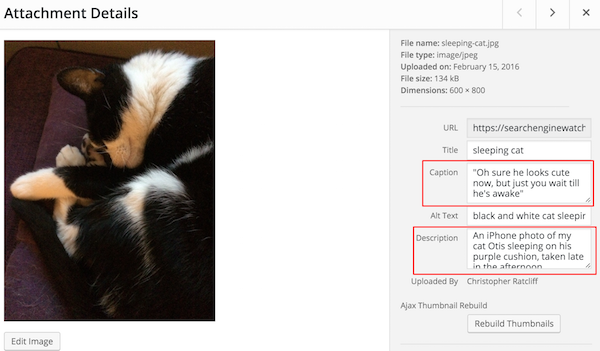
In this article, SEW Editor Christopher Ratcliff explains how to optimize images for SEO, with the help of his cat.
wordpress photo upload highlighting caption and description

23. Set up Google Analytics

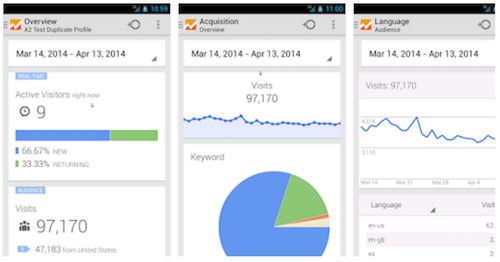
It’s free and it’s essential for you to understand customer behaviour, traffic sources and more.
Here’s a beginner’s guide to Google Analytics.
 Google Analytics app

24. Think about UX

For one thing, after mobilegeddon, your mobile ranking depends on factor related to UX.
Site speed is just one. Use tools like Google’s pagespeed insights to learn about your site and how to improve it.

25. Optimize your Google My Business profile

The basics should be there – if you have a physical store, provide opening times, directions and other useful information.
Don’t leave it at that though. Add images, regular updates and more.

26. See who is linking to you and learn from it

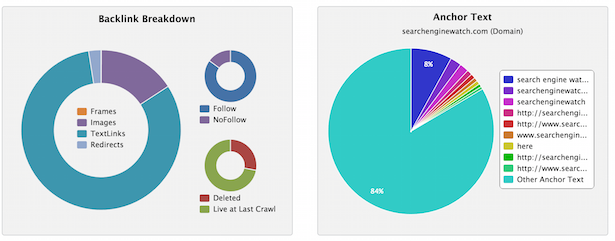
You can view the links you receive through tools like Majestic and others. Are you attracting links from relevant sites? If so, which kinds of content / pages are attracting these links?
backlinks

27. Write a unique title for every page

On Google, you have around 55 characters to make the topic of a page clear to searchers and search engines.
page titles google

28. Don’t expect results too quickly

The tips here will produce results, but don’t expect overnight success. Good SEO can take time, so be patient and stick with the process.

29. Use a little PPC

If you have the budget, PPC can deliver traffic more quickly.
It can also inform your SEO efforts – you can see which keywords work best for conversions and can help you to improve your landing pages.

30. Write your own product page copy

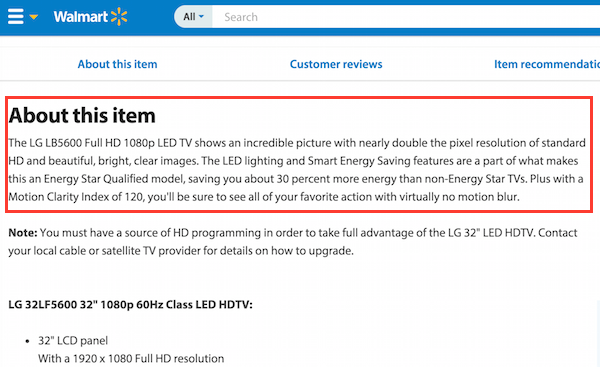
If you’re selling products that other sites will also have, unique product descriptions can help your site to stand out.
They’re also better for conversions, as the manufacturer descriptions will not have been tested for effectiveness, whereas you can try variations and see what works best for your site
duplicate-product-copy
What have I missed? Add your tips below…
To view the original article Click Here

Sunday, 17 April 2016

The 9 Biggest Mistakes Business Owners are Making on Facebook

As a social media strategist who has worked with hundreds of business owners over the years, I’ve found that there are some common mistakes that I see people making over and over again. In no particular order, here’s a list of the biggest mistakes business owners are making on Facebook.
  1. Too many hashtags. I see this one all of the time. An individual or business page will post on Facebook and mistake the platform with Twitter or Instagram. Hashtags work really well on Twitter and Instagram but don’t necessarily work very well on Facebook.  I realize people are trying to save time by pushing their posts from other platforms (Twitter or Instagram) to Facebook – but it just doesn’t come across well. Be sure to treat each platform separately and post accordingly.
    Avoid using too many hashtags in your Facebook posts or simply pushing your Twitter or Instagram updates to the platform.

    Avoid using too many hashtags in your Facebook posts or simply pushing your Twitter or Instagram updates to the platform.
  2. Too long of a post. Now, I understand there’s a time and a place for the occasional longer post but in general, it’s a mistake to constantly post lengthy posts. People just simply won’t read them. People want things that are quick, easy and fast to digest. Keep in mind that 89% of Facebook users are on a mobile device. Aim to keep your posts short and sweet.
  3. If you’re a business owner, do not share your Facebook account with your spouse. I see this often and it just looks very unprofessional. For example, your Facebook account should not be “Joe ‘N Susie Smith” – have separate accounts. Even if you aren’t going to accept every friend request – when you are in a leadership position, having an account shared with your spouse gives the wrong perception.
  4. Don’t add your job title onto your personal profile name. I see this especially in the real estate industry. While I understand why people do this, please know you don’t have to add the title Realtor for people to know that you’re in real estate. So, instead of being “Betty Jones Realtor” – just be “Betty Jones” and then make sure in your About Section you add in your title and brokerage.
  5. You’re not making it easy for people to find you. You want to make it really easy for people to find you. What I mean by this is on your personal profile you should include where you live, where you work and your contact information. This doesn’t mean you have to have your cell phone number listed, but you should at minimum include your email or your website. This is critical if you have a common name. If I am specifically looking for a “Joe Johnson” I will probably find hundreds of results – but by adding in location, job and title – it makes it much easier for me to find you.
    Make it easy for people to contact you by including your information in your personal profile.

    Make it easy for people to contact you by including your information in your personal profile.
  6. You have to have a profile photo that looks like you. Don’t use a photo that is outdated. People should easily be able to recognize you from your photo. Also, it’s best to use a photo that is just of you versus your entire family. Save the family photo for your cover photo.
  7. Putting too many polarizing topics on Facebook. We all know it’s political season and so this mistake is even more prevalent at the moment. My advice is there’s a fine line between being your authentic self and sharing your viewpoints and opinions…and polarizing other people. It’s one thing to be passionate about your beliefs, but in this day and age with social media there are so many blurred lines between personal and professional. It’s important to remember that what you put out there sticks with you for a long time – your digital legacy.
  8. Not checking your notifications. This may seem like a simple no-brainer, but I see a lot of business owners that just get too busy and forget to check their notifications. With Facebook, you can’t just set it and forget it. Responding is just as important, if not more important, than what you post on Facebook.
  9. Outsourcing too much of your personal social media. I often hear from business owners that they just don’t have time for social media. I’m a firm believer that social media does not have to take a lot of time, especially if you have a strategy in place. Now, it’s fine to outsource certain aspects of your social media – but don’t outsource the relationships. You may choose to outsource things like blog post creation, graphic design and scheduling some content – but what you can’t outsource is the value you bring to commenting and engaging with your friends, colleagues and clients in an authentic way. Think of it as a big dinner party; if you had a dinner party with your 10 most important clients – would you have your assistant be there in your place? Of course not! So, the same is true for social media!
Remember, Facebook is truly about the long game. It’s about the marathon and not the sprint. What you do today affects your business 6 months from now…12 months from now…18 months from now. Yes, there’s a whole business strategy with pages and advertising and content. But the other side of that strategy is all of these little things that we do, day in and day out. It’s the little things that will make a big difference.
Check out my Periscope on this topic:

What mistakes are you seeing on Facebook? I’d love to hear! Leave a comment below or jump on over to our #GetSocialSmart Facebook group and join in the conversation. I’ll see you there!

To view the original article Click Here

Saturday, 27 February 2016

4 Keys Vital for Business Website Success

It’s a fact that your business website can be your first impression online.  This fact is going away, it’s just increasing in truth and in complexity!
By truth I mean that more and more people are researching and looking up a business online before they ever make contact with them.  I’ve heard it said that 80% of the sales process is already complete by the time someone contacts you!  The growth and adoption of smartphones has only made your website more important.  In fact, with mobile use of the internet exceeding desktop use and with the search engines shifting to value mobile friendly sites in search rankings, your website, and it’s mobile-friendliness, is simply critical to your ability to succeed online today.
I’m diving into 4 keys which I believe are essential for your business website today.
Some of you need all four.  Others of you are doing 3 of the 4 and need to get that last one in gear.  Still others may be doing all 4 keys to business website success but it’s time to review how you are doing them to make sure things are sharp.  Let me help you review your website in this episode!
Of course, I’d be remiss to not mention that if you need any help… a new website, lead capture, or more, you can contact me.

4 Keys Vital for Business Website Success

1. Mobile-friendly Responsive Website

Traffic on mobile devices continues to search.  It was in 2014 that mobile traffic on the web first passed desktop traffic and that trend has only continued.
In 2015 both Google and Bing made changes to their search ranking algorithm to favor sites that are mobile friendly.  Put simply, this means if your site is not responsive and working for mobile and tablets well, you’ll drop further down in search rankings!
The key is a “responsive” site, a site that responds to the device.  More on this in the podcast!

2. Active Blog / Resource Center on your Site

A key way to differentiate yourself from competition and to help your search ranking is to invest in what I call a “Resource Center”.  It’s a blog that you regularly contribute to that offers just what it says….resourcing to your audience.  This is a way to demonstrate your companies expertise and thought leadership on topics related to your industry and the problems your products/services address.
The more you blog on relevant topics the more you can rank well on search engines like Google.
The more your Resource Center grows, the more “discovery” material you have out there enabling people doing searches in search engines on key topics will find you and come to your site.
Listen in to here me cover this more fully on why you need it, the frequency you need to aim for, and topical ideas.

3. Integrated Lead Capture on your Website

It’s been outlined by Ian Cleary of Razor Social that 70% of web visitors do not return to a website after that initial visit!
With that being the case, having a solid lead capture plan is imperative for your website.  From my experience working with many businesses online, this is a key missing piece on their site.
This works hand-in-hand with a Resource Center because the blog helps get more traffic to your site and then the lead capture helps move them from visitors to your email list for further nurture.
Lead capture doesn’t have to be scary.  It should actually offer value and be a really easy soft sell.  It can be a coupon, discount, offer, or other special resource (like an ebook or recorded video/webinar).
I want you to integrate lead capture that is both valuable and strategically deployed.  My tool of choice for the strategic deployment is Waftio.

4. Social Sharing for Easy Amplification

We’ve got the Resource Center in action, and we’ve got lead capture covered, so why WOULDN’T we make it easy for those visiting to share your content on social media?
It’s happening far to often on great blogs, they forget social sharing buttons to allow their work to be shared by others.  People are looking for great content to share, make it easy for them to share!
I use key social networks like Facebook, Twitter, Google Plus, LinkedIn, Pinterest, and the integrated Buffer button on my blog.
Having the social buttons makes it easy both of others but also for me to share my own content!  It’s simply smart business.

Video Version of the 4 Keys to Business Website Success Podcast:

What’s your key takeaway that you need to do in the next 24 hours based on listening to this?
What’s your Why?
To view the original article Click Here

Saturday, 20 February 2016

LinkedIn For Business: How to Use The Social Media Platform to Achieve Faster Growth

LinkedIn is not just a resume— it’s a platform to connect, create, and converse with your community.
We may not always think of LinkedIn as being a social media platform, like Facebook, Twitter, and Instagram. But it’s time to think again.
LinkedIn is important to your business because it’s a dedicated business network. According to Statista.com, towards the end of 2015, there were close to 400 million users on LinkedIn, all with the common goal: to connect on a deep, professional level.
But, how do you actually leverage LinkedIn to grow your business? This is a big topic, so we’ve broken it down into 5 areas:
  1. The personal profile;
  2. The company page;
  3. Your products and services;
  4. Building a network; and,
  5. Publishing content.
We’ll burrow down into each of these 5 areas, covering them off comprehensively with tips and examples so you’ll come away with a stronger knowledge and skill base to start growing your business on LinkedIn.
Excited? Good, then let’s get cracking with our first area of improvement.

01. Let’s Start With Your Personal Profile

Like any other social media platform, it all starts with a profile, and even though you’re looking to grow your business’ presence, you need to have your own personal profile to begin with.
The big tip for this area is that your personal profile needs to be a professional representation of yourself (your personal brand) and your organization (your business’ brand). Here are our tips to achieving this:
Personal Profile: Customize Your Headline, URL, and Photo
The headline is one of the most important elements of a LinkedIn page and is, effectively, a 120-character sales’ pitch.
Here’s Amy Porterfield’s headline:
Untitled design (5)
Be sure to include your job title or position using keywords that will help people find you, and consider including the organization (if you have the characters to do so), like Melanie Perkins does with Canva:
01. Headline, URL, picture
Customizing your LinkedIn URL to include your name will help you be discovered and contribute to the overall visibility of your profile.
Plus, a photo will make your profile 14 times more likely to be found in searches. This should be a clear and professional photo of you, and only you. Not a social picture or group image.
Here’s Gary Vaynerchuk’s profile, which ticks both of these boxes:
Untitled design (6)
Personal Profile: Write a Succinct and Relevant Summary
If your headline is the 120-character sales pitch, your summary is the 30-second elevator pitch.
Summarize who you are and what you do by promoting your biggest achievements and key strengths, or telling a story about your career. Write in a casual tone, be interesting, and don’t forget those all-important keywords.
Here’s Pat Flynn’s summary, which tells the story of his career:
Screen Shot 2016-01-25 at 10.12.02 AM
If you’re going to use your LinkedIn page to help boost your business’ presence, make sure your personal message is aligned with that of your company.
Personal Profile: Big up your Experience and Education
Fill in at least your previous two positions and where you’ve studied. Flesh out the descriptions of each with information (and keywords) about your skills, experience, knowledge, and achievements.
You can add different media – like photos, videos, documents, presentations, and links – to showcase your work. You can also add links to publications that feature your name or work.
There is also the opportunity to fill in awards, honors, interests, volunteer work, plus more, so add in any relevant and interesting information.
Here’s a section of Peg Fitzpatrick’s list of experience:
Screen Shot 2016-01-25 at 10.16.05 AM
Personal Profile: Collect Endorsements and Recommendations
When you log onto LinkedIn it will often prompt you to endorse the skills of your connections, and vice versa.
Skills are like keywords, highlighting, well, your skills, and endorsements are great to get and easy to give. You can also request recommendations from connections that, if they agree, will be posted to your LinkedIn page.
This is the endorsements’ section on Guy Kawasaki’s page:
Screen Shot 2016-01-25 at 10.18.25 AM
Personal Profile: Know Your Privacy Settings
Don’t forget that unless you make your privacy settings ‘anonymous,’ people will know when you visit their page. This is great when you want people to know you’re looking, but not so flash if you’re checking up on your high school crush. Save that for Facebook.

02. Now, Add in Your Company Page

Once you’ve got your personal page looking slick, the next step is to build aLinkedIn Company Page. Google frequently ranks optimized Company Pages high in search results so create a page that provides visitors with insight and value and make sure you have all the right keywords in all the right places.
Company Page: Create and Optimize 
Follow LinkedIn’s ‘getting started’ instructions to create your Company Page and optimize it with a logo and company details. Then just like you did for your own profile, write a description about your business or organization and fill it with keywords and relevant and interesting information.
Be on brand and write in a professional and personable manner.
Screen Shot 2016-01-25 at 10.23.15 AM
Company Page: Add a Header or Banner
Design and upload a header or banner that represents your brand and is consistent with your other marketing material and social media platforms.
Studio Alto is a great example of branding consistency. It has the same image across all social media platforms and tailors the dimensions to suit the size of each banner.
05. Company Page Banner
Company Page: Add the LinkedIn Icon to Your Website 
Make it as easy as possible for your website visitors find and access your social media pages. It’s as simple as adding the LinkedIn icon to your website and other associated pages. Here, Gladeye has included the LinkedIn icon alongside Facebook, Twitter, and Google Maps.
06. LinkedIn icon
Company Page: Post Updates About Your Company
There’s a vast variety of information you can post on your Company Page, including job opportunities, behind-the-scenes photos, product announcements, blog posts, new employees, recent projects, event reviews, designer interviews… really, the sky’s the limit.
But whatever you choose to post, two underlying principles prevail: it should bring value to your community and it should be on brand.
For a few tips on writing posts – keep the headline concise, include a link, add visual rich media (image, video, infographic), ask questions to involve your audience, monitor discussions, and make your LinkedIn Company Page posts part of your content calendar.  
07. Company Page posts
Company Page: Use LinkedIn Sponsored Updates 
Sponsored Updates enable you to target an audience beyond your page followers in order to get your best content in front of the right people. Set your budget and you’ll pay either per click or per impression – the choice is yours.
Here, HubSpot used LinkedIn Sponsored Updates to reach marketing professionals in small- to medium-sized businesses in order to promote its ebooks, webinars, and other marketing tools.
08. Sponsored Updates
Company Page: Find Insight With Analytics
LinkedIn’s Analytics will provide information on your most engaging posts as well as helping you to identify trends and understand more about your followers, traffic, and activity on your Company Page.
This is very useful for determining what type of content to post and/or deciding what type of content to sponsor or promote.
S2-resized-600

03. Next, Actively Showcase Your Company’s Products and Services

Google is also a big fan of the LinkedIn Showcase Page and will rank them highly in search results. A Showcase Page is an extension of a Company Page and is dedicated to highlighting a particular product line, service, or brand.
Showcase Pages are listed in the right-hand column of a Company Page.
10. Showcase Page Column
Products & Services: Create and Optimize a Showcase
Follow LinkedIn’s ‘getting started’ instructions to create your Showcase Page. It works like a mini-Company Page and should be designed to attract and target an even more specific audience.
Optimize it with a banner, logo, website link, company details, description, and keywords – you know the drill.
11. Showcase Page
Products & Services: Post Updates About the Brand, Product, or Service
Just like a Company Page, a Showcase Page should be active, engaging, relevant, and professional. Post regularly and factor the Showcase Page into your content calendar.
Use visually rich content effectively and include photos, images, infographics, and videos for page visitors.
12. Showcase Page posts

04. Start to Build and Engage Your Network

Now you’ve got personal page, Company Page, and Showcase Page/s ready to go, it’s time to build your network.
The goal is to connect with like-minded people to create a like-minded community, so think about quality, not quantity, and work at developing a relationship and rapport with connections.
Network Building: Build a ‘Smart Network’
According to social media strategist Stephanie Sammons, you should be building a ‘smart network.’
“The smarter the network, the more relevant people and opportunities you attract.”
Sammons suggests, considering connections in your home and work locations, current and previous industries, organizations, associations, referral sources, potential business partners, industry suppliers, etc.
LinkedIn will also suggest ‘people you may know,’ which will do some of the legwork for you. However, always use discretion in sending invitations as well as accepting invitations.
13. Connections
You can request introductions, so if there is mutual contact between you and a potential connection, ask them to introduce you. And because good karma is important, you can also be the mutual contact and help connect two people you have in common.
Network Building: Customize Your Invitation
When you send an invitation to connect via LinkedIn it will prompt you to enter how you know the contact. It will also provide a standard message: “Hello, I would like to add you to my professional network on LinkedIn.”
Customize, tailor, personalize, modify, adapt this message. However you want to say it the message needs to be rewritten. You have 300 characters to invite, introduce, and impress, so make those 300 characters count.
14. Invitation
Network Building: Build Rapport on Other Platforms
When it comes to LinkedIn you might choose to connect with people you’ve heard speak at a networking event. After you’ve met and spoken, and built a rapport, you invite them to connect on LinkedIn.
Treat other social media platforms, such as Twitter and Facebook, in the same way. Establish a rapport, let them know you’d like to connect, and then send the invitation, referencing how you know them in the message.
Network Building: Other Tools to Build Your Network
LinkedIn has lots of great tools that can help you to build and engage your network. A saved search will enable you to search for people in your target market, save the search, and then be notified by email when new people match your search criteria.
Upgrade to a Premium account to send a Paid InMail. You get a limited number of InMails before you start paying for them so use them wisely.
Otherwise, keep in mind you can get a 30-day free trial of LinkedIn Premium and do a targeted burst of InMails during that period.

05. Finally, Publish Content

Now, are you ready to get you and your business noticed on LinkedIn? Ready to position yourself as a thoughtful leader and active participator? Then it’s time to start publishing content on the platform.
Keep in mind that when you publish on LinkedIn you share from your personal page. You can’t publish from your Company or Showcase Page, but you can communicate your organization or brand’s story.
16. Published post
Publish Content: Write For Your Audience
Your LinkedIn audience may be different from your other social media followers so write or adapt your posts to cater to this audience.
Your posts should demonstrate your authority or knowledge, or reflect on personal experience. Be informative, relevant and current, and don’t do straight out promotion, unless it has an educational element.
Guy Kawasaki, Canva’s Chief Evangelist, knows marketing, technology, and start-ups, and all his posts are relevant to these topics – even his Official Guy Kawasaki Father’s Day Gift List.
17. Posts
LinkedIn’s Trending Content tool can help you identify topics that resonate with specific audiences and can serve as a good starting point for publishing relevant and targeted posts.
Publish Content: Monitor Activity
Followers and connections can like, comment, and share your posts. Monitor the activity and respond when necessary. Shared posts reach an audience beyond your own, so use this as opportunity to find new connections.
And of course, do as you hope others will do for you – share, like, and comment on other people’s posts. It’s another way for 2nd and 3rd degree connections (and more) to see your name and your insightful comments.
18. Interact with Posts
Publish Content: Find Insight With Analytics
Just like posts on your Company Page, you can also use LinkedIn’s Analytics to gain knowledge about your personal posts. View engagement with your long-form posts, including views, comments, and reader demographics.

Your Turn

Building a relevant and like-minded community on LinkedIn is about connecting, creating, and conversing. It’s an interactive platform that can be used to connect with industry and business professionals you may never have the chance to otherwise.
They can offer you great value, insight, and opportunities, so why not do so in return? You’ll boost your personal presence as well as that of your business.
To view the original article Click Here