Showing posts with label lead generation. Show all posts

Friday, 29 April 2016

How to Use Twitter Retargeting Ads to Generate More Customers

Twitter_Retargeting.jpg
When you think of lead nurturing, do you think of a series of well-timed, relevant emails to a perfectly segmented audience?
Of course you do. And you would be right. In practice, email is the primary channel for lead nurturing. However, supplementary channels such as paid retargeting also serve as an effective way to gently help an engaged prospect along the buyer's journey.
At HubSpot, we started experimenting with Twitter Ads as a method of lead nurturing ... but it didn't exactly go as planned. In fact, our results actually sucked.
How come? Well, my team's job is to drive product interest through trials, demos, and inbound marketing assessments. For someone to covert on one of these offerings, they need to complete a 13-field form on a landing page. And given Twitter’s mobile-first nature, it was easy to see why we weren’t successful.
But instead of throwing in the towel and deciding not to use Twitter Ads for the middle of the funnel, we decided to take a different approach. Rather than asking people to fill out a form, we decided to try showing product-related and bottom funnel content to see if we could influence leads down the funnel to become opportunities and eventually, customers.
So we asked ourselves: Can Twitter be an effective channel for influencing the lead-to-customer conversion rate?

The Experiment

In order to answer the question we were asking ourselves, we had to run a lengthy split-group test to determine if Twitter was effective at influencing leads down the funnel. Here is a breakdown of the experiment:
  • The Problem: Our retargeting efforts on Twitter were underperforming. (Not familiar with how retargetting works? Brush up on the basics here.)
  • The Objective: Figure out if Twitter retargeting influences long-term metrics, such as number of customers.
  • The Hypothesis: By targeting existing leads with product awareness and bottom funnel content, we can influence long-term metrics such as the lead to customer rate.
  • The Methodology: Create a large list of leads and split them into an experiment group and a control group. Retarget the experiment group with Twitter Ads in conjunction with our regular nurturing channels. The control group is not retargeted on Twitter, but still receive nurturing via our regular channels.
Aware that there are several ways to interpret and measure "influence," I knew it was important to note what this experiment is and what it isn't:
  • What it is: This experiment is meant to be a macro-level assessment of the effectiveness of a channel by analyzing lead to customer rate between two groups.
  • What it isn't: This experiment isn’t an analysis of exactly which ad, content, or landing page contributed to an opportunity or customer conversion.

Our approach prior to the experiment:

Prior to this experiment, we promoted direct response ads that asked for a free trial, a demo, or an inbound marketing assessment. Here’s an example:
Twitter_Retargeting_Experiment_.png
As you can see, we are directly asking for a free trial of our SEO tool and then directing the lead to a landing page with a very long form. Not so great on a mobile-first platform.

Our approach during the experiment:

During the experiment our leads saw both product awareness and bottom funnel content. We'll define these types of content in detail later, but here are some examples of the content we employed:
Bottom Funnel Content: ROI Calculator
ROI_Calculator_Twitter.png
Product Awareness Content: Product Video
Attribution_product_videos.png

The Results

At the end of the experiment we determined that the retargeted group converted into customers 64% better than the control group.
What conclusion did we actually draw from this? It’s not all about form fills. Retargeting leads with bottom funnel and product-related content is an effective way to influence people along the buyer’s journey, especially on a mobile-first platform.

Want to Try It Yourself?

Do you want to see if this works for your business? Here are the steps to set up this experiment for yourself. (Note: Everyone has their own software and systems, so if you begin to feel overwhelmed by these steps due to any technical limitations, just take the overall principles and do the best you can.)

1) Set up your audiences and reporting.

Here’s one of the hard truths about retargeting: list size matters. Since this is list-based retargeting, match-rate is absolutely crucial. Why? Because according to MediaMath, match rates can vary from 70-80% down to as low as 20-30% for some platforms. In other words, in order for list-based retargeting to be effective, you’ll need a fairly large list.
Create your list in whatever CRM or marketing automation platform you use. (HubSpot Marketing customers: You'll want to start by creating a smartlist and setting whatever criteria you want to target. Learn more about creating lists here.)

2) Create your control and experiment groups.

With any good experiment, you’ll need to have an experiment group to test against your control group for the most accurate results. In this test, the experiment group was retargeted with Twitter Ads and the control group was not.
To get our audience into Twitter, we used list-syncing service called GoChime. GoChime automatically syncs HubSpot lists to Twitter and Facebook to make retargeting your database simple. If you have a list-syncing service like GoChime, then simply sync your experiment group over to Twitter to use as a Twitter Tailored Audience. (GoChime also recently announced increased match rates, so your retargeting will be that much more effective.)
If you do not have this syncing capability, you’ll want to follow the instructions below:
  1. Export your list. Export the list you created into Excel. Make sure you have at least one of the properties you need for list-based retargeting on Twitter -- email address, phone number, or Twitter handle.
  2. Randomize your list. Randomization will ensure that you get the most accurate results possible, while also ensuring that other variables that the list may have automatically sorted by -- company size, location, etc. -- won't influence the results of your test. (Check out this article on how to randomize a list in Excel.)
  3. Slash your list in half. Open a new Excel sheet. Go back to your original, highlight your data to the halfway point, copy and paste that data into the new Excel sheet. Go back to your original sheet, then delete the portion you copied. You now have you experiment group and control group!
  4. Re-upload your two lists. After your groups are created, re-upload them back into HubSpot or whatever software you are using to track success. Be sure to give them clearly defined names in order to differentiate between the experiment group and the control group.

3) Upload your lists into Twitter Tailored Audiences.

In order to do list-based retargeting on Twitter, you need to at least have your audience’s email addresses. You can also upload a list containing phone numbers or Twitter handles, but email is likely to provide a better match-rate.

4) Set up your reporting.

Next, you’ll want to set up your reporting so you can measure the impact of your test. This process will differ depending on which system you're using, but these are the metrics you should be looking at for your experiment:
  • Lead-to-Customer Rate: This is your primary metric and will allow you to see how many leads converted into customers.
  • Lead-to-Opportunity Rate: For B2B marketers, this will help you see how many opportunities were influenced from your campaign.
These are the primary metrics for success in the experiment, but do make sure you’re also looking at your Twitter metrics -- engagement rate, cost per engagement, etc. -- so you can optimize within the platform.
To record your results, check out the simple tables below. (Note: These are example results -- not results from our experiment.)
Experiment Group
Experiment_Table_Twitter_Ads.png
Control Group
Screen_Shot_2016-04-15_at_11.26.16_AM.png
If the sample size (number of leads) of your groups differ, make sure to calculate statistical significance between the two groups. (KISSmetrics has a great A/B significance calculator that will work well for this purpose.)

5) Selecting your content.

Now that we’ve been through the steps on how to set up this experiment, let’s talk about content selection. The type of content we used can be broken down into two categories: product awareness and bottom funnel content.

Product Awareness Content

Product awareness content simply means any type of content that tells the story of your product. The most important thing to remember about product awareness content is that it must be helpful and tell the prospect how your product can help solve their problem.
Product awareness should not be confused with the “awareness” stage content of the buyer’s journey, which is typically more top funnel content like ebooks, templates, checklists, and so on. Instead, product awareness and bottom funnel content actually fall into both the “consideration” and “decision” stages of the buyer’s journey.
Examples of product awareness content:
  1. Product Videos. Product videos are an excellent way of getting eyeballs on your product or brand, especially on Twitter. Since Twitter is a mobile-first platform,videos produce strong engagement with their auto-play functionality.
  2. Product Blog Posts. Say you work for a company that sells budgeting software to finance departments. You can write a post on tips for preparing for next year’s budget, with the end call-to-action asking for a trial or demo. The aim of the post is to directly shine a light on the problem your product solves and give your prospects answers to the questions they haven’t asked you yet.
  3. SlideShares. SlideShares are always a good way to deliver content about your product that’s digestible, valuable, and even a little fun.

Bottom Funnel Content

After you’ve been retargeting your experiment group with product awareness content, you’ll want to move toward “bottom funnel” content. Bottom funnel content is basically anything that you would show in the late stages of the buyer’s journey.
Examples of bottom funnel content:
  1. Case Studies. Case studies help the prospect see what their day-to-day life would look like should they decide to adopt your product.
  2. ROI Reports/Calculators. If you’re a B2B business, then proving the potential ROI of your product is essential. Helping your prospects calculate the potential ROI of your product is not only helpful, but it makes you look confident in your product, which builds trust with the prospect.
  3. Third-Party Reviews. If you have a great product with glowing customer reviews, then why not show that off? Nothing builds trust like social proof, so make sure you leverage third-party reviews if you are able.
After all that information, I will end with this: Measuring influence is hard. As I stated in the beginning, this experiment isn’t meant to help you figure out exactly which ad made prospects turn into sales opportunities and customers. Instead, this experiment is meant to help you take a step back and make an educated assumption of whether or not Twitter Ads (or any other social ad platform, like Facebook) can be used to influence your overall lead-to-customer rate.
Happy experimenting! Let us know what questions you have in the comments section below.
To view the original article Click Here

Saturday, 27 February 2016

4 Keys Vital for Business Website Success

It’s a fact that your business website can be your first impression online.  This fact is going away, it’s just increasing in truth and in complexity!
By truth I mean that more and more people are researching and looking up a business online before they ever make contact with them.  I’ve heard it said that 80% of the sales process is already complete by the time someone contacts you!  The growth and adoption of smartphones has only made your website more important.  In fact, with mobile use of the internet exceeding desktop use and with the search engines shifting to value mobile friendly sites in search rankings, your website, and it’s mobile-friendliness, is simply critical to your ability to succeed online today.
I’m diving into 4 keys which I believe are essential for your business website today.
Some of you need all four.  Others of you are doing 3 of the 4 and need to get that last one in gear.  Still others may be doing all 4 keys to business website success but it’s time to review how you are doing them to make sure things are sharp.  Let me help you review your website in this episode!
Of course, I’d be remiss to not mention that if you need any help… a new website, lead capture, or more, you can contact me.

4 Keys Vital for Business Website Success

1. Mobile-friendly Responsive Website

Traffic on mobile devices continues to search.  It was in 2014 that mobile traffic on the web first passed desktop traffic and that trend has only continued.
In 2015 both Google and Bing made changes to their search ranking algorithm to favor sites that are mobile friendly.  Put simply, this means if your site is not responsive and working for mobile and tablets well, you’ll drop further down in search rankings!
The key is a “responsive” site, a site that responds to the device.  More on this in the podcast!

2. Active Blog / Resource Center on your Site

A key way to differentiate yourself from competition and to help your search ranking is to invest in what I call a “Resource Center”.  It’s a blog that you regularly contribute to that offers just what it says….resourcing to your audience.  This is a way to demonstrate your companies expertise and thought leadership on topics related to your industry and the problems your products/services address.
The more you blog on relevant topics the more you can rank well on search engines like Google.
The more your Resource Center grows, the more “discovery” material you have out there enabling people doing searches in search engines on key topics will find you and come to your site.
Listen in to here me cover this more fully on why you need it, the frequency you need to aim for, and topical ideas.

3. Integrated Lead Capture on your Website

It’s been outlined by Ian Cleary of Razor Social that 70% of web visitors do not return to a website after that initial visit!
With that being the case, having a solid lead capture plan is imperative for your website.  From my experience working with many businesses online, this is a key missing piece on their site.
This works hand-in-hand with a Resource Center because the blog helps get more traffic to your site and then the lead capture helps move them from visitors to your email list for further nurture.
Lead capture doesn’t have to be scary.  It should actually offer value and be a really easy soft sell.  It can be a coupon, discount, offer, or other special resource (like an ebook or recorded video/webinar).
I want you to integrate lead capture that is both valuable and strategically deployed.  My tool of choice for the strategic deployment is Waftio.

4. Social Sharing for Easy Amplification

We’ve got the Resource Center in action, and we’ve got lead capture covered, so why WOULDN’T we make it easy for those visiting to share your content on social media?
It’s happening far to often on great blogs, they forget social sharing buttons to allow their work to be shared by others.  People are looking for great content to share, make it easy for them to share!
I use key social networks like Facebook, Twitter, Google Plus, LinkedIn, Pinterest, and the integrated Buffer button on my blog.
Having the social buttons makes it easy both of others but also for me to share my own content!  It’s simply smart business.

Video Version of the 4 Keys to Business Website Success Podcast:

What’s your key takeaway that you need to do in the next 24 hours based on listening to this?
What’s your Why?
To view the original article Click Here

Sunday, 31 January 2016

7 Missed Social Media Lead Generation Opportunities

4600581394 dc57b57e3d m resized 600Lets take a look at opportunities that many marketers are missing in the battle for online lead generation. Many of these issues stem from not including calls to action (CTAs) alongside valuable and relevant content that is being shared on social media. 

7 Missed Social Media Lead Generation Opportunities

1. No Blog CTA - Business blogs are great, because they are a social media asset that a company owns and completely controls. Businesses that blog get 55% more website traffic than those that don’t . However, it doesn’t help your business if those new visitors remain anonymous. Many businesses forget to include CTAs on their blog, preventing traffic from turning into leads. At HubSpot , we have found that putting CTAs at the end of blog posts works well to increase lead generation. 

2. No Referral Process - If you are sending social media followers to interesting blog content with CTAs, then some of them will become leads for your business. The next problem to solve is getting more followers so that you can continue to grow your flow of new leads. It is important to have some type of process that encourages people to follow your business on social media and recommend others to follow your business. This process could be a contest on Twitter or Facebook or could be as simple as occasionally asking your followers to recommend to others in their online community to follow your business. 

3. Having a Facebook Page Without A Landing Page - The fewer clicks needed for someone to become a lead for your business, the better. One way to reduce this friction is to integrate lead capture forms into social media platforms where possible. You can add an offer and landing page as part of your Facebook page. If you are a HubSpot customer or trial user, you can now do this very easily 

4. Missing Social Media Bio Opportunities - Often the first pieces of content a potential new follower or lead sees on the social Web is your profile information. On Twitter, for example, the profile information for your account is in the sidebar of your page. There, most businesses simply put in the link to their home page. However, it is a better option to send them to a custom page only for Twitter users that features special content as well as a relevant offer to people who may follow you on Twitter.
5. Missing Social Signature Links - Signatures matter whether they are in your email, a blog comment or on a site like LinkedIn. Forgetting to include a signature with a link is a major mistake. When selecting the link to go into your signature, make sure you pick a relevant resource that also has potential to convert some visitors into leads for your business. 

6. Boring Content - You can have the most amazing CTA and lead generation offer in the world, but if it is surround by boring content, no one will ever see it. If your content is boring and talks only about your product, it won’t attract any attention through social media or any other channel, for that matter. So focus on creating content that is about your industry and the problems that your customers are trying to solve. 

7. Too Many Clicks - Don't make people work hard. In the case of social media lead generation, working too hard means making people click too many times to find the information they want. Going from anonymous Web visitor to a lead could also involve a lot of work. Examine your lead generation paths throughout your social media tactics and make sure that you have reduced friction as much as possible. 

Great social media marketing is about combing awesome and relevant content with voluntary opportunities for prospects to get closer to your business, whether that'd mean becoming a follower, subscriber or a lead. 

What other missed opportunities would you add to this list?

To view the original article Click Here

Saturday, 21 November 2015

How to Get More Customers in Your Sales Funnel with Engaging Lead Generation

In business and in marketing – it’s all about the leads. But today, with so many choices, options and research available, getting the average visitor to take action is a lot more challenging than it used to be.
The core concept of the sales funnel itself hasn’t changed much: you’ll always get more interested prospects at the top than at the bottom. But how you engage with those prospects at every step of the funnel has changed dramatically. Let’s take a closer look at how you can not only entice more users to take the first step, but also brainstorm new and innovative ideas to keep them interested as they make their way through to becoming loyal brand advocates.

The Big Top-of-Funnel Mistake that Nearly Everyone is Making

By far the biggest problem I see marketers and companies of every size and scope making with regards to filling the top of their funnel is this:
Mentioning your product.
“But Sherice!” I can hear you saying, “They need to be aware of the product before they can take action!”
I understand your concern – but let’s look at this from the customer’s perspective. Say I’m looking to invest in a system that provides scalable, cloud-based hosting for my website. Much to the impulsive marketer’s dismay, at this point in the funnel, I don’t want to download a white paper about “How XYZ Company Delivers Scalable Cloud Hosting Solutions”, yet that’s exactly the kind of thing that’s thrown at me from every website.

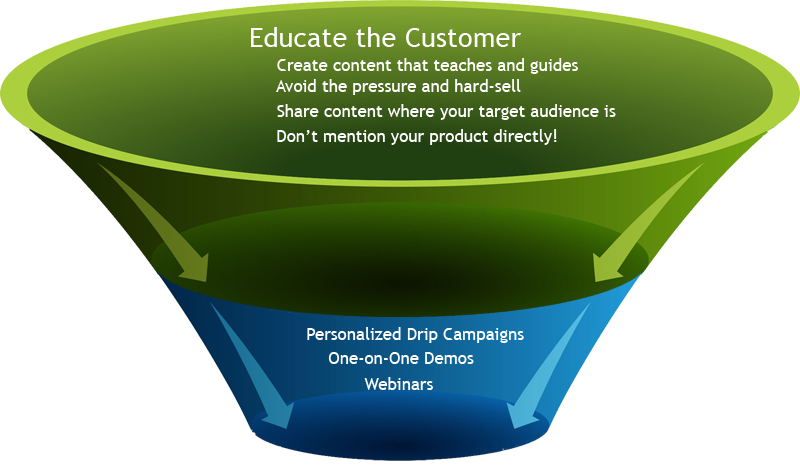
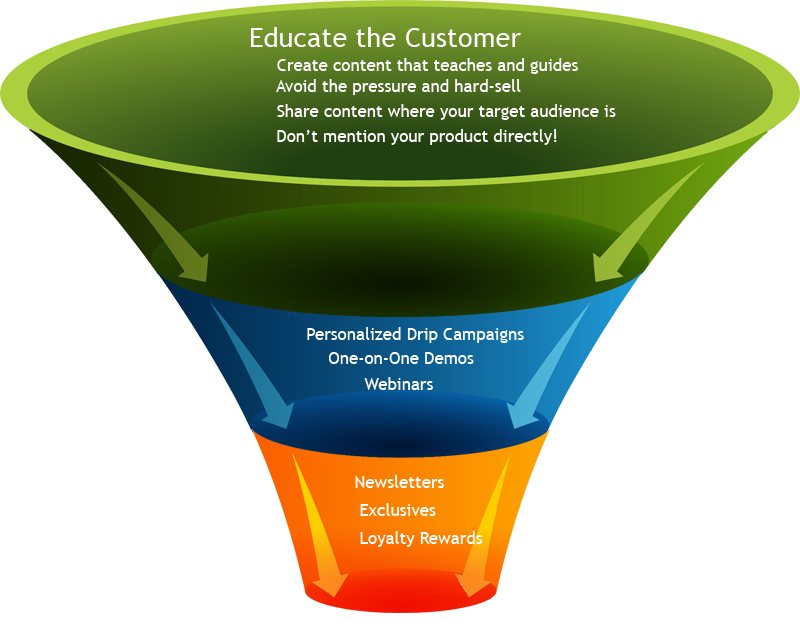
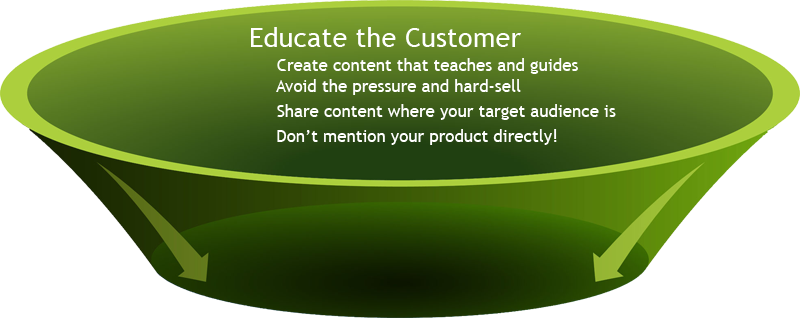
Educate at the Top of the Funnel First

funnel-1
Take a step back and look at ways to educate, rather than persuade the customer. At this point in the funnel, they’re not looking seriously at solutions. They’re involved in the discovery process – learning what’s out there and what options they have available. You need to prove you’re even worth listening to by illustrating your expertise in a way that’s helpful and knowledgeable, not pushy.
This means filling the top of the funnel with bite-sized, visually scan-able tidbits of content in the medium and format your users prefer. And don’t just wait for the prospect to be the first to act – make sure that your content is hosted anywhere they might go as part of their research and discovery track, whether that’s video, infographics, podcasts or slide shows. They shouldn’t have to go to your site in order to learn more.
Here again, the information you send them shouldn’t be talking about your company directly at all, but rather acting as a guide to help them solve whatever issue or question they have. Going back to my previous example about cloud-based hosting, I may want to know about things like:
  • Which apps/services are supported?
  • What type of platform is best for my needs?
  • What are SaaS, IaaS and PaaS?
  • How close is the server to my location?
  • What options do I have for databases and storage?
  • How much of the server can I control or access myself?
And so on. Even at this “Awareness/Interest stage of the funnel, it’s best to educate and guide rather than push for a sale. Once the interest is piqued, the question then becomes, how can you carry over more of your prospects to the next level of the funnel?
In short, how do you tie this education and guidance to your brand without pushing the consumer away?

Going from Prospect to Purchase

funnel-2
This is the point at which many marketers jump ravenously on the sale, but too often, the pressure is too much, too soon. Remember, they’re considering your offer among many likely competitors so how you differentiate yourself (in a way that’s meaningful to the consumer) is what’s going to warrant them giving you even more serious consideration.
This is where you put your email marketing muscle into action – reach out and learn what your prospect’s biggest concerns are. What do they specifically have questions about? Then set your content and marketing teams about forging relevant, personalized drip campaigns that answer those questions in such a way as to position your product heads and shoulders above the rest.
Common techniques that work best at this time are things like feature lists, comparison charts and pricing breakdowns. Once the consumer sees exactly what they’ll get, what it costs and what it includes, it’s time for the sales team to make their move and reach out to the customer to start planting those “loyalty seeds”.
Things like a free, one-on-one demonstration of the product, a fully featured trial account and tutorials can go a long way in showing the customer that you’ve got their best interests at heart. If you’ve got new features lined up for release, invite them to be one of the first to see how these new updates will benefit their business and how to use them effectively!

Follow Up After the Sale

funnel-3
After the sale may feel like the time to celebrate – but resting on your laurels at this point just makes it easier for competitors to swoop in and convince your newly hard-earned customer that your product or service isn’t the best choice for them. This is why every customer should be looked at more as an ally rather than another notch on your sales belt.
Always be looking for ways where you can create the kind of experience that the customer just can’t help but talk about. It sounds cliché to talk about delivering a phenomenal customer experience, but doing so at every stage of the process – from the website to the technical support to the newsletter and every outreach avenue and touch-point in between is what creates unbreakable loyalty.
Here, things like reward/referral programs, loyalty exclusives, how-to newsletters, social media coupons and other incentives can solidify that loyalty. Don’t just throw sale after sale notification at them – make them an integral part of your brand, and your brand a part of their lifestyle. It doesn’t matter if you’re selling shoes or scalable hosting.
Always be looking for ways to add value – not what you think is valuable, but what the customer finds valuable. Every marketing initiative at each stage in the funnel should continually ask “what can we do to make this even better?”
By asking the right kinds of questions at the right points throughout the sale funnel process, you’ll not only win over more prospects, but you’ll be creating an iron-clad foundation of loyalty and communication that people (even your competition!) can’t help but admire and try to duplicate. Always look for ways to refine your funnel at any point where you find “leaks”. Seek out disconnects where the message doesn’t match the intent or where the content isn’t meeting the reader’s needs. An engaging sales funnel isn’t made of stone: it’s a fluid, ever-changing and adapting product that demonstrates precisely how you put customers first.
Have you created some unique, engaging or compelling content for your sales funnel that customers just can’t stop talking about? Tell us more about it in the comments below!
To view the original article Click Here

Thursday, 11 June 2015

5 Simple Ways to Optimize Your Website for Lead Generation

quick-lead-gen-wins.jpeg
Optimizing your website to generate leads is a no-brainer. But it's not as simple as throwing a "click here" button on your home page and watching the leads pour in. (Unfortunately.)
Instead, marketers and designers need to take a more strategic approach. In this post, we'll go over some quick ways you can optimize your website for lead generation that actually work.
To understand how to optimize our website, we'll have to first gain a basic understanding of the lead generation process. What components are at play when a casual website visitor turns into a lead? Here's a quick overview:
lead_generation_visualization.png
The lead generation process typically starts when a website visitor clicks on a call-to-action (CTA) located on one of your site pages or blog posts. That CTA leads them to a landing page, which includes a form used to collect the visitor's information. Once the visitor fills out and submits the form, they are then led to a thank-you page. (Learn about this process in more detailin this post.)
Now that we've gone over the basics of lead generation, we can get down to the dirty details. Here are five simple ways to optimize your site for lead generation.

1) Figure out your current state of lead gen.

It's important to benchmark your current state of lead generation before you begin so you can track your success and determine the areas where you most need improvement.
A great way to test out where you are is to try a tool like Marketing Grader, which evaluates your lead generation sources (like landing pages and CTAs), and then provides feedback on ways to improve your existing content.
You can also compare landing pages that are doing well with landing pages that aren't doing as well. For example, let's say that you get 1,000 visits to Landing Page A, and 10 of those people filled out the form and converted into leads. For Landing Page A, you would have a 1% conversion rate. Let's say you have another landing page, Landing Page B, that gets 50 visitors to convert into leads for every 1,000 visits. That would be a 5% conversion rate -- which is great! Your next steps could be to see how Landing Page A differs from Landing Page B, and optimize Landing Page A accordingly.
Finally, you could try running internal reports. Evaluate landing page visits, CTA clicks, and thank-you page shares to determine which offers are performing the best, and then create more like them.

2) Optimize each step of the lead gen process.

If your visitor searched "lawn care tips" and ended up on a blog post of yours called, "Ten Ways To Improve Your Lawn Care Regimen," then you'd better not link that blog post to an offer for a snow clearing consultation. Make sure your offers are related to the page they're on so you can capitalize on visitors' interest in a particular subject.
As soon as a visitor lands on your website, you can start learning about their conversion path. This path starts when a visitor visits your site, and ends (hopefully) with them filling out a form and becoming a lead. However, sometimes a visitor's path doesn't end with the desired goal. In those cases, you can optimize the conversion path.
How? Take a page out of Surety Bonds' book. They were struggling to convert visitors at the rate they wanted, so they decided to run an A/B split test (two versions of a landing page) with Unbounce to determine which tactics were performing better on each page. In the end, they ended up changing a link to a button, adding a form to their homepage, and asking different questions on their forms. The result? A 27% increase in lead generation. 
If you want to run an A/B test on a landing page, be sure to test the three key pieces of the lead gen process:

a) The Calls-to-Action

Use contrasting colors from your site. Keep it simple -- and try a tool like Canva to create images easily, quickly, and for free. Read this blog post for ideas for types of CTAs you can test on your blog, like the sliding CTA you see here:
Pop-up_CTA-1.gif

b) The Landing Pages

According to a HubSpot surveycompanies with 30+ landing pages on their website generated 7X more leads than companies with 1 to 5 landing pages. 
For inspiration, here are 15 examples of well-designed landing pages you can learn from.

c) The Thank-You Pages

Oftentimes, it's the landing pages that get all the love in the lead generation process. But the thank-you page, where the visitor is led to once they submit a form on the landing page and convert into a lead, shouldn't be overlooked.
Along with saying thank you, be sure to include a link for your new lead to actually download the offer on your thank-you page. You can also include social sharing buttons and even a form for another, related offer, as in the example below:
    • HubSpot landing page

Bonus: Send a Kickback Email

Once a visitor converts into a lead and their information enters your database, you have the opportunity to send them a kickback email, i.e. a "thank-you" email.
In a study HubSpot did on engagement rates of thank you emails versus non thank you emails,kickback emails doubled the engagement rates (opens and clickthroughs) of standard marketing emails. Use kickback emails as opportunities to include super-specific calls-to-action and encourage sharing on email and social media.

3) Personalize your calls-to-action.

Dynamic content lets you cater the experience of visiting your website to each, unique web visitor. People who land on your site will see images, buttons, and product options that are specifically tailored to their interests, the pages they've viewed, or items they've purchased before.
Better yet, personalized calls-to-action convert 42% more visitors than basic calls-to-action.In other words, dynamic content and on-page personalization helps you generate more leads. 
How does it work? Here's an example of what your homepage may look like to a stranger:
Smart Content
And here's what it would look like to a customer:
Smart Content
(To get dynamic content (or "smart content") on your site, you'll need to use a tool like HubSpot's Content Optimization System.)

4)  Test, test, test.

We can't stress this part of the process enough. A/B testing can do wonders for your clickthrough rates.
For example, when friendbuy tried a simple A/B test on their calls-to-action, they found a 211% improvement in clickthroughs on those calls-to-action. Something as simple as testing out the wording of your CTA, the layout of your landing page, or the images you're using can have a huge impact, like the one friendbuy saw. (This free ebook has fantastic tips for getting started with A/B testing.)

5) Nurture your leads.

Remember: No lead is going to magically turn into a customer. Leads are only as good as your nurturing efforts.
Place leads into a workflow once they fill out a form on your landing page so they don't forget about you, and deliver them valuable content that matches their interest.  Lead nurturing should start with relevant follow up emails that include great content. As you nurture them, learn as much as you can about them -- and then tailor all future sends accordingly. 
Here's an example of a lead nurturing email:
Lead Nurture Email
This email offers the recipient some great content, guides them down the funnel, and gets to the point. According to Forrester Researchcompanies that nurture their leads see 50% more sales ready leads than their non-nurturing counterparts at a 33% lower cost. So get emailing!
What other tips do you have for optimizing your website for lead generation? Share them with us in the comments.
To view the original article Click Here
Wednesday, 22 April 2015

The 4-Step Slam Dunk Process That Generated 140,000 FREE Leads From YouTube

blog_Fuel
How cool would it be to gain 140,000 leads (email subscribers) to fuel your business?
How much cooler would it be if you could do it for free?
I’m about to reveal the EXACT 4 step process I’ve used to do exactly that to build a business in the basketball training niche.
Youtube-strategy-img1Youtube-strategy-img2
The opportunity is HUGE on YouTube as it’s a fairly underutilized and untapped platform.
Organic traffic on YouTube is different than other platforms like Facebook, it LASTS for months and years.
This channel is in the basketball training niche and it’s growing daily.
Youtube-strategy-img3
Leads turn into sales, and there isn’t anything healthier for your business than making the cash register ring… (especially if the leads are FREE)!
The strategy of generating organic traffic (and free leads) from YouTube took me 3 years to perfect and I’ve documented it step-by-step.
This system can be used in any market where content can be created…
If you follow these steps, you will see a significant spike in traffic from YouTube in 30-60 days, you just have to stick with it and be consistent.

1. Game Planning: YouTube Keyword Research

As marketers, our job is to provide a solution to a pain point for a market.
For example, athletes may search “How to jump higher” or “How to dunk”.
These potential customers are searching for answers to their problems, and it’s our job as marketers not to rely on them to come to us, but instead, meet them at their problem and provide a solution.
First, write down the broad subject of what your business is all about.
For example, in our business, which teaches athletes how to become better basketball players, I’d write:
Basketball Training
Next, I want you to write down this question:
If you surveyed 100 ideal customers and asked:
“What would you type into Google or YouTube to improve at [PROBLEM YOUR BUSINESS SOLVES]?”
What would the 5 most likely answers be?
Here’s mine…
Subject: Basketball Training
  • Basketball Training
  • How to get better at basketball
  • How to dribble a basketball
  • How to shoot a basketball
  • How do I jump higher
What would your target market type into Google/YouTube when looking for the solution to their pain point?
Write out the top 5 answers (or as many as you can come up with).
Next, I want you to remove “How to” or any added words that aren’t associated with the “keyword” that describes what your customer needs help with.
  • Basketball Training
  • How to get better at basketball
  • How to dribble a basketball
  • How to shoot a basketball
  • How do I jump higher
So the new list would look like:
1. Basketball Training
2. Get Better at Basketball
3. Dribble a Basketball
4. Shoot a Basketball
5. Jump higher
These 5 keywords from your list are called your “Bracelet Keywords”.
Next, take your first bracelet keyword, and go directly to YouTube.
Begin to type in your first bracelet keyword, leaving the last 2 letters off the end of the spelling like so:
Youtube-strategy-img4
As you type, you’ll notice an automated list of “recommendations” below the search bar.
This is called the “Google Autocomplete” function. This function offers a prediction of what you are searching for based on the popularity of previous user searches.
Pretty cool, right?
Next, make a list of all of the Autocomplete recommendations that your market is searching for:
Youtube-strategy-img5
Go through your 5 Bracelet Words, and make a list of all of the recommended autocomplete keywords you were given. You can expect between 35-45 solid keywords that your market is clearly searching for.
Each of the keywords are essentially DONE FOR YOU titles for videos. You’ll want to do a video for every single term you find.
Once you shoot a video, and begin the upload process, be sure to include the keyword in…
  • The headline
  • description
  • tags of the video
… to zero in and target people searching for this exact term.
Here’s one of our videos…
YouTube SEO

2. Rule Change: Great YouTube Content is Worth 3 Points

In early 2014, YouTube made an algorithm switch that based video suggestion on watch time and no longer on videos that received the most clicks early.
With this massive algorithm shift, YouTube leveled the playing ground for people like us to compete with larger channels, businesses, and brands.
The old algorithm awarded channels who sent large amounts of traffic to a new video, giving it a higher ranking in their search engines.
But now, it’s no longer a “traffic competition”, but a content competition.
Simply put, if you provide quality content on a consistent basis, you WILL get traffic because your “Watch Time” will out-perform your competitors!
But how do you provide quality content that you know your market will enjoy?
First: Focus on ONE specific need in each video.
For example, if I was making a video from my list of charm keywords for “Basketball training for beginners”, I’d speak directly on the subject of basketball training for beginners. That way, when people searched “basketball training for beginners” and clicked my video, the content will be completely congruent to what they are searching for, therefore, increasing their watch time.
Second: Video length plays a massive role. Your videos should be just long enough to provide value but short enough to keep the viewers attention for the length of the video.
Videos around 3 minutes in length are long enough to provide value and content, but short enough to not lose viewer interest. I recommend each video targets a specific tip, trick, or technique.
In terms of video editing, don’t over complicate it. Some of our best videos that continue to bring us thousands of leads a month were shot on an iPhone.
The keys are consistency and congruency.
If you can only post once a week, stick to that, if you can post three videos a week, even better. Determine the days of the week that you’re going to post your videos (ex. Monday, Wednesday, Friday) and stick to 
3. Scoreboard: How To Turn YouTube Views Into Leads
If you aren’t familiar with the term “Annotation”, they are described by YouTube as:
“Clickable text overlays on YouTube videos. Annotations are used to boost engagement, give more information, and aid in navigation.”Youtube-strategy-img6
I refer to them as “Clickable Billboards” in your videos to direct viewers to take a specific action.
Annotations are what make YouTube marketing so effective. With clickable annotations you can ask your viewers to take a number of actions to help your channel and business grow.
Some of my favorite annotations are:
  • Click here to receive a free gift. (This is how we grow our mailing list.)
  • Click here to subscribe to our channel for free training.
  • Like or comment on this video and tell us what videos you’d like us to make in the future.
To set up an annotation, simply visit the video page once uploaded, and click on the “Annotation” button under the video!
Youtube-strategy-img7
Inside the Annotations Dashboard you will be able to pick what type of annotation you’d like to use, the text on the annotation, when you’d like to show your annotation inside of the video, and even choose the color and font size.
Annotation “Links” include the ability to send viewers to other videos, playlists, have them subscribe to your channel, and most importantly, visit an associated website. This means if people click your annotation, they will actually leave YouTube and visit your website or landing page.
If you are new to YouTube, or have not yet set up an “Associated Website”, you will need to do so in order to allow “clickable annotations” to your website.
Visit your “Creator Studio” under your profile picture in the top right:
Youtube-strategy-img8
Then select “Channel” from the dashboard on the left. Scroll down, and you’ll find a Feature entitled “External Annotations”, if the “Status” light isn’t green, then click “Learn More” for step-by-step instructions on setting up external annotations to your associated website!
Youtube-strategy-img9
You only need to connect your main domain to YouTube, as all pages under that domain will be accepted as an associated website.
Two tips for optimizing your annotations to generate the most:
  • “10 in and 10 out rule”: You only show annotations in the first 10% of the video, and the last 10% of the video. So if a video is 2 minutes, or 120 seconds long, we’d show an annotation during the first 12 seconds, and the last 12 seconds. As the video lengthens or shortens, so do our annotations. This allows the viewer plenty of time to take action if they choose, but our annotations take us only 20% of the entire video, allowing the viewer to still enjoy the content.
  • “Rule of ONE”: Only one annotation is displayed at a time. Don’t make the mistake of asking the viewer to do more than one action at a time. I recommend that you offer a reason for your viewer to click your annotation and visit your website (like a free gift or consultation) during every video, as well as the ability to subscribe to your channel. This will drive traffic to your website and leads into your business, but also allow for channel growth, which will increase your organic traffic reach.

4. 4th Quarter: Give a Strong Call To Action

At the end of each video, we provide verbal calls to action that instruct the viewer to take specific actions.
Verbal CTAs are extremely powerful in regards to the growth of your channel, and turning views into leads.
If you tell viewers to complete an action, they are much more likely to do so.
I recommend during the last 10% of the video, you provide a verbal CTA to subscribe to the channel by clicking the “Subscribe” button on your video.
Then, tell them to “like” and comment on your video, and ask the question: “What else would you like me to show you how to do?”
By asking the viewer what else they’d like to learn from you, you’ll discover their true pain points, and ideal videos to create, while increasing your video engagement. This is a powerful market research technique.
Your last CTA in every video, should be to click your lead generation annotation. By combining a visual annotation offering something free with a verbal command, you will see a massive increase in clicks per viewers.
Now that I’ve explained our 4-step process for generating FREE leads from YouTube, it’s time for you take action!
Remember, it takes consistency to implement this process but is well worth the high quality leads you’ll generate for your business.
The opportunity on YouTube is incredible, don’t miss out on your chance to add another high quality traffic source to your business.
To view the original article Click Here