Showing posts with label Twitter. Show all posts

Wednesday, 15 February 2017

How to Make Twitter More Relevant (Using Existing Functionality)

What to do about Twitter, the platform that everyone references but (seemingly) no one actually uses.
This week, Twitter announced a new Explore tab to help people find the best tweets – replacing Moments, which had been given prime position in the app.
How to Make Twitter More Relevant Using Existing Functionality | Social Media TodayThe move effectively reduces the relevance of Moments, which the platform had once seen as their great hope at fixing their core problem – that being that Twitter’s hard to understand for newbies, which has limited growth.
The new Explore, meanwhile, is their next solution, showcasing all the best live video, trending content and Moments - in that order. Twitter says their tests showed this new option was a better way to highlight the best tweets have to offer.
“Over the past year, we’ve been exploring different ways to make it simpler for people to find and use trends, Moments, and search. During our research process, people told us that the new Explore tab helped them easily find news, what’s trending, and what’s popular right now.”
So, cool, right?
Except, it’s not really. As noted by M.G. Siegler in his post on the change:
“’Explore’ is an abomination. Worse, it’s a bland abomination.”
Okay, maybe I wouldn’t got that far, but Siegler does make some excellent points in his piece – most notably, Siegler says that Twitter is such a great resource for trending news and content, yet the new Explore only offers a very basic discovery tool, with no personalization or built-in smarts.
“Twitter is filled with great content. Content you can’t find anywhere else. Content the media increasingly has to report about. If you sign up for Twitter but don’t follow anyone, Twitter should highlight such tweets.”  
And he’s right, there’s so much available in Twitter, so much real-time, active conversations of relevance that Twitter could use its systems to uncover and highlight. This is probably the most frustrating element about changes like this, that Twitter could do more and provide a better experience.
How do we know Twitter could do more? Because other, more effective, more personalized platforms, have been built using Twitter data.
I’ll give you an example – Nuzzel is one of my go-to Twitter tools, something I check every day, because it highlights the key topics of discussion amongst my network without me having to sort through it all myself.
How to Make Twitter More Relevant Using Existing Functionality | Social Media TodayHow Nuzzel works is it analyzes your network - the people you’ve chosen to follow - then it pulls out the most shared content among that list of users and shows you what’s trending. Simple. Stupidly simple, really. But it works.
I’ve noted several times that Twitter should purchase Nuzzel and integrate it into their app, then use that to make their own recommendation tools more effective.
I’ll give you a (very basic) example of how that might improve your Twitter experience.
How to Make Twitter More Relevant Using Existing Functionality | Social Media TodayThe full image is a bit hard to see, so I'll below up each element - first the right hand side.
How to Make Twitter More Relevant Using Existing Functionality | Social Media TodayAnd the left:
How to Make Twitter More Relevant Using Existing Functionality | Social Media TodayNow, this is the desktop version, of course, and most people access Twitter via mobile, but you could adapt the same functionality to mobile, shifting the ‘News from Friends’ over to ‘Explore’ as the first thing on the list, etc.
As you can see, immediately you get an understanding of the key topics of focus amongst the people you follow, with links to the relevant tweet conversations. In my opinion, that increases Twitter’s value immediately, while it also gives users more motivation to cull their following lists down to the people they’re genuinely interested in to improve the focus. Doing this should ultimately increase engagement, as you’re incentivized to make Twitter more engaging for yourself (rather than simply chasing follower counts)
Trends needs to be more personalized – part of the problem with ‘Explore’ is that it's just Trends on a new tab. Not improved. Not more targeted. Twitter CEO Jack Dorsey has noted that this is something they’re looking into, but even if you were to use a similar model to Nuzzel, you could detect the top trending hashtags from each users’ network and highlight them here, immediately making them more relevant.
The risk with this is that if your connections are always talking about the same topics – for me, #socialmedia would be high on the list - then those same trends would keep coming up every single day. But Twitter could build an algorithm that detects fluctuations above normal levels – so if everyone was always tweeting about social media, that wouldn’t make my list, as it’d on par with normal levels. But if there were a sudden spike in any new tag, that would be highlighted. Facebook does this with their monthly ‘Topics to Watch’ reports.
On the other side, you could improve the ‘Who to follow’ recommendations by highlighting not only profiles, but what they tweet about.
At present, ‘Who to follow’ is too unfocused – for example, 90% of my tweets are about social media and digital marketing, yet if I engage with my friend, who’s a massive Chicago Bulls fan, just a couple of times in a week, my ‘Who to follow’ tab quickly switches to a range of Bulls-related accounts.
It is getting better, but it would be good to have some additional context – maybe highlighting each users’ top tweets would help, though admittedly this does make the screen space more crowded (less of a concern on mobile, where it would have its own section).
I’ve even added in an ad unit for them – and if they could improve their targeting in the other sections, these ads could be increasingly focused and relevant.
As noted, this sample does look crowded – and my novice design skills probably don’t help - but you can see how just a few changes could make your Twitter experience more compelling, could provide you with links to content you really want to see.
Of course, it’s easy for me to say this, I’m not on the Twitter Dev team who’d have to make this actually happen, but the idea here is to highlight that such tools already exist, there are already apps built on Twitter data that provide more targeted, focused functionality.
Twitter CEO Jack Dorsey did recently ask users for recommendations on what they’d like to see improved, and he made specific note of more focused alerts and topic options.
So this is something Twitter is aware of, something they are looking at.
It’s all possible, the capacity does exist. Let’s hope Twitter can make explore into a more valuable option, and maximize the capacity of the platform as a more individually relevant news source.

Saturday, 14 May 2016

A complete strategy for effective scheduled tweets

scheduled-tweets-automation-spam

By Brooke Sellas, {grow} Contributing Columnist
Scheduled tweets are my jam.
They also keep me servicing several clients 15+ hours a day, 7 days a week. Without scheduled tweets, I’d be shackled to my phone or computer and spend countless hours tweeting.
Not productive. Not scalable. Just. Not. Fun.
And while automation can certainly make those tedious tasks much easier, how far can we take automation (and scheduled tweets) before it becomes spam?

How I Use Automation To Manage Scheduled Tweets

Let’s start with the how, because I know sharing processes can really help those who may just be starting out.
Last December, I wrote a post on the exact process I use for distributing content, so if you’ve got the time I encourage you to take a peek.
There are three main tools I use to schedule my tweets (personally and professionally):
1) Klout
This tool may surprise some of you, but what I like about Klout is that:
  • It curates content for me based on my needs/keywords
  • I can search for content labeled “hidden gem” in Klout, which means I’m not sharing the same over-shared marketing articles from Inc. and Mashable (nothing against those sites!)
  • I can jump on trending content with “hot off the press” content
I can also share directly (immediately) or schedule my tweet(s) to go out at later times.
2) IFTTT
I use “If This Then That” to schedule my top trusted blogger content. Which is to say that sites like this one are always producers of amazing content and I trust them enough to automatically share their new posts to my Twitter stream.
IFTTT has a recipe that allows me to plug in an RSS feed and then share any new posts upon publish.
Voila! I don’t even have to think about sharing the content of my fave peeps.
I can also send out my own blog posts to my business and personal streams.
3) Sprout Social 
Sprout Social is my social dashboard homie; I’ve been using it professionally for more than four years.
What I LOVE (and boy do I mean L-O-V-E) about the ability to schedule tweets in Sprout is the “Sprout Queue.”
The queue allows you to pop tweets in and “queue next” or “queue last” — which is cool, but it’s not the best part.
The BEST part is ViralPost®, which by definition does this:
"Developed in 2012, ViralPost®–available in Premium plans—determines the best time to publish content to a brand’s social channels. Unlike other social media scheduling tools, ViralPost® doesn’t consider when your followers are publishing. Instead, it recommends times when your audience is actively engaging and simultaneously identifies when others are least active."
Pretty sweet, huh?
This means for myself (but mainly our clients) I can ensure we have a steady stream of scheduled tweets going out, AND that they’re going out when they’re most likely to be engaged with.
So now that you understand the how, let’s look at the WHY just scheduling these tweets and using automation could be seen as spam.

When Scheduled Tweets Become SPAM

Yes, I just showed you how I used automation and scheduled tweets for myself and my business.Because automation makes it SO easy to “be present” (make sure you make air quotes around being present) we often forget to, well, be present.
The difference is that I make an effort to respond within a certain amount of time.
Personally, that means as soon as I can and professionally we try to respond within 3 hours (or ASAP if something comes in while we’re sleeping).
We pride ourselves on being present.
But because automation makes it SO easy to “be present” (make sure you make air quotes around being present) some of us often forget to, well, be present.
I see plenty of accounts with a firehose of content going out and little to no interaction or engagement.
Once someone “likes” it, comments on it, mentions it, retweets it, etc., you’re supposed to respond. Right?
There are many schools of thoughts here:
  • Some people say they don’t thank people for sharing their content (I do – call me crazy but I AM thankful when people think my content is worth sharing!)
  • One well-known SMM expert told me she thanks people during a certain window, and once that window is gone she doesn’t thank any other people
  • Some tweeps don’t respond to straight retweets  but do respond to retweets that have a comment or add thoughts (I fall into this camp)
  • And some peeps just don’t respond at all
So for the non-responders, doesn’t that mean they’re using Twitter as a broadcast platform?
And if they’re scheduling tweets but not following up, isn’t that spam?
Maybe I’m overthinking this, but as automation and robots take over “doing” the human element of things, where do we draw the line with what’s real, what’s worth connecting with, and what’s just plain spam?
Scheduled tweets are still a representative of your brand. Shouldn’t you be doing more than simply broadcasting?
What do you think: are scheduled tweets with no follow up just spam? Let me know in comments section below!

To view the original article Click Here

Friday, 29 April 2016

How to Use Twitter Retargeting Ads to Generate More Customers

Twitter_Retargeting.jpg
When you think of lead nurturing, do you think of a series of well-timed, relevant emails to a perfectly segmented audience?
Of course you do. And you would be right. In practice, email is the primary channel for lead nurturing. However, supplementary channels such as paid retargeting also serve as an effective way to gently help an engaged prospect along the buyer's journey.
At HubSpot, we started experimenting with Twitter Ads as a method of lead nurturing ... but it didn't exactly go as planned. In fact, our results actually sucked.
How come? Well, my team's job is to drive product interest through trials, demos, and inbound marketing assessments. For someone to covert on one of these offerings, they need to complete a 13-field form on a landing page. And given Twitter’s mobile-first nature, it was easy to see why we weren’t successful.
But instead of throwing in the towel and deciding not to use Twitter Ads for the middle of the funnel, we decided to take a different approach. Rather than asking people to fill out a form, we decided to try showing product-related and bottom funnel content to see if we could influence leads down the funnel to become opportunities and eventually, customers.
So we asked ourselves: Can Twitter be an effective channel for influencing the lead-to-customer conversion rate?

The Experiment

In order to answer the question we were asking ourselves, we had to run a lengthy split-group test to determine if Twitter was effective at influencing leads down the funnel. Here is a breakdown of the experiment:
  • The Problem: Our retargeting efforts on Twitter were underperforming. (Not familiar with how retargetting works? Brush up on the basics here.)
  • The Objective: Figure out if Twitter retargeting influences long-term metrics, such as number of customers.
  • The Hypothesis: By targeting existing leads with product awareness and bottom funnel content, we can influence long-term metrics such as the lead to customer rate.
  • The Methodology: Create a large list of leads and split them into an experiment group and a control group. Retarget the experiment group with Twitter Ads in conjunction with our regular nurturing channels. The control group is not retargeted on Twitter, but still receive nurturing via our regular channels.
Aware that there are several ways to interpret and measure "influence," I knew it was important to note what this experiment is and what it isn't:
  • What it is: This experiment is meant to be a macro-level assessment of the effectiveness of a channel by analyzing lead to customer rate between two groups.
  • What it isn't: This experiment isn’t an analysis of exactly which ad, content, or landing page contributed to an opportunity or customer conversion.

Our approach prior to the experiment:

Prior to this experiment, we promoted direct response ads that asked for a free trial, a demo, or an inbound marketing assessment. Here’s an example:
Twitter_Retargeting_Experiment_.png
As you can see, we are directly asking for a free trial of our SEO tool and then directing the lead to a landing page with a very long form. Not so great on a mobile-first platform.

Our approach during the experiment:

During the experiment our leads saw both product awareness and bottom funnel content. We'll define these types of content in detail later, but here are some examples of the content we employed:
Bottom Funnel Content: ROI Calculator
ROI_Calculator_Twitter.png
Product Awareness Content: Product Video
Attribution_product_videos.png

The Results

At the end of the experiment we determined that the retargeted group converted into customers 64% better than the control group.
What conclusion did we actually draw from this? It’s not all about form fills. Retargeting leads with bottom funnel and product-related content is an effective way to influence people along the buyer’s journey, especially on a mobile-first platform.

Want to Try It Yourself?

Do you want to see if this works for your business? Here are the steps to set up this experiment for yourself. (Note: Everyone has their own software and systems, so if you begin to feel overwhelmed by these steps due to any technical limitations, just take the overall principles and do the best you can.)

1) Set up your audiences and reporting.

Here’s one of the hard truths about retargeting: list size matters. Since this is list-based retargeting, match-rate is absolutely crucial. Why? Because according to MediaMath, match rates can vary from 70-80% down to as low as 20-30% for some platforms. In other words, in order for list-based retargeting to be effective, you’ll need a fairly large list.
Create your list in whatever CRM or marketing automation platform you use. (HubSpot Marketing customers: You'll want to start by creating a smartlist and setting whatever criteria you want to target. Learn more about creating lists here.)

2) Create your control and experiment groups.

With any good experiment, you’ll need to have an experiment group to test against your control group for the most accurate results. In this test, the experiment group was retargeted with Twitter Ads and the control group was not.
To get our audience into Twitter, we used list-syncing service called GoChime. GoChime automatically syncs HubSpot lists to Twitter and Facebook to make retargeting your database simple. If you have a list-syncing service like GoChime, then simply sync your experiment group over to Twitter to use as a Twitter Tailored Audience. (GoChime also recently announced increased match rates, so your retargeting will be that much more effective.)
If you do not have this syncing capability, you’ll want to follow the instructions below:
  1. Export your list. Export the list you created into Excel. Make sure you have at least one of the properties you need for list-based retargeting on Twitter -- email address, phone number, or Twitter handle.
  2. Randomize your list. Randomization will ensure that you get the most accurate results possible, while also ensuring that other variables that the list may have automatically sorted by -- company size, location, etc. -- won't influence the results of your test. (Check out this article on how to randomize a list in Excel.)
  3. Slash your list in half. Open a new Excel sheet. Go back to your original, highlight your data to the halfway point, copy and paste that data into the new Excel sheet. Go back to your original sheet, then delete the portion you copied. You now have you experiment group and control group!
  4. Re-upload your two lists. After your groups are created, re-upload them back into HubSpot or whatever software you are using to track success. Be sure to give them clearly defined names in order to differentiate between the experiment group and the control group.

3) Upload your lists into Twitter Tailored Audiences.

In order to do list-based retargeting on Twitter, you need to at least have your audience’s email addresses. You can also upload a list containing phone numbers or Twitter handles, but email is likely to provide a better match-rate.

4) Set up your reporting.

Next, you’ll want to set up your reporting so you can measure the impact of your test. This process will differ depending on which system you're using, but these are the metrics you should be looking at for your experiment:
  • Lead-to-Customer Rate: This is your primary metric and will allow you to see how many leads converted into customers.
  • Lead-to-Opportunity Rate: For B2B marketers, this will help you see how many opportunities were influenced from your campaign.
These are the primary metrics for success in the experiment, but do make sure you’re also looking at your Twitter metrics -- engagement rate, cost per engagement, etc. -- so you can optimize within the platform.
To record your results, check out the simple tables below. (Note: These are example results -- not results from our experiment.)
Experiment Group
Experiment_Table_Twitter_Ads.png
Control Group
Screen_Shot_2016-04-15_at_11.26.16_AM.png
If the sample size (number of leads) of your groups differ, make sure to calculate statistical significance between the two groups. (KISSmetrics has a great A/B significance calculator that will work well for this purpose.)

5) Selecting your content.

Now that we’ve been through the steps on how to set up this experiment, let’s talk about content selection. The type of content we used can be broken down into two categories: product awareness and bottom funnel content.

Product Awareness Content

Product awareness content simply means any type of content that tells the story of your product. The most important thing to remember about product awareness content is that it must be helpful and tell the prospect how your product can help solve their problem.
Product awareness should not be confused with the “awareness” stage content of the buyer’s journey, which is typically more top funnel content like ebooks, templates, checklists, and so on. Instead, product awareness and bottom funnel content actually fall into both the “consideration” and “decision” stages of the buyer’s journey.
Examples of product awareness content:
  1. Product Videos. Product videos are an excellent way of getting eyeballs on your product or brand, especially on Twitter. Since Twitter is a mobile-first platform,videos produce strong engagement with their auto-play functionality.
  2. Product Blog Posts. Say you work for a company that sells budgeting software to finance departments. You can write a post on tips for preparing for next year’s budget, with the end call-to-action asking for a trial or demo. The aim of the post is to directly shine a light on the problem your product solves and give your prospects answers to the questions they haven’t asked you yet.
  3. SlideShares. SlideShares are always a good way to deliver content about your product that’s digestible, valuable, and even a little fun.

Bottom Funnel Content

After you’ve been retargeting your experiment group with product awareness content, you’ll want to move toward “bottom funnel” content. Bottom funnel content is basically anything that you would show in the late stages of the buyer’s journey.
Examples of bottom funnel content:
  1. Case Studies. Case studies help the prospect see what their day-to-day life would look like should they decide to adopt your product.
  2. ROI Reports/Calculators. If you’re a B2B business, then proving the potential ROI of your product is essential. Helping your prospects calculate the potential ROI of your product is not only helpful, but it makes you look confident in your product, which builds trust with the prospect.
  3. Third-Party Reviews. If you have a great product with glowing customer reviews, then why not show that off? Nothing builds trust like social proof, so make sure you leverage third-party reviews if you are able.
After all that information, I will end with this: Measuring influence is hard. As I stated in the beginning, this experiment isn’t meant to help you figure out exactly which ad made prospects turn into sales opportunities and customers. Instead, this experiment is meant to help you take a step back and make an educated assumption of whether or not Twitter Ads (or any other social ad platform, like Facebook) can be used to influence your overall lead-to-customer rate.
Happy experimenting! Let us know what questions you have in the comments section below.
To view the original article Click Here

Thursday, 21 April 2016

24 Slightly Depressing Stats on the ‘Fall’ of Twitter

Despite its die-hard loyal user base, Twitter has been doing nothing but rubbing its fans up the wrong way for the last 12 months.
Yellow-eyed_Penguin_crying_MC
Whether its been the adoption of a dreaded algorithm, a mooted 10,000 character increase, the killing of its share counts, the pointlessness of ‘Moments’, heck even changing its ‘favourite’ button from a star to a heart was a massive thing, there’s a good chance that if you log-in to Twitter you’ll find people kicking-off about Twitter.
Much of this is down to the very fact that its users, especially its long-term ones who rode the crest of its initial popularity, are so loyal to the channel and don’t want to see it mutated beyond its unique purpose: serving concise sound-bites and sharing links in real-time.
But as Twitter deals with a stagnant user growth, partly due to a trend away from public social to private messaging, partly because Twitter is difficult to master for new adopters, the company has to try new things in order to stay relevant.
Today sees our second ever weekly #ClickZChat, where the good people of SEW and ClickZ take to Twitter to ask our expert friends and followers about a particularly burning digital marketing related issue.
Last week, we discussed whether or not brands have reached peak content and is it possible to cut through the noise? You can read everyone’s comments in the round-up post: have we reached peak content?
This week we’ll be talking about social media and the ‘death of Twitter’ in particular, so please join usat 12pm EST (5pm UK) on Wednesday 6 April.
As preparation for the discussion, I’ve pulled together as many stats relating to Twitter as I could possibly find, paying particular attention to its ‘rise and fall’.
Please note: many of these stats were published in a ClickZ article by Leighann Morris from last year, and I have updated the numbers wherever possible.

Active users

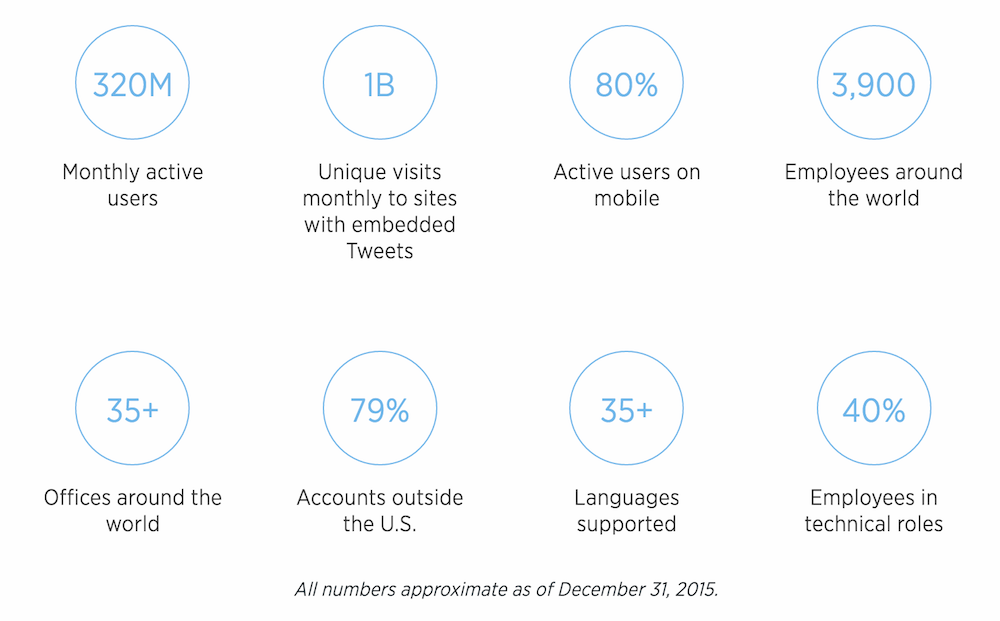
If you go by Twitter’s official numbers, by December 2015 Twitter had 320m monthly active users.
80% of Twitter are active users on mobile.
79% of Twitter accounts exist outside the US.
official twitter stats
[source: Twitter]
However as reported by CNN, in February 2016 Twitter announced that it has lost 2 million users in the last three months of 2015.
This compared to a year earlier when Twitter’s customer base only grew by just 6%.
So Twitter ended 2015 with 305 million active users. By contrast, Facebook has 1.6 billion and Instagram surpassed Twitter in September, growing to 400 million users.
There are 391 million Twitter accounts with no followers.

Tweets sent

500m tweets are sent per day.
From Twitter’s launch in 2006 and until 2009, the volume of tweets approached a 1,400% gain in daily volume year to year and around 1,000% gain in yearly volume.
By mid 2010 the rate of growth slowed down to below 100% gain in yearly volume in 2012.
Today, the volume of tweets is growing at around 30% per year.
[source: internetlivestats.com]

Demographics

23% of all online adults use Twitter (a proportion identical to the 23% of online adults who did so in September 2014).
Internet users living in urban areas are more likely than their suburban or rural counterparts to use Twitter. Three-out-of-10 online urban residents use the site, compared with 21% of suburbanitesand 15% of those living in rural areas.
Twitter is more popular among younger adults — 30% of online adults under 50 use Twitter, compared with 11% of online adults ages 50 and older.
twitterstat10
Twitter’s proportion of daily users remains unchanged from 2014 at 38%.
twitterstat11
The number of online adults who say they use Twitter has grown 7% since 2012 – but compared with other platforms, this is pretty slow growth.
twitterstat12
[source: Pew Research Centre]
In July 2015, Twitter had 87.89 million unique visitors from the United States, down from 89.2 million visitors in April 2015:
twitterstat15
[source: Statista]

Twitter’s value

Despite losing users and struggling with growth, Twitter is still making impressive amounts of money…
Twitter’s annual revenue in 2015 amounted to more than $2.22 billion US dollars, up from $1.4 billion U.S. dollars in the previous year.
twitterstat13
Twitter’s worldwide advertising revenue this year is valued at $2,444 million.
twitterstat14That being said, Twitter’s stock price hit its first ‘all-time low’ in August 2015, slumping to 5.6% to $29.27, pushing Twitter’s market value below $20 billion.
twitterstat19
[source: Statista]
Analysts believe it will have to fall a further $10 billion for  any tech giants to seriously consider any kind of approach. And that may not be far off…
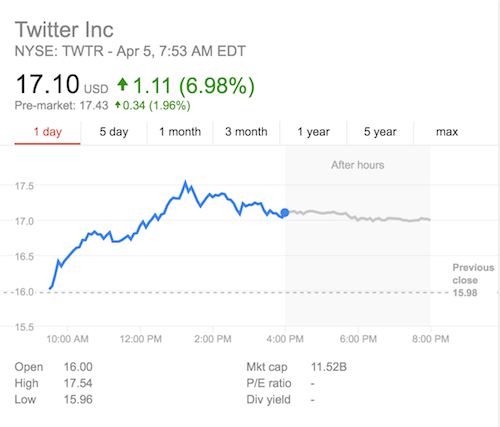
Twitter’s stock price has slumped further from $29.06 in October 2015 to just over $17 (as of April 2016).
October 2015:
twitterstat20
April 2016:
twitter s value Google Search
Twitter hit its new record all-time-low share price in February 2015 with just $14.31.
As Chris Lake suggested in his 17 things Twitter can do to transform its fortunesTwitter is now valued at around the $12bn mark and that, “For a company that should post revenue of at least $2.3bn for 2015, its market price will be whetting the appetites of prospective acquirers.”

And finally…

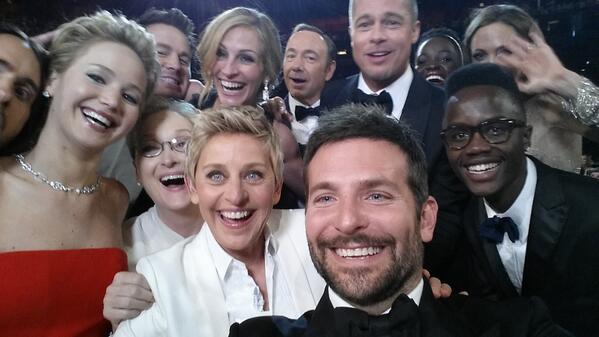
The most retweeted tweet on Twitter is still the Ellen Degeneres Oscars selfie from the beginning of 2014, which has now been retweeted more than 3 million times:


To view the original article Click Here