Wednesday, 27 April 2016

8 Mistakes Even Professional Content Writers Make (And How to Avoid Them)

Writing_Mistakes.jpg
I’ve done a lot of dumb things as a writer. But that’s okay. Mistakes are the best way to learn, right? 
When we make a mistake once, we usually don’t make it again. And the less time we have to spend correcting our mistakes, the more time we have to actually get things done. 
I've outlined a list of eight common mistakes that professional content writers sometimes make below. The idea is that once you learn about these mistakes, you’ll be less likely to commit them yourself. Let's walk through them ...

8 Mistakes Even Professional Content Writers Make (And How to Avoid Them)

Mistake #1: Thinking that you can’t break through writer’s block.

Some people tend to think that writer’s block is an unbreakable force -- nothing can be written until the block is broken.
The truth is, you can break writer’s block. Some people stand on their head, but there are other helpful tools you can use, too. 
Next time you experience writer’s block, try shifting your mindset. Don’t think, “Oh no! I can’t write.” Instead, think, “Okay, I’ve got this. I’m going to make it.”
Want more advice on how to beat writer's block and actually enjoy writing again? Check out this post.

Mistake #2: Not editing your work.

You need time to edit your writing when it’s cold. In other words, let some time pass before you go back and work on that article again. You’ll view it with a new sense of curiosity, perspective, and insight.
Not everyone loves editing. I get that. Look at it this way, though: Editing turns something great into something even greater. That’s something to look forward to. For advice on how to approach a piece of content, check out these strategic editing tipsfrom HubSpot's Ginny Soskey.

Mistake #3: Not proofreading your work.

After you edit, you need to proofread, too. Editing is making those big changes to the content itself. Proofreading is making the tiny changes to the grammar and spelling.
I’ve made a habit of never releasing a word of content until it’s been edited or proofread at least four times. Proofread, and proofread again. You’ll be glad you did.
Before you publish your next piece of content, check out this helpful proofreading checklist.

Mistake #4: Not doing any research.

You may be the world’s most brilliant writer and master of your subject, but you should do a little bit of research on your subject matter. People aren’t as impressed by your opinion as they are by a breadth of studies, data, evidence, and other information thatcorroborate your opinion.
Get ready for hard work, though. Here’s how one researcher described the researchprocess:
Research is not only a science but also an art and it is not easy. It requires honest and hard work with patience and perseverance. Not everyone is a born writer and authors can fall ill with headaches and backaches during the process of writing the research results."
Research can be fun. When you realize that you’re providing your readers with insight and advanced knowledge, a simple writing project can take on a new level of excitement. Need help uncovering credible statistics to support your content, check out these nine reputable resources.

Mistake #5: Not defining your pronouns.

Huh? What does “not defining your pronouns” mean? Allow me to explain ...
The following words are pronouns:
  • It
  • This
  • These
  • Those
  • That
There are a lot of pronouns in the English language. Pronouns are helpful, useful, important parts of speech.
What is the problem? Not defining them:
  • Those are bad. What are bad?
  • That’s no good. What’s no good?
  • It’s a problem. What’s a problem?
  • Destroy these. Destroy what?
You should define all pronouns either within the context of your writing or within the sentence. Undefined pronouns lead to unclear writing.

Mistake #6: Writing too fast or too slow.

There’s no correct writing speed. Each writer should write at the pace that suits them and allows their creativity to flow. However, be aware that your speed of writing influences your quality of writing.
  • If you write too fast, you could make sloppy mistakes.
  • If you write too slowly, you could make clumsy mistakes.
When readingthe mind goes over information faster than while writingKeep this in mind when you write. Your mind easily processes long sentences or big words when you’re writing them. But to the reader -- whose eyes are skimming across your content at 300 words per minute -- your writing is dull, ponderous, slow, and agonizing.
If you write fast, your brain is moving at a closer equivalent to the normal reading speed. Of course, you should still pay attention to your words, sentences, and structure. But at the same time, you’ll be able to get down those thoughts in a more fluid and natural way.
Here’s how the The Huffington Post reported on one writing speed researcher:
Typing can be too fluent or too fast, and can actually impair the writing process,” Srdan Medimorec, a PhD candidate in the Faculty of Arts at Waterloo said in a statement. “It seems that what we write is a product of the interactions between our thoughts and the tools we use to express them.”
A 2016 study from the University of Waterloo discovered, “the quality of your writing will likely get better if you simply type slower.”
Does this mean that you should try to move your fingers slowly, type with one hand, or just trudge along at a lazy pace? Not necessarily.
Each person has their own right pace. And different types of content demand a slower or faster pace. You move at the pace that’s best for you.
In some situations, the ideas and words are coming at an incredibly fast rate. You have to type as fast as you can. In other cases, you might be doing careful research, searching for the precise word, or writing about a sensitive subject. Slowing down is a good idea.

Mistake #7: Not understanding who your readers are.

If you want to become a better writer, become a better student of your reader. It’s actually pretty simple.
Great writing is connecting with readers in a meaningful way. You won’t be able to perform that task unless you get in their heads. I challenge all writers, before putting a single word on a page, to do as much research and gain as much understanding of their potential readers as possible.
The process is as simple as going through the exercise of creating a persona, and reminding yourself of that person every time you write. (Check out this free tool to get started.)

Mistake #8: Not outlining an article before you write it.

Outlining might bring back memories of high school English class. Don’t worry. That’s not what I’m talking about here. 
The process of outlining is simply creating a structure for your article.
I do a lot of writing, and one of the things that helps me write with clarity and speed is outlining. First, I jot down a quick introduction and conclusion. This helps me to lead up to my subject matter, and then sum it up. Doing so also makes me fill the empty space between with something relevant and meaningful.
Generally, my outline simply looks like a few bullet points. My goal is to write down the main things I want to talk about. Usually, they aren’t even complete sentences. (No big deal. I’m not writing my article at this point. I’m just outlining it.)
The whole process takes me ten minutes or so, but it saves me hours of time. Plus, it gives my article more clarity.

Ready to Write?

Writing better is about blowing apart old habits and horrible mistakes. Even though I’ve been writing almost every day for ten years, I still make mistakes. Hopefully, my mistakes are becoming fewer and fewer, but I still catch myself making them sometimes.
At the same time, however, I feel like I’m improving. And that’s what becoming a better writer is all about.
What about you? What mistakes are you eliminating in order to improve your writing?
To view the original article Click Here

Tuesday, 26 April 2016

How to Use Facebook for Business: 13 Essential Tips [Infographic]

thumbs-up-facebook-business-page.jpeg
Facebook is constantly making changes to the design of the profiles -- for businesses and individuals alike. They've made a few cool changes in the past few years, includingadding call-to-action buttons to business Pages and letting you record company milestones, like product launches and events.
There are a lot of ways Facebook is helping brands build a follower base, increase visibility, improve branding, communicate with and engage fans, and even drive traffic and leads.

To learn more about how to use Facebook for business, download our free guide here. 

So, what can you do to optimize your brand's presence on Facebook? Check out the infographic below from Cafe Quill for helpful tips on getting the most from your Facebook business Page.
8
facebook-business-page-tips-infographic.jpg
To view the original article Click Here

Monday, 25 April 2016

Something Big is Happening With Snapchat: Why Businesses Shouldn't Wait to Get Started

SnapChat_Update_2.jpg
There's a funny pattern of awakening that tends to happen when a technological advancement sneaks up on us. It starts with a mess of confusion.
We don't understand the technology or its purpose: "I don't get Twitter. Why would I want to know what you had for lunch?"
It then evolves into miscategorization: "The iPhone is actually a pretty crummy phone."
We get so caught up in definitions, we almost miss the larger leap that's occurring: "Why would people use messenger apps when you can just text?"
Then, finally, we get it: "The iPhone is not a phone at all. It's an everything device. And Twitter is not about lunch. It's about removing the barriers to real-time publishing."
While we're busy missing the big picture, a rapidly growing niche of early adopters is diving in. Early adopters don't get distracted by the need to categorize or define the technology. They just use it. And in repeated agenda-less use, the bigger picture becomes clear.
This same pattern is happening today with Snapchat.
Hang with me. Don't roll your eyes just yet. I'm going to pay it off. I've been a Snapchat doubter for a while now. Like many others, I relegated it to a fad or a niche service for a subset of a subset of the population. I'm beginning to realize I was wrong.

Snapchat is Shedding Its Skin

First, the basics. Snapchat is a one-to-one and group messaging app that has more than100 million daily active users. Long classified as an app in which teenagers exchange goofy self-destructing videos, Snapchat is beginning to shed its skin and evolve into something new. Last week, Snapchat announced a 2.0 version with a slew of new features, some of which will reshape the purpose of the app altogether. First, let's go through the features:
  • Stories now auto-advance: To keep content flowing and viewer engagement up, Snapchat stories now auto-advance.
  • 200 stickers added in private chat: While stickers may seem small, this addition brings Snapchat in parity with one of the more popular features on other messaging apps such as LINE and Facebook Messenger.
  • Upload photos from your phone: Another crowd-pleaser, this moves Snapchat from solely an "in-the-moment app" to one that can be used to share and react to the past.
  • 10-second looped video and audio notes: With video and audio notes, users can post genuine, human reactions as opposed to falling back on "LOL" or other anachronistic responses.
  • Phone calls & video calls: This is where things start to get interesting. Users can place full phone or video calls right within Snapchat, so you can seamlessly move from sharing 10-second bursts and pictures to having a longer conversation.
On their own the features are interesting, but it's the message behind the features that really caught my attention. Together, these features amount to a very clear benefit: The removal of limits to how you communicate with others remotely.
Think about it: Every other app or device we use for communication requires a certain category or format of that communication. Phones are great for long-form audio. SMS is great for text and sometimes images. Other messenger apps are great for short form messages and transactional conversations. But before this release, no single app or device optimized for all the ways humans communicate: long form, short form, audio, video, text, photo, and drawing.
Which means that Snapchat, for now, is actually pretty special.

Snapchat Wants to BE Your Phone

TechCrunch picked up on this immediately. In a review of the new Snapchat features, TechCrunch called the app social media bedrock, saying:
Photos that self destruct in 10 seconds aren’t even the point of Snapchat anymore. With today’s launch of Snapchat 2.0, Snapchat wants to BE your phone.”
But, I already have a phone. It's the larger black box that contains Snapchat and the other apps I've downloaded. Sure, that's true. But think for a moment about all the individual apps you'd need from within that phone to equate what Snapchat now enables you to do in one.
"It lets private conversations morph between mediums depending on what users want to show or tell," explains TechCrunch editor-at-large Josh Constine. "Snapchat is positioning itself as the most vivid, human way to chat.”
And it's doing so in a single, simple interface.
Last fall, Designer Tony Aube wrote a fascinating essay -- "No UI is the New UI" -- which  asserts that to date, much of remote human interaction has taken place through the filter of some sort of user interface. However, messaging apps are moving us toward a near-invisible UI. Aube went on to say:
What make [messaging apps] special is that they don’t use a traditional UI as a mean[s] of interaction. Instead, the entire app revolves around a single messaging screen."
That screen, which can now nimbly move between image, face-to-face, audio, and other forms of communication, removes some of the technical congestion found in other apps -- congestion which can cloud and limit the experience.
"We’ve learned a ton about how people talk, but our goal remains unchanged," Snapchat explains in its launch post. "We want Chat to be the best way to communicate -- second only to hanging out face-to-face."

Do You Want a Side of Fries With That Hype?

It's easy to read all of the excitement over the new Snapchat features and think we've all been blinded by a good PR team. But this actually isn't about Snapchat at all. Rather, it's an observation on how the systems we use to communicate are evolving.
One of the best explanations I've seen of how a single technology gains adoption and in turn advances society is the Gartner hype cycle. Here it is, as illustrated by, Luc Galoppin:
6074160455_20d4203ea2_z.jpg
In the hype cycle, the slope of enlightenment comes after the first rush of early success stories give way to more patterned instances of how the technology can benefit society and business. In the slope of enlightenment, those benefits start to crystallize and become more widely understood.
I'd argue that with Snapchat -- and other messaging apps -- we're just starting to emerge from the "trough of disillusionment." We're just starting to see beyond individual messaging app features. We're just beginning to piece together the larger shift that's happening in the way we communicate. Likely, it's a shift that other messaging apps and devices will pick up on and adopt.

Why Should Businesses Dive in Now?

I'm not going to sit here and tell you your audience is on Snapchat. In fact, they might not be ... yet. But there is a benefit to wading into this emerging channel early.
Below is an illustration -- by Luc Galoppin (and annotated by me) -- of the standard adoption curve in which products and technologies go through on their path to ubiquity. Note: Snapchat is currently at the tail end of the early adopter stage.
snapchat-early-adoption.png
Early adopters are both impressive and essential to technological advancement. Namely because early adopters don't feel the compulsion to classify new technologies. They just want to get in and use them. Sometimes in doing so, they create new use cases that the app inventors didn't even think about. In turn, early adopters shape second and third iterations of products, and have shaped this latest release from Snapchat. Behavior precedes strategy. And strategy that natively understands that behavior is all the more effective.
You won't necessarily understand the potential of Snapchat by reading about it. You have to get in there, follow people, and use it. So even if your audience isn't quite there yet, there's a case for trying it out with the early majority ... before the late majority arrives. That's what we did.
To view the original article Click Here

Sunday, 24 April 2016

30 Quick and Easy SEO Tips for Small Businesses

For the uninitiated, SEO can seem to be a complex and foreign landscape, but it doesn’t have to be too complicated.
Indeed, there’s a lot that small businesses (and anyone) can do without any great SEO knowledge, and without spending too much money.
With the help of some search experts, I’ve compiled a list of tips (in no particular order)…

1. Set up a Google My Business account

Set this up and get all of your business details uploaded. It’s totally free and will enable you to appear in local search results for queries specific to your area of operation.
Even broad queries with large volumes are now showing local results which is something small business owners can capitalise upon.
/IMG/127/336127/girl-goat-chicago

2. Build a fast, mobile-friendly website

Developing mobile sites can now be done easily with simple plugins for your CMS, such as WordPress, meaning that making all of your content mobile-friendly can be done quickly and cheaply.
Optimising it for fast load-speed (again through plugins where available) will help you stand out from the competition in terms of performance.

3. Conduct extensive keyword research to identify gaps in the market

Targeting the same keywords as your bigger competitors won’t see you make much ground as they are more established and have more coverage online.
Using keyword research tools such as Google’s Keyword Planner to spot gaps in the market will enable you to capitalise upon these – they may even convert at a better rate too.
Tips 1-3 by Jamie White, Head of Technical SEO at Search Laboratory.

4. Start using Google Search Console

It’s a free tool that gives a wealth of information about your website’s performance in Google search, as well as any errors on your site and issues you should address.
Improving your website without Search Console is like running a marathon without any shoes on. With Search Console you can find out what keywords Google thinks your website is relevant for, whether there are problems crawling your website, if your site is mobile friendly, and much more. It’s the starting point for most of your improvement efforts.

5. You need to understand your online audience through and through

Who is your typical online customer? What are they looking for? How do they spend their time online? What kind of content do they like to consume?
When you completely understand your audience, you will understand what you need to do online to grab their attention.
If your audience spends a lot of time on Facebook, you should focus effort there. If your audience reads online tutorials about topics relevant to your niche, maybe you need to produce your own tutorial content.
Without a thorough understanding of your audience’s needs and requirements, you won’t be able to make effective use of the online channels at your disposal – you’ll just be trying out different things at random, and that’s a terrible waste of your precious resources.

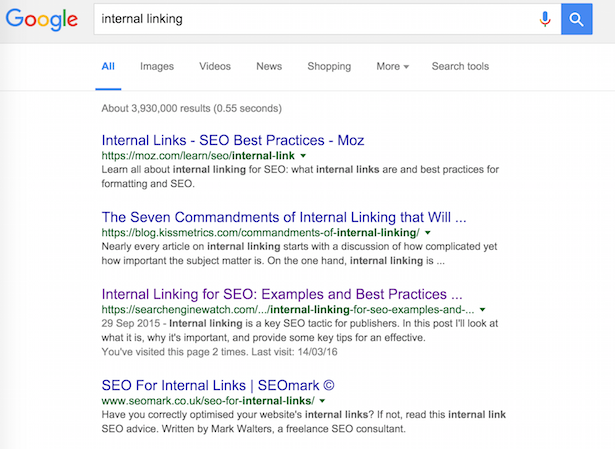
6. Look at how search engines are displaying results in your niche

Too often, small businesses have no idea who or what they are actually competing with in search.
For example, if you want to focus on a keyword that has a lot of huge international companies ranking on the first page, you should realise that perhaps your expectations need to be tempered.
Another example: if search engines show a lot of images or videos in their results for keywords you want to be visible for, you should consider producing that sort of content rather than just focus purely on text.
Also, often search engines will show local business results – if that’s the case, your efforts need to be adjusted to focus on achieving visibility in those types of results.
cake
Tips 4-6 by Barry Adams, Polemic Digital

7. Get ScreamingFrog and check your site for possible onsite issues

Watch for security issues too – Sucuri site check is free and while it won’t be able to see all possible issues it can catch some of the most widespread ones.
This may seem unrelated to the topic of this article but compromised sites do lose their traffic and visibility.

8. Claim your physical address on Google Maps

If it’s a local business which a physical location and offline customers, make sure you claim your physical address on Google Maps.

9. Whatever you do, be genuine

Hiring somebody on the cheap to run  your Twitter account or build links for you may seem like a tempting  idea but it can – and probably will – backfire.
If you haven’t got  much of a marketing budget, take one step at a time but do it yourself as nobody knows your business and your customers better than you. Connect with them personally, do not count on somebody else spamming them on your behalf resulting in any positive outcome.
Tips 7-9 by Julia Logan, Irish Wonder

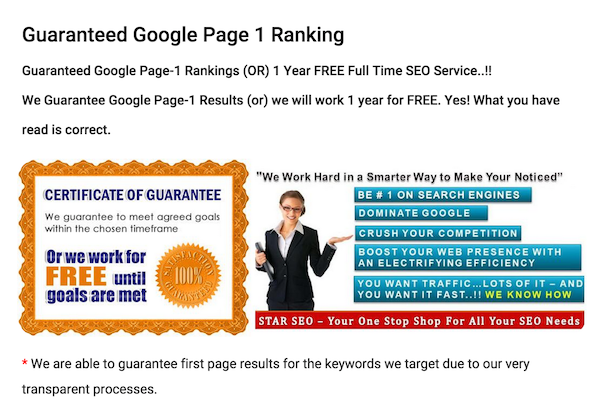
10. Beware of agencies that promise the earth

Unless you’re prepared to buy PPC ads, then there is no way to guarantee a page one listing (even then it can be tricky on competitive terms).
If an agency or salesperson promises you this, ignore them. They’re lying and will likely do a lot of damage to your long-term search visibility.
page one guaranteed
Also, if you’re just getting started, you don’t necessarily need an agency to improve your SEO efforts. See what you can do yourself first.

11. If you do hire an agency, keep an eye on them

Agencies using the wrong methods can do a lot of damage.
Often by dodgy link-building which may achieve some short-term results but will expose your site to the risk of penalties long-term.

12. Keep up with industry news

Things can change fairy quickly in SEO, so things that work for a while can become against Google’s rules over time.
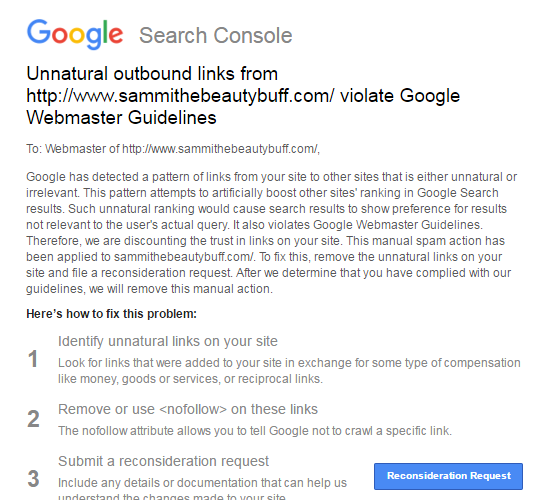
As with the recent penalties for bloggers reviewing products, Google will rarely spell things out. It will give advice and hints, but it won’t contact you. You’ll often only know you’ve done something ‘wrong’ when you login to Google Search Console and receive a notice like this:
Google penalty

13. Try not to rely too much on Google

Yes, it’s well worth working to improve your rankings, and search traffic is valuable, but don’t put all of your eggs in one basket.
Google can change the way it ranks sites, the way it display results at any time, in ways which could adversely affect your search traffic.
Look to build email lists, use social media etc so that you’re attracting customers from a range of sources.

14. Launch a blog / create content

Content is what will help you rank for your target terms. This means content on product pages, homepages and everywhere around the site, but a blog can also help.
It shouldn’t be done just for SEO reasons, as blogs present an opportunity for you to talk about your product and services and the issues around them.
It means you can create the kind of content that people interested in your product or service would appreciate, and begin to build an audience.

15. If you blog, do it regularly

You don’t have to write five articles a day, but regular updates mean your visitors have something to read, and you’ll also be creating fresh content for the search engines.

16. But don’t go keyword-crazy

Yes, you want to target the terms that your customers are likely to search for, but you have to write for humans first of all, or your content will be weak.

17. Aim for evergreen content

Look to create quality content that addresses customers issues and has a longer shelf-life. This‘evergeen content’ is more likely to achieve search rankings over a longer period of time.
evergreen

18. Use a clear URL structure

People should be able to guess the topic of a page just by looking at the URL.

19. Use internal linking to optimise your site

Effective internal linking is about linking topics and themes together in a more sensible way, for readers and for search engines.
For example, if you are providing cake-decorating services, you’ll have lots of articles using that phrase. They’re not all going to rank for that, so choose the page you’d most like to rank for that term and point the links at that.
It can be very effective, as this internal linking example from the Daily Mail website shows.
David Cameron landing page

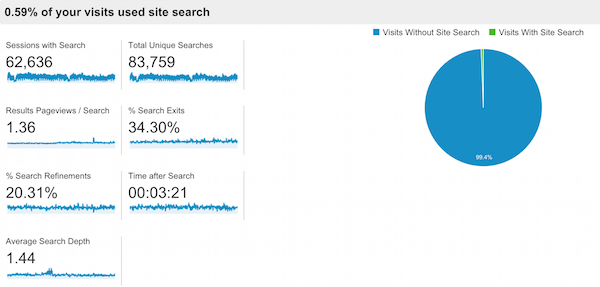
20. Use your site search data to find terms to target

You can view the terms your visitors search for on site by looking into your analytics data.
You can learn a lot from this site search data, which can help in many ways.
For search, the keywords that people use on your site could be terms that you aren’t currently targeting via SEO or PPC.
If so, analysing site search data is a great way to find more relevant terms to target. They also tell the the kind of language that customers use.
/IMG/908/333908/clickz-site-search-usage

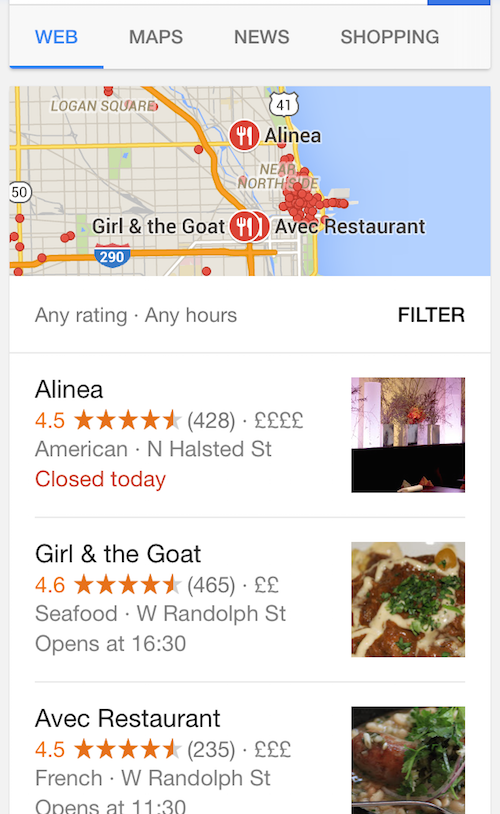
21. Encourage reviews

Reviews will help to drive conversions but, from an SEO perspective, they help to drive your local SEO visibility.
/IMG/955/335955/chicago-rest

22. Optimize images

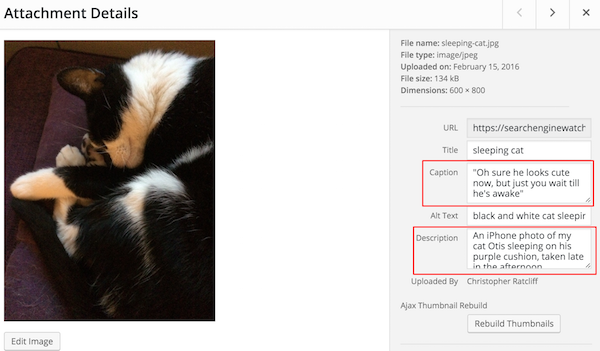
In this article, SEW Editor Christopher Ratcliff explains how to optimize images for SEO, with the help of his cat.
wordpress photo upload highlighting caption and description

23. Set up Google Analytics

It’s free and it’s essential for you to understand customer behaviour, traffic sources and more.
Here’s a beginner’s guide to Google Analytics.
 Google Analytics app

24. Think about UX

For one thing, after mobilegeddon, your mobile ranking depends on factor related to UX.
Site speed is just one. Use tools like Google’s pagespeed insights to learn about your site and how to improve it.

25. Optimize your Google My Business profile

The basics should be there – if you have a physical store, provide opening times, directions and other useful information.
Don’t leave it at that though. Add images, regular updates and more.

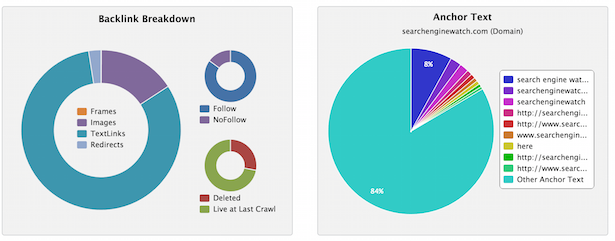
26. See who is linking to you and learn from it

You can view the links you receive through tools like Majestic and others. Are you attracting links from relevant sites? If so, which kinds of content / pages are attracting these links?
backlinks

27. Write a unique title for every page

On Google, you have around 55 characters to make the topic of a page clear to searchers and search engines.
page titles google

28. Don’t expect results too quickly

The tips here will produce results, but don’t expect overnight success. Good SEO can take time, so be patient and stick with the process.

29. Use a little PPC

If you have the budget, PPC can deliver traffic more quickly.
It can also inform your SEO efforts – you can see which keywords work best for conversions and can help you to improve your landing pages.

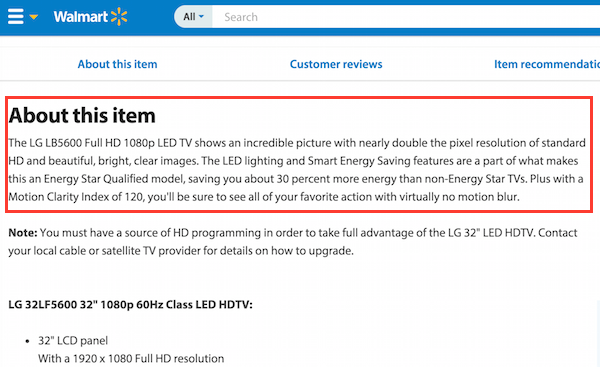
30. Write your own product page copy

If you’re selling products that other sites will also have, unique product descriptions can help your site to stand out.
They’re also better for conversions, as the manufacturer descriptions will not have been tested for effectiveness, whereas you can try variations and see what works best for your site
duplicate-product-copy
What have I missed? Add your tips below…
To view the original article Click Here