Showing posts with label lead conversion. Show all posts

Saturday, 26 March 2016

How to Boost Your Lead Nurturing with Social Media

Aaaargh!
I bet you know the feeling too.
The one you have every time you compare a list of new leads with actual sales.
Fact, you seem to be attracting a good deal of prospects.
But for some bloody reason, not many of them convert.
Damn!
Lead Nurturing with Social Media
You seem to be doing everything by the book. You created a killer email course they sign up to, spread those messages evenly not to overwhelm anyone, and structured it to build up their desire to try your product or service.
And yet, something still prevents them from becoming customers.
Well, you see:
You may have fallen into a trap of thinking that lead nurturing is an entirely email-driven strategy.
In this post, I’ll show you that incorporating social media could help give your lead nurturing strategy a boost.
Intrigued? Let’s get cracking then.

Social Media Lead Nurturing in Perspective

Ridiculous, isn’t it?
I mean, how can you even think that people who have signed up for your lead magnet also follow you on social media?
And yet…
Over 1.5 billion people use Facebook every month. More than 1 billion logs to the site every day (source).
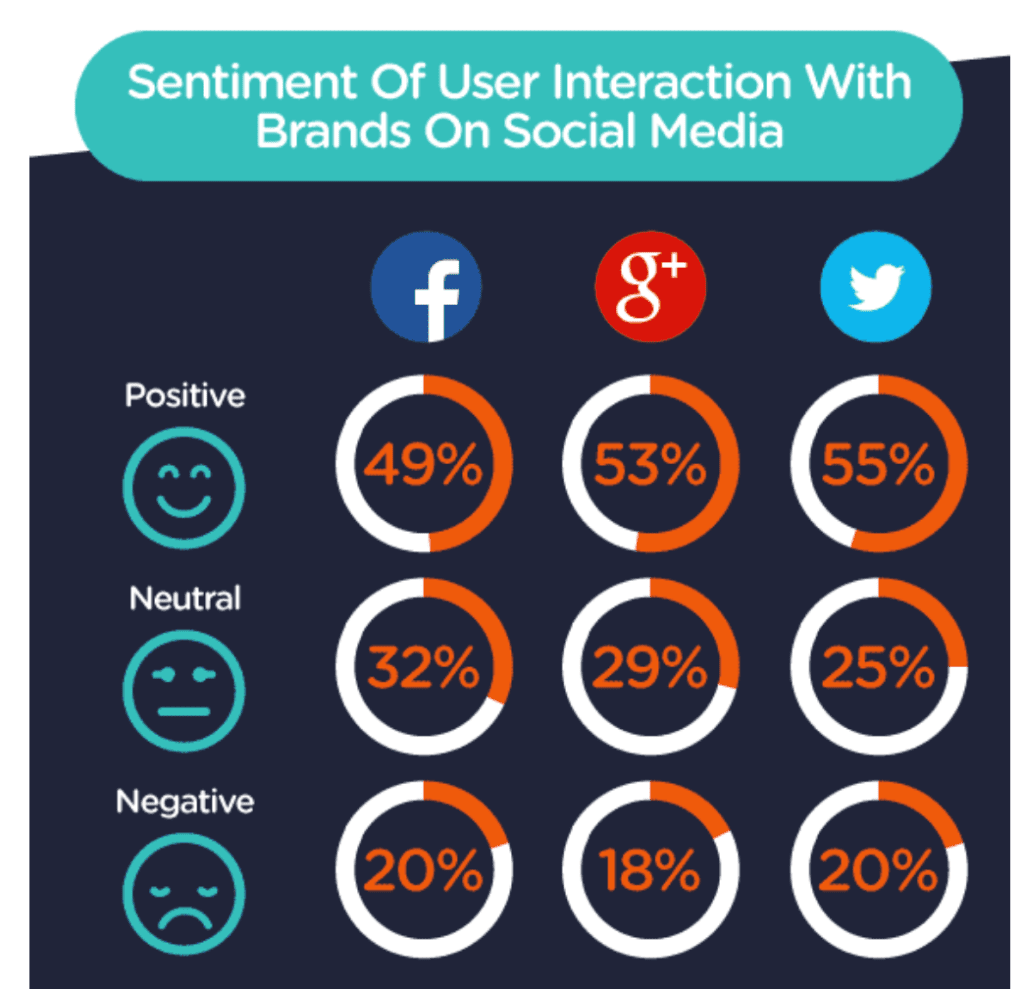
81% of Facebook users have positive or neutral experience with brands on the social network (source).
Why_Do_We_Follow_Brands_on_Social_Media___Infographic____Social_Media_Today
And 80% of Twitter’s 305M active and engaged monthly users have the same experience with their social network.
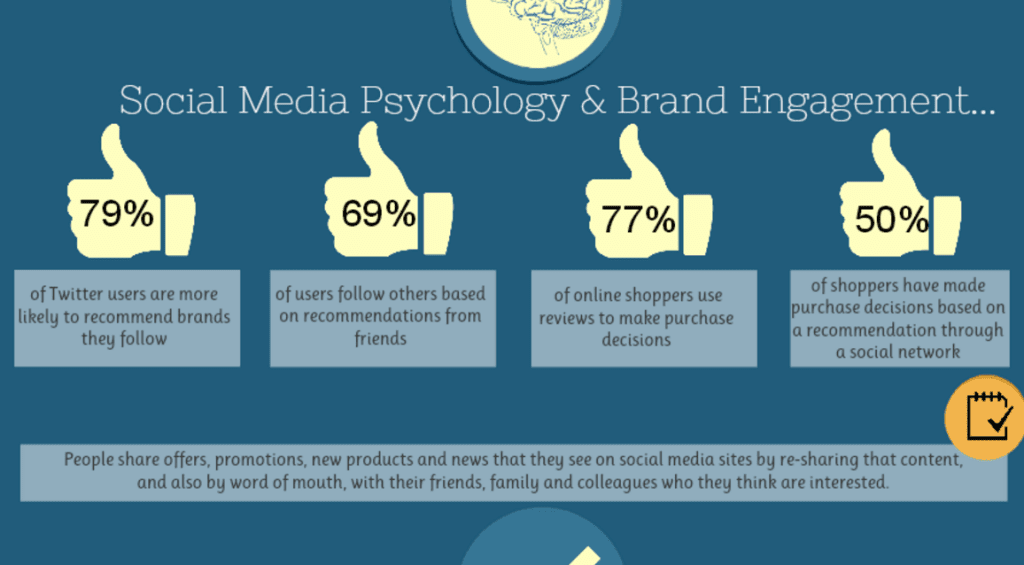
What’s more, according to AdWeek:
  • 79% of these people are more likely to recommend brands they follow.
  • 77% of users pay attention to product reviews on Twitter to make a buying purchase.
  • 50% made a purchase decision based on a recommendation on the social network.
engagement
Given these numbers, I think it’s safe to assume:
Your leads MOST LIKELY follow you on social media.
And even if they don’t, there are strategies you could employ to get them there.
But before I show you how to use social media to nurture the leads, let’s understand one more thing:

What Makes an Effective Lead Nurturing Campaign?

You know:
It’s darn easy to string a couple of blog posts together, convert them into a drip campaign or eBook, and then…
…expect it to amaze leads so much that they’d have no other choice but to buy from you.
In reality, effective lead nurturing takes way more than that!

It requires having relevant communication with leads

You know:
Just sending someone a bunch of advice isn’t enough to convince her to buy from you.
It takes engaging the person in a meaningful and relevant communication, asking for their feedback, learning more about them, and then, delivering content that matches those needs.

It requires you to be conversational

Similarly, lecturing someone from the high horses isn’t going to impress them much, I promise.
At least, not anymore.
You see, your leads aren’t just emails in your CRM. They’re people who want to have a conversation with you, learn about you, learn to trust you, and also, tell you more about what they expect from you.
And the only way to let them do it is by having a meaningful conversation with them.

It needs to target many channels

Today’s customers rarely focus on a single communication channel. They move from email to social media to website, and scout Google for information too.
And so, for your lead generation strategy to be relevant, it needs to be spread across many channels, including social media, of course.

It’s a long-term strategy

Finally, an effective lead nurturing campaign is designed to bear fruit over time, not right away.
Today’s customers have enough alternatives at their disposal to be able to move away from any pushy sales tactic at a snap.
So instead of firing your sales docs at them, use the multi-channel approach to get prospects familiar with your brand, build trust and the perception of expertise.
You should quickly notice that your lead to customer conversion will grow over time.

How to Use Social Media to Give Your Lead Generation Strategy a Boost?

1. Start by Having Conversations with Your Customers

I’m sure you know this already:
Social media is not a marketing collateral.
Of course, one could argue that bios and profiles could act as a promotional copy.
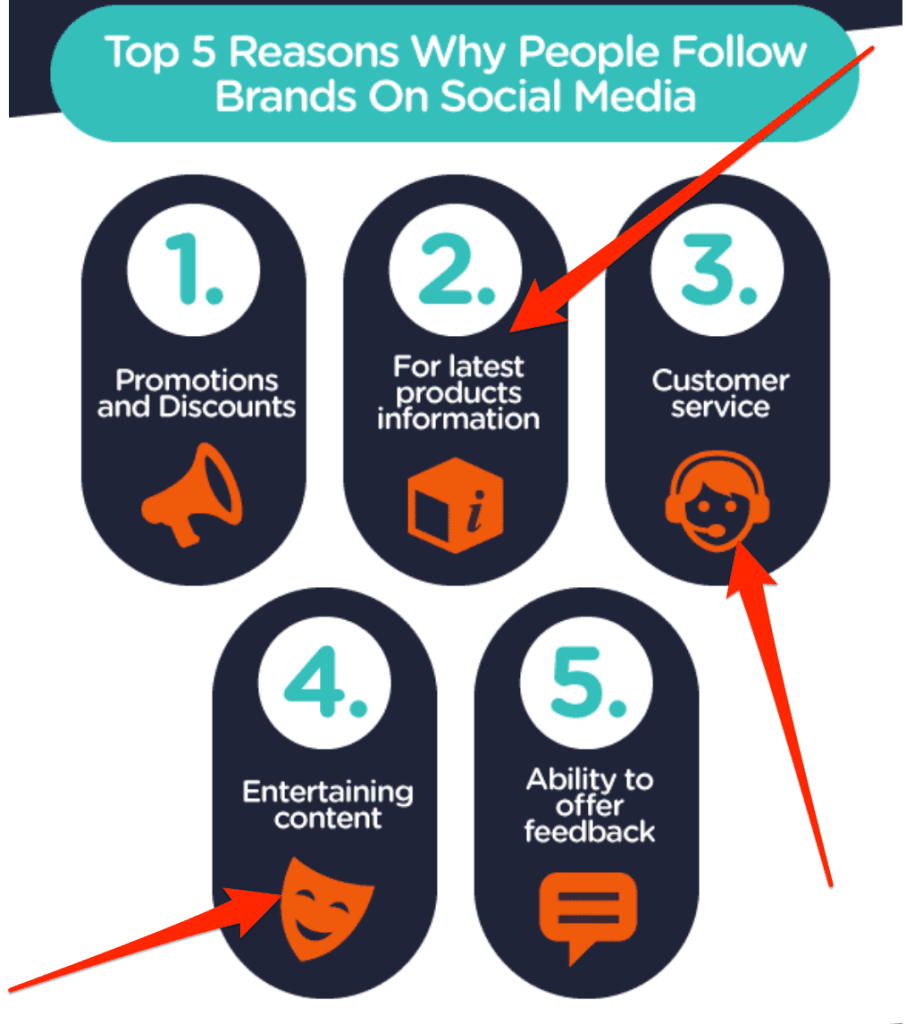
But the majority of people seek to connect and engage with brands.
They want to learn about and discuss a brand’s products, share their customer woes and have a laugh too.
engagement1
(image source)
So, start supporting your lead generation strategy by allowing customers to have a conversation with you on social media.
The amazing online music store, Burning Shed constantly talks with their audience on Twitter.

burning2
burning1
And as a matter of fact, that’s what put them on my radar. A subsequent conversation I had with the company on Twitter converted me into a loyal customer I’m now J

2. Post Answers to Their Burning Questions

You can’t deny it:
Your audience is curious.
Every day they face challenges relating to the problem your product or service solves.
And they’re looking for someone to show them how to overcome it.

Enter social media

You can use this curiosity to your advantage to build trust in your brand, and help leads begin to perceive you as helpful.
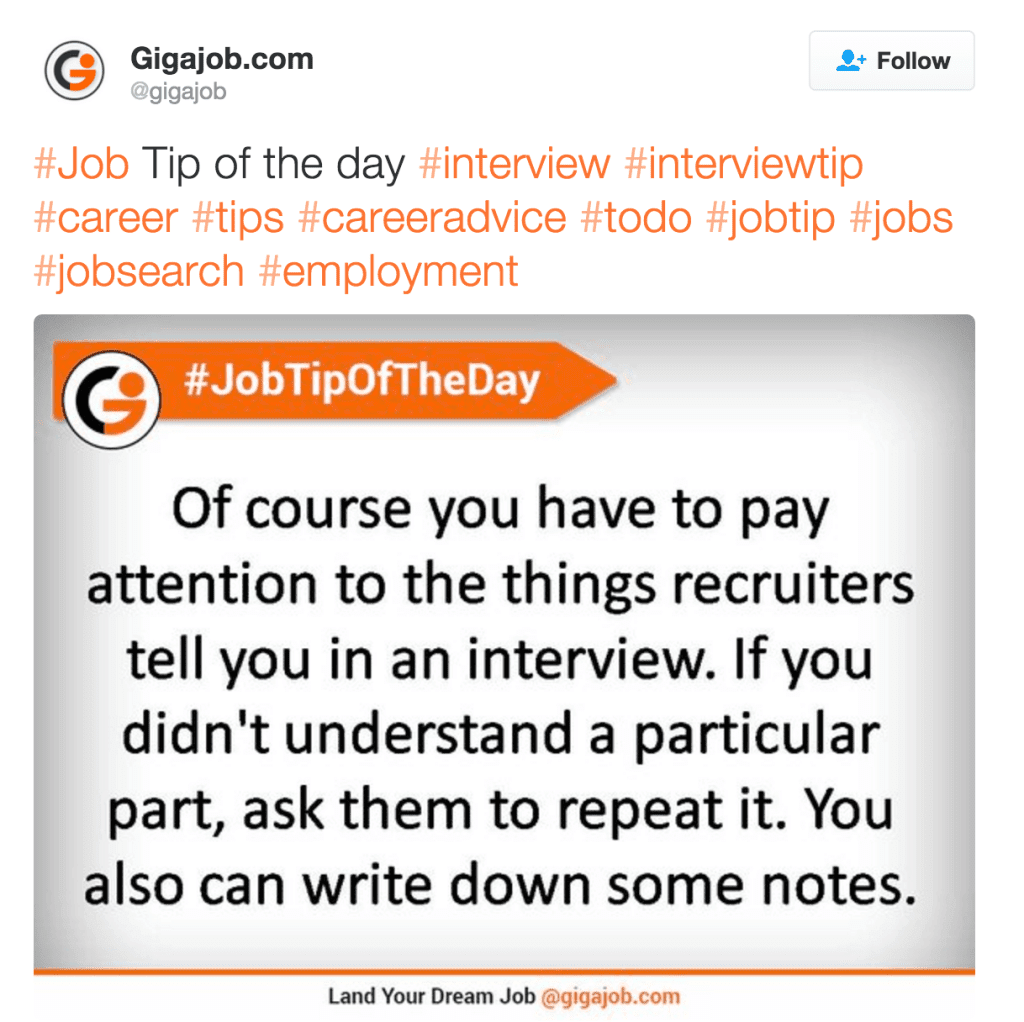
And it’s easy to do. Simply, post relevant advice and tips to your social media followers.
Create a “Tweet tip of the day” series of content answering your audience’s burning questions.
questions
Then, repurpose it into visual content to publish on Linkedin, Facebook, and other social networks.
questions2

3. Build Trust by Celebrating Current Clients

You know, one of the things your prospects want to see is how you work with clients.
But no, they don’t just want to learn about your processes.
They want to know if you support your clients.
Build personal relationships with them.
And treating them as more than just people paying your bills.
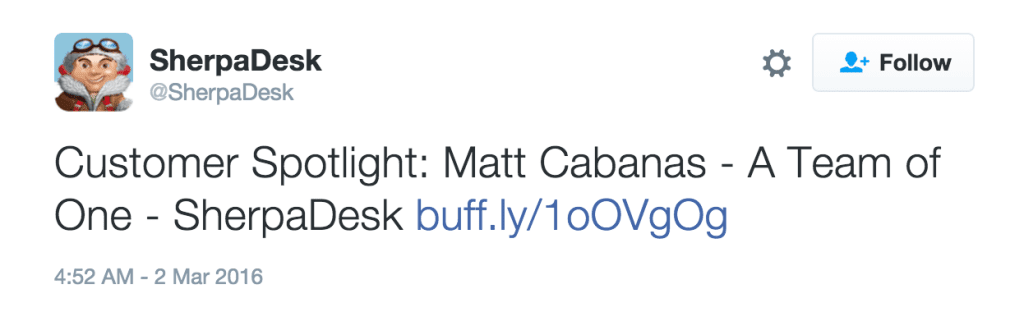
And what’s a better way to show it than by celebrating existing customers?
3
3-2
Praise your customers on social media. Spotlight the best clients. Help them out too, if they need some assistance. Even if it’s spreading the news on their behalf, it will still position you as a caring supplier.
That’s something your leads will never get from reading your drip campaign emails or case studies.

4. Recommend Relevant and Helpful Content

Sounds like a no-brainer, right?
And yet…
I see many businesses mindlessly filling up their Buffer queue with random stuff they’ve found in their RSS feeds, without any consideration if this advice helps their leads in any way.
All while the solution is so simple – pick content that’s relevant to specific lead groups or segments you target and if possible, use hashtags to denote which group the content could help.
hashtags
To view the original article Click Here

Tuesday, 8 March 2016

Why Facebook And Google Analytics Conversions Don’t Add Up

Why Facebook and Google Analytics conversions don't add up


This question has come up a lot lately with PPC accounts that are expanding into Facebook Ads. “Why are my Facebook conversions higher than Google Analytics?” The problem is we are trying to compare Facebook conversions similar to how we track AdWords and Bing traffic, but it’s not the same.
When it comes to comparing conversions, it’s not that Facebook is necessarily over reporting or Google Analytics is under-reporting, they just are different. Below I will break down how Facebook and Google Analytics report conversions and tips for how to close the gap.

Why Conversions Don’t Add Up

When comparing conversion tracking across various platforms or 3rd party reporting systems, it’s fairly typical for conversions to be off by at least 10-15%. This is due to a number of factors including de-duping logic, where the pixels are implemented on the site, and a host of other issues. A few other reasons that prevent Facebook and Google Analytics from matching up include:

  • Cross-Device – Majority of Facebook interaction is on mobile which is difficult for Google Analytics to track across devices and browsers
  • Different attribution models
  • Facebook counts multiple conversions vs. unique (1-click)
In addition, many 3rd party-tracking providers like Google Analytics use referrer URLs to credit conversions back to ads. Due to this method, these providers generally under-report Facebook conversions by about 40%. This is due to the fact that roughly 40% of Facebook users browse Facebook using HTTPS instead of HTTP. So when a user clicks a Facebook ad and converts on site, the referrer cannot be recorded since the user left an HTTPS environment and entered an HTTP environment. The other piece in why they don’t match up comes down to attribution and the default reporting setting for Google Analytics and Facebook.

How Facebook Reports Conversions

Facebook tends to be more generous with conversion tracking compared to Google Analytics when comparing the default models. Facebook default conversion tracking is as follows:

  • 24 hour view through
  • 28 day click through
Any comparison you do against other conversion reporting data should be within the same attribution model.

Facebook conversion reporting tips to keep in mind:

  • Conversions are attributed to either a view through conversion or click through – never both
  • Clicks take precedence over views
  • Conversions are attributed to the most recent ad someone clicked or viewed.
  • Any events outside the maximum conversion window (28 days) are not counted.
The Facebook conversion tracking process looks something like this:
Clicked ad from Facebook > Left site > Converted on website 3 days later

How Google Analytics Reports Conversions


Google Analytics only reports conversions that resulted from a direct referral. Even if you created a campaign using URL parameters to track the link used in your ad, Google only reports those conversions that happened in a straight line:
Clicked Ad > Converted
As I mentioned above, by default, Facebook counts view through conversions that happened within the first 24 hours where Google Analytics only tracks last non-direct clicked conversions.

How To Close The Conversion Gap

Facebook

While it’s likely Google Analytics and Facebook will never match up 100%, below are a few tips for trying to close the gap.
  • Customize Facebook attribution window
 Attribution window
Updating the attribution window so that it more closely aligns with Google Analytics can help close the gap. For example, you can remove 24-hour view through conversions. You can customize the attribution window by going to:
Select Campaign > Columns > Customize Columns > Bottom Right Attribution Settings
CustomizeColumns

Google Analytics 

Review the Multi-Channel Funnels > Top Conversion Path reports to get a sense of how Facebook is actually supporting the funnel. Typically you will see that Facebook falls higher in the funnel – generally higher first click attribution.
GA-Multi-Channel Funnel

From here you could use this information to potentially create a customattribution model for Facebook. For example, you could test potentially a Position Based model which attributes 40% to the first and last touch points or look at creating your own custom attribution model.

Compare Conversion To Offline Data

If you have access to offline conversion data, understanding what percentage difference there is between offline data and the various platforms will also help you have a better understanding when it comes to optimizations. If you regularly track what percentage conversions in Facebook and Google Analytics are off by compared to offline data as the benchmark, this can also help to determine if there could be a potential tracking issue over time, helping you optimize and budget accordingly.

Closing Thoughts 

Tracking is always a tough maze to navigate. If you don’t take the time to understand how each platform tracks and reports, you could be trying to compare apples and oranges. Understanding the attribution, timing and then customizing reporting to better align the platforms, can help close the gap and help you start comparing different types of apples vs. oranges.
To view the original article Click Here

Wednesday, 21 January 2015

6 Steps to Create a Top-Notch Opt-in Form

opt in forms header
Imagine this……
You spend time, money and effort driving traffic to your website.
But the majority of people who come onto your website may not be ready to purchase. Without gaining an opt in, these prospects will simply leave your website and possibly never return.
Email marketing is the backbone of your company and underpins every other type of marketing you do.
Having a prominent email opt in on your website is a great way to capture information from those visitors that are ready to buy from you, but also (and most importantly) from those that would otherwise have left your website without purchasing anything.
If this happens, these people are lost opportunities at that point, but if you craft a well presented, compelling email opt in form, you may well be able to capture their interest to hear more about you, or act on an opt in offer. You then have their contact details and can work towards providing further valuable information, and lead towards a conversion.
But growing your list is also much more than just capturing those visiting and leaving your website. It needs to be a consistent long term effort across every touch point prospects have with you and your business.
Whether it’s a sign up form on your website or a dedicated squeeze page to capture leads, let’s take a look at 6 key steps to creating a top notch opt in form:
  1. Create a killer headline
As with a newspaper headline, your objective here is to create a compelling headline that is either BENEFIT driven (by this I mean it focuses on the benefits the subscriber will receive) or hits on a specific problem or wish that the subscriber’s you would like to attract have. It should be kept short and sweet whilst grabbing the attention of the user.
The examples below show the difference between these two headlines:
Speaking directly to your target audience:                                       Benefit driven:
Email Sign Up Form Headline Examples
  1. Be open, honest and transparent
This form is the first impression of your business for many users, so it’s really important to start the relationship off in the right way and tell people exactly what they will receive and when, so that there are no nasty surprises when they start to receive your emails!
By setting their expectations properly at the point of sign up, you will ensure that the people who register really want to receive your communications and are interested in what you offer. This will also help to ensure a low complaint rate (subscribers pressing the spam/junk button) and higher engagement (opens, clicks, conversions etc.) with your campaigns going forward.
As can be seen in the example from M&S below, showing subscribers an example image / link to an example email that you’ve previously sent, that they can look at helps to illustrate exactly what your communications look like and the value provided.
M&S Sign Up Form
  1. Make it easy to use
Ensure your sign up forms are not overly complicated, and are clean, easy to read and understand, as well as to complete. If you can, use systems that make the sign up form more intuitive (such as completing common email addresses, postal addresses from just postcodes etc.), this will also help people to complete the form quickly and easily.
The example below from Selfridges shows a very easy to use, simple sign up form including drop down options, a benefit drive headline and images of previous emails sent to set expectations further.
Selfridges Sign Up Form
  1. Only collect the information you need
It is common marketing knowledge that the more steps you require someone to take to complete an action, the less likely they are to do so. The same holds true when it comes to prospects signing up for your email list – the more information you ask for, the less likely they are to complete the form and sign up.
Collect only the information that you NEED on sign up – so email address, would of course be the minimum level of information needed to register them. However, by asking for items such as first name or what their interests are, you can ensure that you start to personalise your messages from the start of the relationship.
On the flip side, the more fields you require to be completed, although this will reduce the number of sign ups you receive, it is likely that those that do will be even more qualified and interested in what you are offering.
So consider carefully your business objectives, how you will want to personalise your communications going forward to ensure relevancy as well as the end conversion you are driving the sign up to, in order to decide what fields to collect on sign up and which could be collected later on in the relationship (such as during the on-boarding process; the initial sign up automated series of emails).
In the example below from H&M they choose to only collect email address on sign up; this may be related to their opt in offer. Giving a discount on sign up means that any subscribers who go on to use this offer will provide more information during the purchase process.
H&M Sign Up Form
  1. Give something in return
With so many email programmes out there to choose from, how can you encourage visitors that interact with your website, social media channels, shop front or other touch points, to register to receive YOUR emails?
Sometimes called an opt in offer or lead magnet, adding an incentive gives an additional reason to the user to give you their email address (a valuable commodity) as well as helping to address and bolster the ‘what’s in it for me’element of the decision to subscribe.
The example below from SnapRetail shows a squeeze page offering a free guide as the incentive.
SnapRetail Squeeze Page
Want more info about opt in offers? Download my free guide ’28 Incredibly Enticing Opt In Offers to Build Your Email List’ here >
  1. Put it everywhere and make it prominent!
If no one sees your sign up form, how is your list going to grow?! Ensure you place it, and advertise it, everywhere that you have a touch point with prospects and customers including, first and foremost, your website.
The key here is to capture the traffic you drive to your website through other marketing that you are doing; as I mentioned at the beginning of this post, email marketing underpins every other marketing effort you make.
If you liked this article you may also like:
To view the original article Click Here