Showing posts with label SEO mistakes. Show all posts

Tuesday, 6 October 2015

5 Mistakes SEOs Still Make With Links & Content

oops-error-mistake-ss-1920
You make a lot of mistakes. That’s part of life.
And SEO is a complex field; there’s a lot to remember, even more to do, and everyone’s stock answer to your questions seems to be, “It depends.”
Furthermore, it’s not just the fresh-faced, new-on-the-scene SEOs who are making mistakes. Seasoned veterans and outright experts are doing it, too.
Here are five well-known mistakes that SEOs make in regards to links and content — and that are costing vital traffic:

Mistake #1: Building All Links On The Home Page

It’s tempting to point all your links to your home page. Because, well… that’s usuallywhere your sales funnel starts, right?
Or your client is nagging you to drive all your traffic there — which can be even worse.
But building all your links to your home page isn’t just a mistake.
It’s a bad strategy.
Firstly, most sites have too many home page links. And if most sites are doing it, you shouldn’t be. Because following the crowd in SEO is guaranteed to find you somewhere on the 10th page…if you’re lucky.
A good strategy is to link deep into your site and use all those lovely internal pages you took the time to craft.
Neil Patel said it best in this post about link building:
Look at Wikipedia. The site that ranks for almost every term out there and is the 6th most popular site in the world. Majestic SEO is showing that Wikipedia in total has over 600 million backward links, whereas the home page has roughly 6 million links. That means 1% of their total links point to their home page, while 99% goes to internal pages.
Spreading your link equity across your site, rather than concentrating it on your home page, just makes sense. Instead of users landing on your home page and having to fight to find the content they’re looking for, they’re already there. It feels more natural — and if your content is good, it builds more trust.
Linking deep helps you build the overall SEO value for your site, too — the more high-value pages you have, the more opportunities you have to achieve search engine visibility.
It’s a win-win.

Mistake #2: Stopping Link Building After Hitting The First Page

Look, let me be straight with you: search engine optimization efforts don’t last forever. Within a matter of weeks, you’re going to need to change something.
That’s why campaigns never really finish; they just change focus for a while.
SEO is constantly changing, and it’s your job to keep up with it.
Sure, when you hit the first page, give yourself a pat on the back. Grab a beer, high-five your client, take a few screenshots, and enjoy it. But once you’re done celebrating, it’s time to work on a strategy to help you stay on the first page.
Think of this from Google’s point of view: Your site wasn’t doing anything. Now, it’s suddenly hot and alive and interesting. And then it stops doing anything again.
It assumes you’ve either had a quick hit of a link building campaign or a viral blog post, and you’ve finally run out of steam.
Keep building links. Don’t stop being hot and alive and interesting in the eyes of Google — or you’ll run out of traffic (and clients) quickly.

Mistake #3: Not Using Blogging As A Strategy

Not long ago, I had a conversation with a marketing director at a Fortune 500 company. She asked me to write a series of blog posts for her that would drive traffic to their new initiative.
I asked her, “How long would you like the post to be?” To which she said, “It doesn’t matter; it’s not like anybody is actually going to read it.”
This is what’s wrong with how businesses and old-school marketers view blogging. They view blogging as low value — and it’s a view that’s rubbed off on lots of SEOs, too.
But not blogging is a big mistake. In fact, it can be one of the highest-value strategies you can use.
Look at it this way: How often is the content on your site updated? Not often. Because you can’t really update your About Me or Services page more than a couple of times a year.
That means your site is just sitting there dormant. And Google doesn’t like inactive sites.
But if you have a blog, you’re adding another page to your site at least once a month — if not once a week or once a day.
That says to Google, “Hey, look at us! We’re working our butts off over here. Come and see what we’ve made.”
And if you’ve got more pages in your index, there are more pages to rank with that you can work your SEO magic on for a little extra traffic.
hubspot-blog-attract
HubSpot sees blogging as a vital way to attract new customers.
Take a look at HubSpot, for instance: 70 percent of their traffic comes from old blog posts — that is, content they didn’t create that month. That’s a ton of visitors for work they did months ago.
And with every month that they grow their content index, the bigger that 70 percent becomes — because they’re bringing strangers into their site and converting them with great blog content.
You don’t have to focus on your blog as much as some big sites like HubSpot or Buffer to get the most out of your SEO. But even having a blog you update with relevant content twice a month is better than having no blog at all.
But, as you’ll see next, relevance is the key.

Mistake #4: Ignoring Content Relevance

I believe there are two big flaws in online marketing:
  1. Marketers think people are dumb.
  2. Marketers think search engines are dumb.
Advertising legend George Lois once said, “If you think people are dumb, you’ll spend a lifetime doing dumb work.”
And he was right.
People aren’t stupid. They’re clever and brilliant. They want to be sold to and discover products in creative ways.
But most of all — and what makes them smart — is that they want trust. They want to know that they’re spending money with someone worthwhile.
So if the content you’re creating to rank isn’t relevant, they’re going to see right through you. They won’t trust you. And, they’ll bounce quicker than my niece on a trampoline.
If you think search engines are dumb, then you, my friend, are in the wrong game.
In the same way that people want relevant, trustworthy content, so do search engines. In fact, it’s what the boffins (techies) at Google are crying out for. Because, as you’ve just read, it’s what the people want.
So just creating SEO content for the sake of creating SEO content isn’t good enough anymore.
But what makes relevant content?
  • It fits the topic of the site you’re writing for.
  • It adds value to the end reader.
  • It fits any (and all) keywords you’re using.
  • It makes sense for any backlinks to point to it.
  • It contributes to the overall quality of the site.
If your content isn’t doing any of those things, then it isn’t relevant.

Mistake #5: Not Using Brand Anchor Text

Anchor text is probably going to remain a constant in SEO for years to come. But it’s not anchor text itself that’s a problem — it’s the type you use.
For example, it’s no secret anymore that the more diverse your anchor text, the better — and the more natural it is in the eyes of Google.
But there’s one type of anchor text that SEOs always overlook: branded anchor text. That is, links on text that are:
  • Your brand name
  • Your name
  • Your URL
For example, by linking to Apple’s home page with the text “Apple Inc.,” I’ve just created a branded anchor text link.
Now, you might be thinking, “But you just said don’t link to your home page.” And you’d have a point — you shouldn’t link to your home page if it’s more relevant to link to another page.
All too often, however, SEOs will write a guest post or some content and leave their brand name unlinked. And it’s a sin — because it’s the perfect opportunity to boost your search rankings.
Of course, you have zero control over what anchor text people use when they link back to you. But that’s out of your control, so I’m not talking about that.
I’m talking about when you do have control. When your name, brand or URL come up naturally in content, take the opportunity to link it.
You won’t be penalized for it, and it could get you a much better ranking.

Don’t Worry, Get Traffic

Be honest with me: How many of those mistakes are you making?
It doesn’t matter if it’s one, two or the whole list. What matters is that you do something about it.
Because if you don’t make the change, you’re going to be left in someone else’s virtual dust, aren’t you?
Let’s quickly recap the mistakes, and what to do about them:
  1. Building All Your Links To The Home Page: While some links to your home page are great, don’t saturate it. Focus on deep linking and creating a rich index of SEO content.
  2. Stopping Once You Hit The First Page: SEO doesn’t last forever. The minute you relax is the minute it changes. Keep working and getting backlinks to make sure you’re a permanent fixture on the first page.
  3. Not Using Blogging As A Strategy: Keep your site active and create a big index of pages that you can link to.
  4. Ignoring Content Relevance: People and search engines aren’t dumb. So don’t treat them that way. Create relevant content that’s fit for purpose.
  5. Not Using Brand Anchor Text: Don’t let easy links to brand messages that use your name pass you by. Link them, and look for the difference it makes in your rankings.
So tell me, which one are you going to focus on first?
To view the original article Click Here

Wednesday, 24 June 2015

7 Common SEO Mistakes You Need to Fix Now

7 Common SEO Mistakes You Need to Fix Now
A sunny day, unblemished by a single cloud in the sky. A masterful painting with not one stroke out of place. An hour of watching Jimmy Fallon without phones ringing, the door buzzing, or insipid ads playing in a loop. These are what I imagine perfection to be in my head.
Most website owners I know tend to add their websites to that list. I would beg to disagree.
Admittedly, you don’t need to hire a designer or even a developer anymore to build a half-decent website. Tools such as Weebly (great for launching themed blogs in an instant),Spaces (the latest for online stores with payment systems and landing pages), and the like eagerly await the DIY entrepreneur. Not one for quick fixes? There are tons of developers who can design as well as designers who also code that you can turn to.
But there’s always something that even the most meticulous developer can overlook. Nine times out of ten, that overlooked bit relates to SEO.
Now, SEO audits are nearly as common as broken websites. So are in-depth articles about how to perfect every little bit that helps move your rankings and conversions that critical half-inch further. And while everyone is up-to-the-minute on the most recent changes to the Google algorithm, where it’s headed, and how to stay on top of it, there remain some simple issues webmasters tend to ignore over and over again.
To get an idea of how long these problems (and their solutions) have existed, I suggest you go to Google and try to find the earliest times they were mentioned and discussed. Chances are, you’re taken back to when SEO wasn’t even a known term. And when you’re done reading, pick any 10 sites at random, and see if they aren’t making at least two of these seven mistakes. (highlight to tweet) If even one isn’t, I’d like to hear about it!
Grab a notepad, tick off all the gaps you see in your own site from the list below, and get to work on fixing them.

Slow and Steady Doesn’t Win Any Races

Users have officially run out of patience. Yes. The maximum page load time that the average user allows is just two seconds, post which they are onto greener (and faster) pastures. Since page load speed is so key to user experience, it’s obvious then thatGoogle uses site speed as an SEO ranking factor—not a huge one, but definitely an important one. Tools like Pingdom (with a great waterfall display) and GT Metrix (with verbose details of code corrections) help you analyze your site’s speed and discover reasons why it loads slowly.
web page load speed
These are, of course, over and above Google’s very own Page Speed Insights (for mobile and desktop) that is a must-checkout.

Forgetting Image Tags

It’s nice to have a website with brilliant images that add to the content and make it more engaging for the user. However, all the images that you and I can see on a website are pretty much invisible to the average search bot (read: Google bot—Bing bot manages). Enter image tags.
Ensure every single image on your website is optimized to be searched and indexed by search spiders by including ALT tags on each image. An image description combined with a caption that goes under the image are all bonuses in helping search bots know what they’re crawling. Just make sure you don’t stuff your ALT tags with keywords hoping to see your images rise to the top of the pile. Instead, go with real descriptions that may include keywords only if they are appropriate.

Not Researching Long Tail Keywords

You probably already create content and optimize your site for your top keywords and phrases. However, a significant number of search requests on most websites have very little to do with your exact keywords, and actually are variations of the same. Check if this is the case with your website, too, with a keyword analytics tool of your choice. SEMrush is one of the ideal tools to do this. It looks into your organic as well as paid keywords and reports traffic and search volumes, trends, related keywords, and competitors’ data on them.
keyword research
To make sure that you’re not wasting huge resources barking up the wrong tree, make sure you put your keyword analytics in perspective with your data from Google Analytics, your social media management suite, your email marketing platform, and more. An all-in-one marketing dashboard like Cyfe is a good idea to get a bird’s eye view of your data from multiple sources in one glance.
Cyfe marketing analytics dashboard

Ignoring Local SEO

If your business serves customers at a physical location, it’s got to have local SEO. Why?Because people tend to Google for the address, opening hours, or phone number of a business establishment before making a visit. You don’t want to miss out on a customer wanting to spend some cash at your store, do you?
With a comprehensive tool like Moz Local, first discover where you currently stand with respect to citations and listings across the web. Once you know which directories, websites, and listings you’ve missed out on, get to building your profile on those sites right away.
Moz local SEO
A consistent NAP format and profile is essential for getting the complete benefit of local SEO.

Missing XML Sitemap

Do you have one? If not, get one. Why? Because it tells Google and other search bots exactly what pages to index as well as the hierarchical relationship between individual pages. This is very useful when it comes to ranking well on pages that may be three or more levels deep on the site.
The sitemap you create for search engines must be in XML for them to be able to make sense of it. It does not hurt to have a sitemap for human visitors to your page, either. That way, when a user can’t find a particular page on your main site navigation, they can dive deeper into your site map and discover it there. Only this time, make sure people like us can read it by creating it in HTML.

No Robots.txt

Just as a site map tells search engines what pages they should index, a robots.txt file tells them what not to. This is critical, especially if you host internal data on your domain name and would not want it visible to the average user on the web.
Typically, a “disallow” command used with the right syntax is enough to block Google bots from indexing a specific URL. However, if there are other sites that link to the URL which have not been blocked from Google, there’s a small chance that the page might still surface. In such a case, follow Google’s instructions:
Google URL syntax

Not Using 301 Redirects

A 301 (permanent) redirect is what you call it when you type an old URL, and your browser automatically takes you to a brand new, updated URL for the same website. “301” is actually the HTTP response returned by the server. This is a standard option adopted by websites when they are in the process of rebranding themselves, but don’t want to lose out on their existing clients and site authority.
The 301 redirect tells search engines that the content in question has moved to a new URL and that you should pass on all the link authority to the new URL. However, it’s not necessary for you to rebrand your site for a 301 redirect. In cases where the content of a page has changed drastically or removed altogether, you are advised to use a 301 redirect.
A 404 HTTP code (broken link) is a bad experience for your visitors, and a 302 HTTP code (temporary redirect) is a bad experience for Googlebot. And Google doesn’t take kindly to either.

Start Fixing

regular site audit is an easy way of detecting such glaring gaps in your SEO and fixing them ASAP. If you haven’t been doing site audits so far, get into the habit now. Your site and its search visibility will thank you for it.
To view the original article Click Here

Saturday, 2 May 2015

6 Common SEO Mistakes to Avoid

6 Common SEO Mistakes to Avoid and How to Fix Them Read more at http://www.jeffbullas.com/?p=31249#EfvydZ8bw8QS1OJD.99
After years in SEO, I’ve seen thousands of websites and audited hundreds of them. After a while, one starts to notice trends. The same basic SEO errors are repeated over and over. Most of these are easy to find and fix, the kinds of things that any decent SEO consultant should be aware of.

If you have a site and don’t have an SEO consultant, these are a few of the things you can quickly go and check yourself. If you do have an SEO consultant, they should have brought these issues to your attention.
If they haven’t …and sadly I see a lot of clients who have had “SEO consultants” for years but still have these problems, you may want to question if you have the right consultant working for you.

Here are 6 common SEO mistakes to avoid.


1. Duplicate content

What is duplicate content? Duplicate content in the context of SEO, means the same content appearing in more than one webpage (URL) within same or different domain (web site). The most common problem with duplicate content is that search engines can’t decide which content to index, eventually not showing this web page in search results.
Duplicate content can come under different types. One of the most common errors is duplicate versions of the homepage:


Homepage Duplication

One of the first things I check with a site is whether there are duplicate versions of the home page.

Here are some examples of duplicate homepage:
  • http://www.example.com.au
  • http://example.com.au
  • http://www.example.com.au/index.html
  • http://example.com.au/home
  • http://example.com/default.aspx  
If you are serving duplicate versions of your home page to the engines, they are duplicate content. The engines will usually figure out which version to index, but sometimes they get it wrong. So why confuse them if you don’t have to?

Duplicate URL

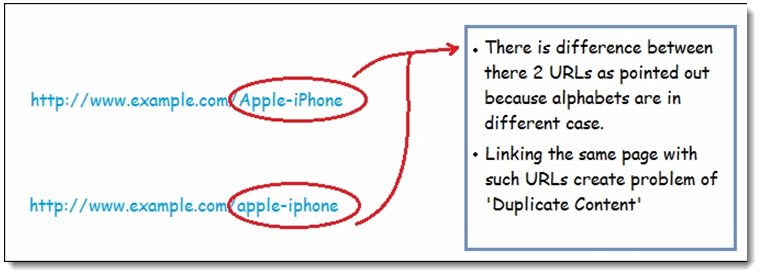
I have seen quite a few duplicate URL’s, where upper case or lower case URL text are used inconsistently, causing search bots to be confused and consequently devaluing the URL  or not ranking your website highly.

The issue here is if you have all your internal or external links pointing at www.example.com/Apple-Iphone  or www.example.com/apple-iphone  and the “real” version of the page is www.example.com/apple-iphone, you’re splitting the link equity between these two URLs. You want all that linky goodness pointed at the one original URL you want to rank in the search engines.
6 Common SEO Mistakes Figure 1: URL Duplication   Image credit: searchenabler.com

Different Webpages Having Nearly Similar Content

Almost every site I’ve ever worked on or for has had duplicate page content problems.
Duplicate content happens when you or your staff either copy some other website content then paste it on your site or you use same piece of content across different pages within your website. This issue occurs more often especially when an SEO guideline has not been put in place in the architecture phase of building a site. A designer or content writer for your website might not pay attention to it because they are not SEO specialists.

How do you resolve these duplication issues?

  • Minimise similar content: If you have many pages that are similar, consider expanding each page or consolidating the pages into one. For instance, if you have a restaurant site with separate pages for two locations, but the same information on both pages, you could either merge the pages into one page about both locations.  You could also separate it into two pages and write unique content about each location.
  • Delete duplicate page version of your content
  • 301 redirect the duplicate versions to the original ones or Place “rel canonical” tag on the original page  to send a strong hint to search engines your about preferred version to index among duplicate pages on the web. If you are not clear what 301 redirect or rel canonical tag are, just ask your web developer to fix them for you.
6 Common SEO Mistakes Figure 2: Using Canonical Tag to Fix The URL Duplication   Image credit: searchenabler.com
  • URL best practices: Use hyphens to separate words when necessary for readability. They should not use underscores, spaces, or any other characters to separate words. The URL of a web document should ideally be as descriptive and brief as possible. Do not use CAPITALS in words in URLs.

2. Forgot about content marketing


Don’t expect that your hired SEO team will make your website traffic take off significantly just with onsite optimisation, link building and without any content strategy in place.

Many things in the SEO world have changed drastically, especially for the last couple of years when content has started to play a critical role in determining whether your SEO or digital marketing campaign is successful or not. Any SEO strategy without content marketing in place should not be considered. The days that SEO agencies build hundreds of backlinks on directories, social book marketing sites, blog comments and forum comments pointing to a static website are well and truly over.

Let me give you an example:

When I started working on New Cars Plus (which are a discount new cars buying services based in Sydney). Their website was as static and had very low traffic. It had only 400 visits a month. After 12 months of regularly creating and posting content, the site traffic soared from 400 visits a month to 8,596 visits per month.
6 Common SEO Mistakes Figure 3: New Cars Plus traffic from April 2012 to April 2013

Wow!!…. Did I do that? The good news is that it wasn’t rocket science but a combination of link building, pure content production and social seeding.

So my point is not to expect your website traffic to be soaring up the rankings with pure off-page optimisation (link building and social signals). Remember, this site took 12 months of continuous work.

Even if you rank number one on a number of keywords (in the case of a perfect world), the maximum traffic you’d get is xxx number of visits per day and it is not growing, especially with the constant updates from Google, your high ranking positions are not ensured.


3. Poor site structure

Often when building a new website, your web developer doesn’t integrate best SEO practices into the website structure. This is totally understandable because the web developer is not an SEO specialist. Therefore an overlooked facet of site architecture (in other words, the way the website is laid out and how the pages connect to each other) is fairly common.

I would argue it’s the single most underrated area of SEO.

In general, the home page of your site is going to have the most authority because it’s going to have the most incoming links and the best quality of inbound links. Authority (or link juice) flows throughout a website from high authority pages to low authority pages through links. For every step away a web page is from the home page, the less and less of that total authority is going to be passed to it. All other factors being equal, the further away the page is from the home page, the worse it will rank.

I’ve seen cases of high authority web pages being buried deep in site architecture and losing rankings dramatically. I’ve also seen the reverse where web pages are moved closer to the home page and suddenly jump several spots in Google. Ultimately you want to create your website structure so it is easy and intuitive to navigate for users.

A flat structure often satisfies that requirement and will help you get more of those users to your site through search engines.
6 Common SEO Mistakes Figure 4: Flatten your site architecture, no more than 3 clicks from the homepage is recommended and cross-link to relevant and related topics
Here is another example of mine, this website at www.warrantyandinsurance.com.au  and extended car warranty insurance company.

We  built a flat architecture site, having all related pages linking to each other through targeted keywords, writing unique Meta Title and Meta Description, page content with targeted keywords.

This is basic on-page optimisation stuff which also includes updating the site twice per month with some blog posts (I should produce more content than that, but it is a low budget site).

Despite that the website traffic has been naturally growing at the rate of 30% month on month and generating more than a 8.5% conversion rate. Compared to other car insurance sites this is a huge success considering I haven’t done any link building to this website.


4. Don’t have a mobile site design for multiple screens


Google is now taking into consideration the mobile when ranking websites. Here are some other facts to keep in mind about the importance of a mobile site
  • 61% of customers who visit a mobile unfriendly site are likely to jump to a competitor’s website (Karim Temsamani at IABALM 2012 via IAB)
  • According to a recent Herald Sun report, smartphone users in Australia will reach 15.2 million in 2015.
  • Traffic coming from mobile devices from websites I have managed is now at an average of 25% and it is still going upwards.

With so much focus on usability, the demise of the desktop browser dominance, and the prevalence of mobile devices, Google’s made it very clear that no mobile experience, no love from Google!

Therefore, creating a user-friendly site design that works well and fast across all devices…especially mobile and tablet.

Mobile versions for your website can be built easily by using one of three popular mobile design technologies such as dedicated mobile site (m.example.com.au) or responsive design (Google’s preferred method) or native application (for complex design/user interface).

For most of the simple sites, I would recommend using responsive design for anyone who has limited resources for maintenance, limited budget and want a SEO-friendly website. I built this Responsive Design Testing Tool on my website. So if anyone of you wants to see how your website looks like on different devices, check out this tool.
6 Common SEO Mistakes Figure 5: Result Driven SEO’s Responsive Design Testing Tool

5. Unreasonable SEO expectations

SEO isn’t easy, fast, or cheap. Gone are the days of scalable, easy tactics that exploited loopholes in the algorithms.

Another thing, there is a widely-held belief that SEO is all about rankings on a certain keywords. I don’t totally agree with this, let me show you why.

Most of the time customers want to target short-tail, competitive and high search volume keywords such as:
  • Truck finance
  • Equipment loans
  • Machinery finance
The reality is much different. People type in search terms differently and most of them use long-tail keywords. Some examples of this are:
  • “Truck finance no deposit”
  • “Bad credit truck financing”
  • “How can I get equipment finance with bad credit”
  • “Machinery finance no credit check”
And guess what?
They are not on your keyword ranking list. Another thing according to the latest research done by Neil Patel, is that long-tail keywords generate more conversion than short-tail ones.
6 Common SEO Mistakes Figure 6: Short-Tail vs Long-Tail Keywords in Conversion,   Image Credit: quicksprout.com

If you look at the image above, you’ll notice that one- or two-word key phrases are costly to rank for and they don’t convert well. Searchers are also getting more sophisticated and are starting to use more words in their searches.

Many websites have high traffic coming in but it doesn’t convert well as people bounce in and out. Does your ranking help in this case? Not really.
My point is the SEO success measurement should not solely or mainly based on ranking; other factors such as traffic, longer time visit, lower bounce rate, and most importantly more enquiries or sales are things to look at.

Thirdly, if you want to have a successful SEO campaign, your website have to deserve it. Many site owners think that SEO can make up for the fact that the site is not exceptional, but that’s just not the case.

Take a good hard look at your site and your business. If you truly deserve to SEO success, SEO can help you get there. But if your user interface sucks, your design is dated, your prices are too high, your content is self-centered and boring or your customer service is lousy, fix that stuff first. Then do SEO stuff to get you where you should be.

In the old days you could be successful at SEO and generate the money to make your site great. Now you have to spend the time and money and resources to be great, and then you can be successful at SEO.


6. Hiring a crappy SEO consultant

I hate to say it, but this is still one of the most common SEO mistakes I see business owners making.

Whether it’s because you don’t want to (or can’t) allocate the resources or because your SEO agency/consultant is lazy, incompetent, out-of-date, or just taking you for a ride, hiring an SEO that isn’t on his or her game is the most dangerous SEO mistake of all.

Hiring a crappy SEO used to be just a waste of money at worst, but now they can bury you. I’m not talking black-hat stuff here either. Even in my short time as a full-time consultant (after many years in-house) I’ve talked to site owners who have SEO consultant who:
  • Missed most of the items above
  • Built large numbers of crappy, money keyword anchor text focused links from spammy blog networks and directories (Ever heard of Penguin?)
  • Claim to have built links that they couldn’t show the client because it would give away their “secrets”.  If any SEO agency you talk to seems vague and indirect in their answers, doesn’t want to show you the link report of existing clients (assuming they are allowed to), move on to the next agency.
During my time as a SEO consultant, I have had to fix many bad SEO sites. You are better off not having an SEO consultant at all than having a bad SEO site.

Conclusions


I’ve pointed our most common mistakes that people have when it comes to SEO, there are many SEO mistakes that you should look out too, but I think you should leave them to your SEO specialists, as the owner of the website or marketing manager, you should look at SEO from high-level, strategic point of view to make sure that your SEO campaign is heading to the right direction.

My recommended SEO approach here is to fully optimise your onsite for search engines, optimise your landing pages for better conversion, develop awesome content and generate high quality, thematic links to your site. Does it sum up everything about SEO? Pretty much I believe.

I will cover some cool SEO topics later on, stay tuned!! If you have any questions or comments, feel free to leave some below.

To view the original article Click Here