Savvy social media marketers are a force to be reckoned with.
We’re always tweeting, posting, writing, sharing, creating, curating and engaging.
Managing communities across many social media platforms is a fundamental component of our work.
It's an art to master and maintain a consistent presence on all those different platforms. And it takes time to build our communities.
Sure, there’s a strategy behind our work. There’s also a skill that requires creativity and deliberate effort at any given time.
What’s behind our success as social media professionals?
The key is finding the best tools to manage social media posts. We use those tools to craft a workflow that's realistic and sensible.
Identifying the best tools enables us to optimize, automate, and rock it in a seamless manner.
In recent years, social media management tools have morphed from publishing and scheduling -- to providing sophisticated campaign information.
This is indicative of how important social media is in the digital marketing sphere.
So what's the tastiest recipe of software, dashboards, scheduling tools, and publishing tools? How do we use those tools to juggle multiple accounts?
Here’s my list of the 9 best tools. I use these tools to manage social media posts and content for clients that range from startups to cities.
There's something here for everyone. We'll cover classic tools, popular tools, free tools, paid tools and platform specific tools.
9 Best Tools to Manage Social Media Posts
1. Hootsuite
Hootsuite is a tool that enables anyone to manage almost all aspects of social media posts. This tool offers social media managers the ability to:
- Publish and schedule content, including auto-schedule
- Research and identify engaging content
- Engage with community
- View many aspects of engagement with multi stream view
- Analyze progress and analytics
What's Hootsuite missing?
Social media managers need to create visuals. Hootsuite doesn’t offer that option within the platform. For me, Canva is critical.
Pro Tip: Be sure to integrate the pic.twitter option to enable social media visuals to look native in the Twitter stream.
More reasons I like Hootsuite:
- Excellent customer support
- Their #Hootchat and the associated community.
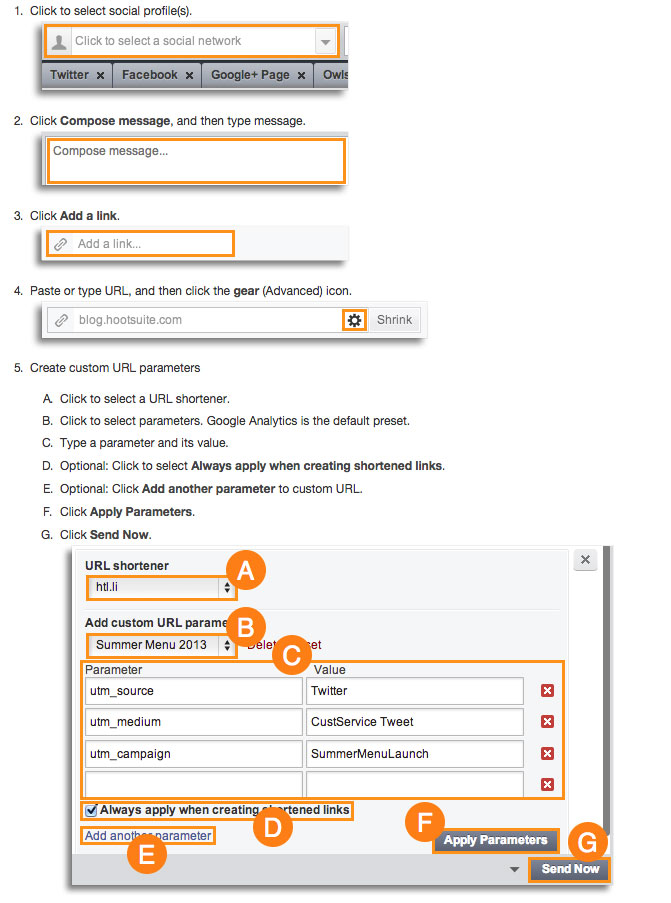
- Their UTM analytics option
With the UTM analytics feature, Hootsuite synchronizes with Google Analytics.
(Image source: Hootsuite)
An important feature on Hootsuite is the bulk publisher tab. It allows a calendar view of scheduled updates.
You can bulk schedule content by uploading a .csv file to Hootsuite. Add your social messages along with the dates and times.
You can use HootBulk (the must-have pro version of Hootsuite) for a simpler bulk experience.
Hootsuite platforms Include:
- Twitter
- Facebook
- Google+ (profiles, not pages or communities)
- LinkedIn
- YouTube
- Instagram
- Foursquare
- WordPress
- Mixi (Japanese social networking service)
Unlike many social media management platforms -- Hootsuite is mature. It's been around since 2008. They’ve developed, tested and improved along the way.
All in all, Hootsuite is one of the best tools to manage social media posts.
2. Post Planner
Efficiency is key in social media management.
As a busy social media professional, I look for this when deciding on the best tools to manage social media posts. Efficient is the word I think of when I use Post Planner.
Originally, Post Planner was an app optimized for Facebook. It helped brands deliver the most relevant content to their communities.
These days, Post Planner is a tool for finding, planning and posting content for Facebook and Twitter. There's also a light Instagram and Pinterest integration.
The Canva integration within Post Planner makes the entire process seamless and efficient. This makes Post Planner an absolute winner in my book -- especially when juggling clients.
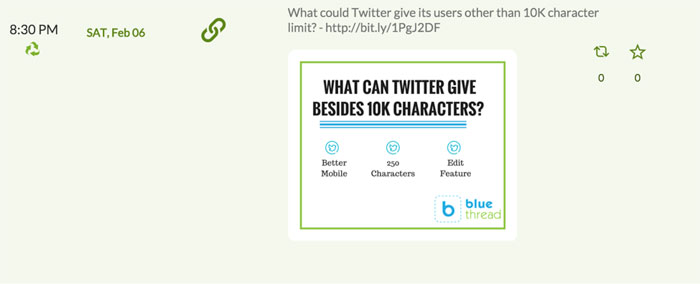
Here's an example. Recently I wrote a post about Twitter possibly moving to 10,000 characters. (don't get me started)
First, I put the link into their scheduling tool. Rather than use the default image on the blog, I decided to create one on Canva. I was able to do that without leaving Post Planner.
Boom! I had a piece of optimized, branded content -- scheduled and automated.
A few more things I like about Post Planner:
- I can identify trending content for sharing
- I can recycle content for optimal sharing (great for evergreen blog content)
- I can do a competitive analysis by searching audience-tested content from other Facebook, Twitter and Instagram accounts. (I use this to see if I can repurpose or recreate that same type of proven content)
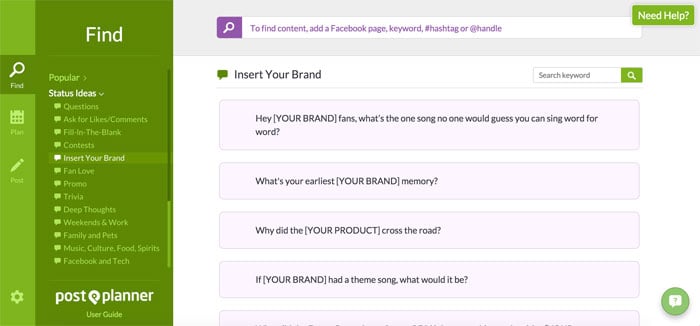
- I can find suggested status update ideas (15,000+)
- I like the analytics (they make data interpretation easy)
What's the downside of Post Planner?
It doesn’t allow for engaging with users or being able to follow a stream from within the platform.
Savvy social media marketers know that there's a gray area in which some of these tools overlap.
One social media expert, Tabitha Philen, combines the features of Hootsuite and Post Planner. She explained to her audience why this is important:
3. Buffer
Buffer's simple design and UX make scheduling, posting and collaborating an intuitive process. Simplicity is Buffer’s value prop in the industry.
Social media platforms that can connect to Buffer:
- Facebook
- Twitter
- LinkedIn
- Pinterest
- Google+
What Buffer and Post Planner don’t offer is Instagram scheduling. That’s a clear advantage for Hootsuite.
But let's face it -- the Instagram scheduling feature within Hootsuite is more of a pre-scheduling and reminder service. I’ll be covering other Instagram scheduling solutions later in this post.
Buffer offers a branded visual solution with Pablo. But it’s not nearly as robust as the Canva integration within Post Planner.
For Pablo to work well, the social media manager needs to know what size images work best for each platform.
The interface within Buffer is clean, simple and easy to understand at a glance. Again, simplicity is their strong point.
What are the real differences between the top 3?
Like we've already mentioned, social media managers often overlap their tools. They use features from one to optimize their results with another.
A broader comparison between these 3 social media management tools would be:
Hootsuite focuses on the medium
Hootsuite looks at the entire process of social media management -- from scheduling to engaging to direct messaging. Hootsuite dabbles in it all.
Post Planner focuses on the content
While Post Planner is also a scheduler, it was built for engagement. And the easiest way to get more engagement is to post proven, audience-tested content.
Buffer focuses on the scheduling
There's no doubt that Buffer is a great social media management tool. It enables a quick and simple way to ‘top off’ content at pre-selected times.
Now let's get into some of the other best tools to manage social media posts.
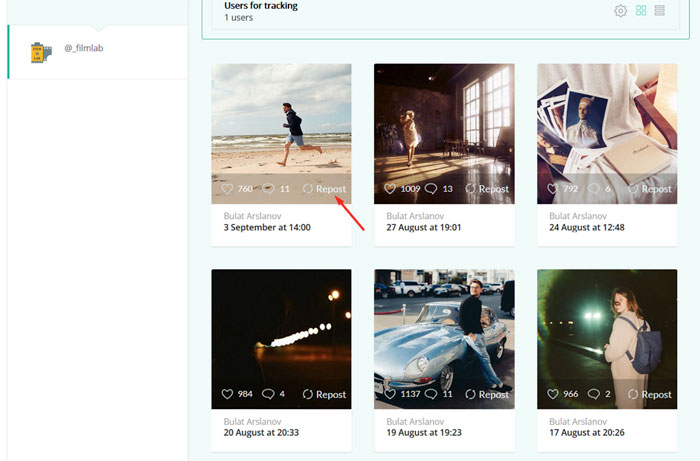
4. Tailwind
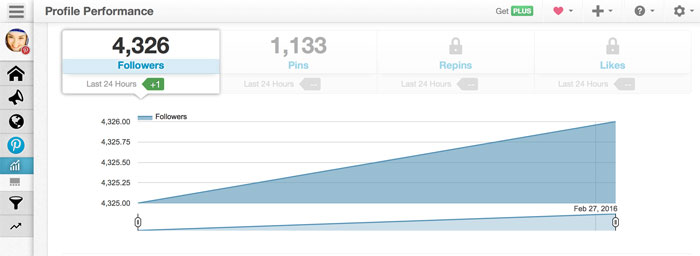
For managing Pinterest -- Tailwind is the perfect tool for social media managers.
Like Post Planner, Tailwind lets you ‘spy’ on your competition and see trending content.
With Tailwind you can also identify influencers. You can then use that data to target your content.
How does Tailwind help you manage your Pinterest posts?
It saves you time
- Whiz through pinning on multiple boards
- Drag-and-drop content into the calendar
- Use the shortcuts baked into the platform to save time
It maximizes your reach
- This optimized system detects the times when your Pinterest audience is most engaged. Hello, autopilot at the perfect time!
- It measures your success
- It provides deep insights into your published content. This info provides data to make future content even better!
- It turns you into a Pinterest scheduling master
- The browser extension lets you create multiple pins from any site with one click. (pretty nifty!)
The Tailwind dashboard makes it easy to interpret your Pinterest data. It provides info about followers, likes and dislikes, and even trends of pinning habits.
It's all right there on the interface.
Social media professionals can use this data to learn what resonates with their audience. (from keywords, to topics, to types of images)
Once you’ve identified the influencers, the next step is to leverage their followers to promote a brand or product. This brings us to our next best tool to manage social media posts.
5. Loop88
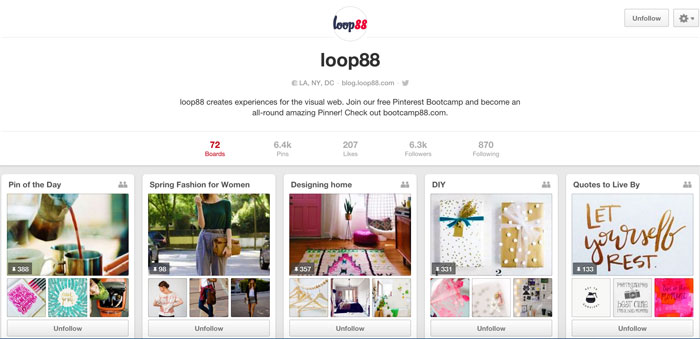
Loop88 is another outstanding tool for Pinterest lovers.
The company is like a digital bridge between Pinterest influencers and brands that want to spread their message on Pinterest.
I know many social media professionals addicted to pinning. They do it with passion, care, and creativity. Of course, these same social rockstars are also bloggers.
Loop88 leverages that niche content with visually rich context and transforms it into an influence opportunity.
In other words -- on Loop88, brands collaborate with Pinterest influencers and amplify content.
It works well for brands looking to be the cool kid at a party -- but they never got an invite. Loop88 is the invite with access to the right friends and community.
But if that was all Loop88 offered, it would be just a service platform. There's much more...
They take their pinning seriously by quantifying the value of influence with data-driven metrics.
Once the parameters are set, Loop88 can also predict the likelihood of interaction on a pin. That’s taking content, context, data, influence and wrapping it all into a gorgeous UI.
Check out their interesting Pinterest case studies for inspiration. They also have a free Pinterest bootcamp going on now in case you're in the mood for some Pinterest pushups!
6. TweetDeck
I couldn't put together a list of the best tools to manage social media posts and not include TweetDeck!
Sophisticated Twitter marketers know it's necessary to manage multiple Twitter conversations across many accounts. And in one place.
That's where TweetDeck shines!
What else is great about TweetDeck?
It’s free. It’s owned by Twitter. Ok, that might not mean much now, but at the very least, it’s backed by an authority.
Big fail on their part -- no mobile app. Don’t worry their owner isn’t amazing either. Tweetdeck is clearly influenced by Hootsuite's UI.
The scheduling and DM feature on TweetDeck is much more intuitive than on any other Twitter platform I've used.
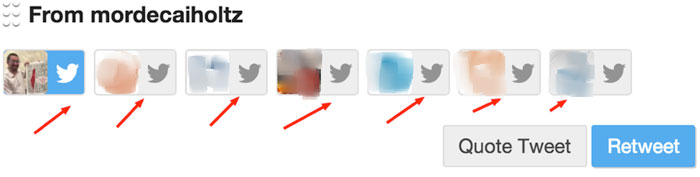
A clear advantage of Tweetdeck is its RT/ Quote RT feature.
You can retweet tweets from any of your connected accounts, unlike Hootsuite which doesn’t allow that option.
Yes, that’s a big feature to me.
Every social media pro finds content on one stream and looks for its relevance to another -- so this option on Tweetdeck is a total value add.
The next tool on my list of the best tools to manage social media posts is for those who love Instagram!
Before I get into this tool, I want to give you some background info to provide context.
For Instagram, the challenge is scheduling content and watching the stream in a logical manner. Latergramme is definitely the most popular tool.
You can use Latergramme to schedule posts from either the browser or your mobile iOS app (sorry Android users). With this tool, you can only upload individual images.
I used Latergramme religiously for a while -- but then these disadvantages became too inconvenient:
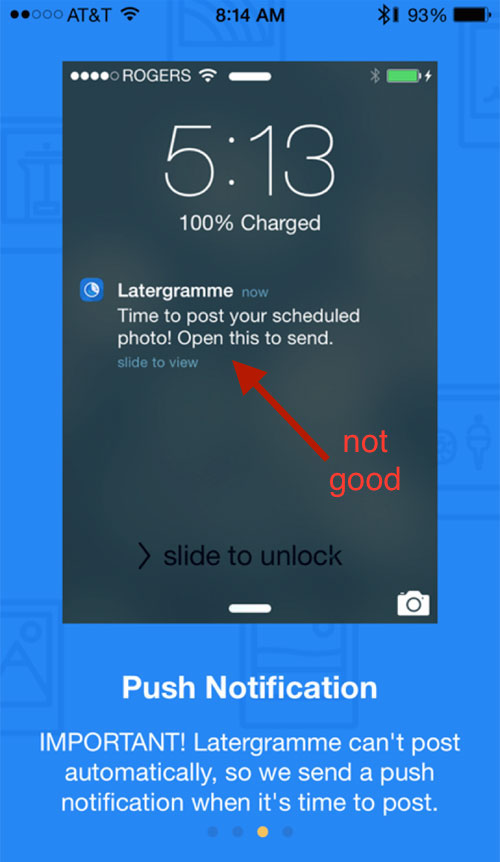
First, the posts don't post themselves
Yes, the main component of the pre-scheduling is done. But the Latergramme push notification before it posts is not an optimal solution for an automated workflow.
Next, you can't manage multiple Instagram accounts.
This is even more annoying than the posting limitation.
So I went on a hunt for a better solution. I needed something that would allow me to automate the process.
That's when I discovered the next tool on our list of best tools to manage social media posts...
7. Onlypult
Scheduling Instagram content isn’t easy because of its API.
Onlypult figured out the secret sauce. You can create (filters and words), schedule and manage Instagram content on multiple accounts.
And you can do all that from within Onlypult's easy to use web platform.
Since it's web based -- content creation is easier. You can just grab your images from whatever image creation tool you might be using.
What are Onlypult's limitations?
- Creating new content has to be done before uploading to Onlypult.
- Doesn't support video
- Doesn't offer bulk posting
- Doesn’t allow brands to comment or engage from within their platform
But the fact that it will publish on Instagram without sending me push notifications still makes it one of the best tools to manage social media posts.
8. beaverQ
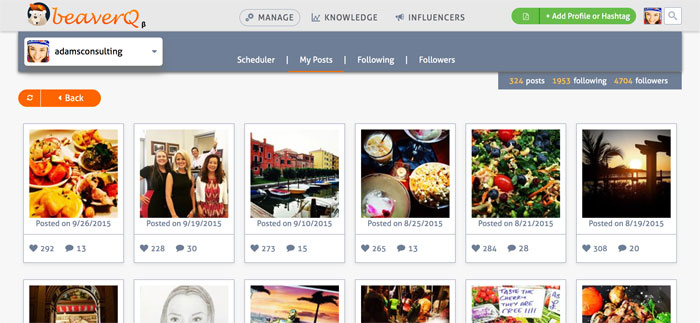
This Israeli startup is still developing some of the components of their Instagram tool, but even in its current state, it's still one of the best tools to manage your Instagram posts.
They’ve researched the challenges of existing tools and then created their own kickass, comprehensive platform.
Things I like about beaverQ:
- I can see all of my posts in one stream
- I can comment
- I can research followers
- I can filter by influencer
- I can sort profiles for optimized content and scheduling
While Onlypult offers filters to an image, and BeaverQ offers a much more comprehensive analytics dashboard -- neither of them allow the creation of images on their platform.
I guess we have to go back to Canva within Post Planner for that. :)
9. Zoomph
Strategic efforts are more meaningful on social media when they can be reviewed and revised in real-time.
The deepest component of social media is real-time engagement and influencer marketing. For this, there’s no better tool than Zoomph.
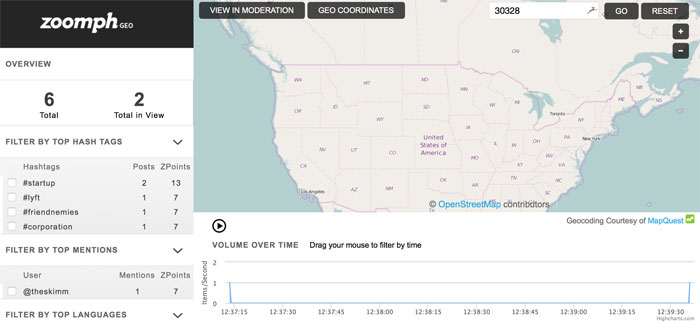
Zoomph is a new kid on the block -- but they’ve definitely done their homework. It’s a simple yet sophisticated tool for tracking, viewing, and leveraging social media data.
Zoomph pulls content from Twitter, Facebook and Instagram. It then relays real-time analytics (down to the emoji) to measure success and engagement.
Let’s use Super Bowl 50 for an example of what Zoomph can do.
It’s no secret that social media enhanced the conversation around the big game, from play-by-play to the commercials.
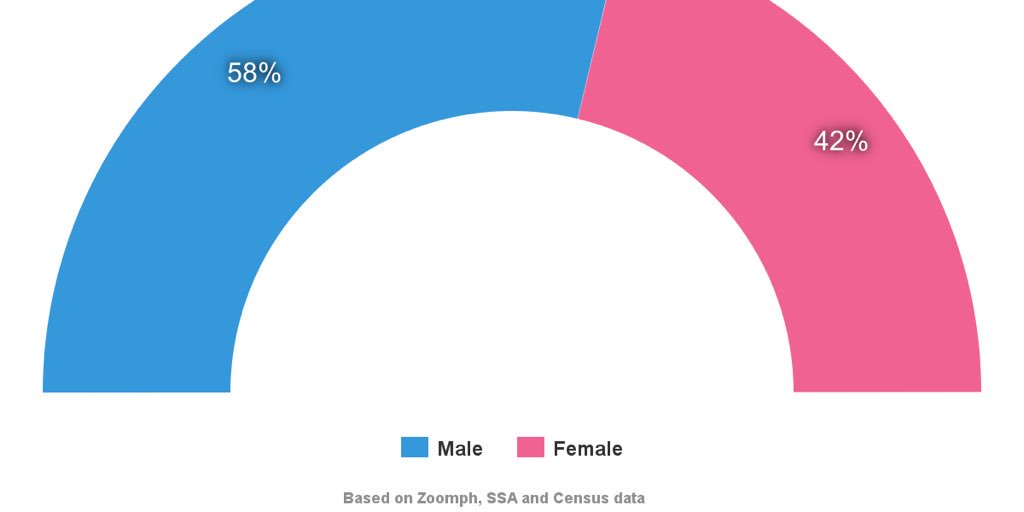
Let's say we want to know the male/female breakdown of the social media users based on a hashtag:
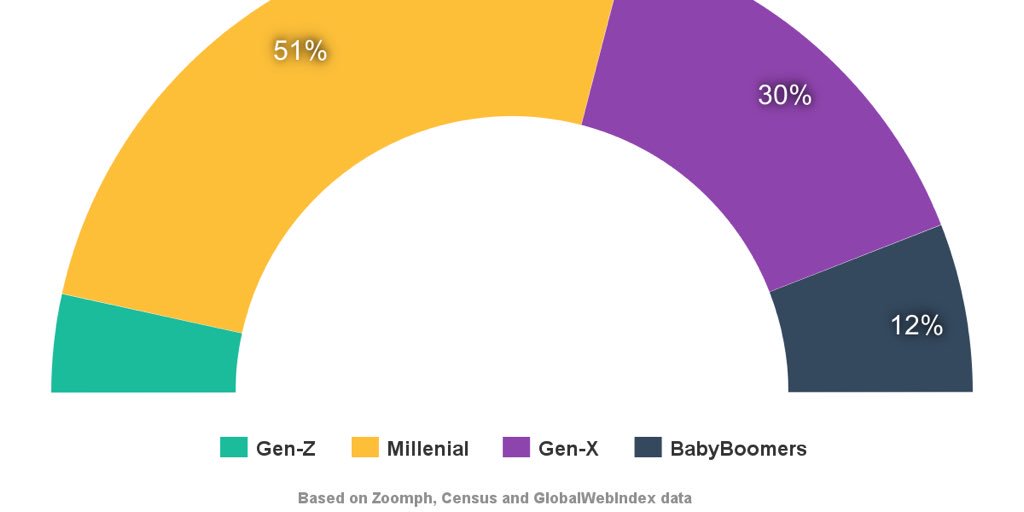
Or the dominant age group of those social media users:
Brands can capture this detailed data surrounding real-time social media content. They can then use this data for:
- Determining parameters for their influencer marketing campaign
- Determining which users to engage with
- Determining the real-time success of niche content
- Determining which users are involved in specific conversations
- And much more
You can even filter your audience's locations by country, language, hashtag, significant terms, social network, etc.
What will be your challenge with Zoomph?
The set up.
With multiple dashboards and an array of useful analytics -- it’s tough to follow it all. Luckily, the customer support is excellent.
Final Thoughts
So there you have it -- a review of 9 best tools to manage social media posts.
Ultimately, the ones you decide to use will depend a lot on what your goals are -- along with some personal preferences sprinkled in.
Regardless of your industry, you probably want tools to do these things:
- the ability to switch between platforms easily while engaging with users in a meaningful way
- find proven, engaging content to post without spending a ton of time looking for it
- the ability to track, analyze and tweak your strategies with easily accessible data
Doing all these things often requires a combination of tools, as Tabitha explained in the video above. She combines Hootsuite with Post Planner.
Content on social media is becoming more visual. Ephemeral content is becoming more popular. (think Snapchat)
The management tools listed in this post will help reduce the tasks involved in automation.
In the end, we all know that there’s only so far automation can go before real-time engagement is what matters most.
Which tools do you think are the best best tools to manage social media posts? Did I miss any good ones?


 Because one buyer's individual contribution makes a difference to the the top-line performance of your marketing, it is worth tackling the barriers to deliver a personal service to them.
Initiatives can be as simple as including their name and other personal details on all communications and as extensive as offering a concierge service with a unique contact number and named representative.
The purpose of personalisation for this group is to make the customer feel special, so extensive effort will need to be made to do so.
The ROI of such strategies, one participant noted, must still be measured and considered, however.
To view the original article Click Here
Because one buyer's individual contribution makes a difference to the the top-line performance of your marketing, it is worth tackling the barriers to deliver a personal service to them.
Initiatives can be as simple as including their name and other personal details on all communications and as extensive as offering a concierge service with a unique contact number and named representative.
The purpose of personalisation for this group is to make the customer feel special, so extensive effort will need to be made to do so.
The ROI of such strategies, one participant noted, must still be measured and considered, however.
To view the original article Click Here