Showing posts with label Facebook Groups. Show all posts

Tuesday, 29 September 2015

9 Ways to Use Facebook Groups for Business

Are you participating in Facebook groups?
Want to start one to support your business?
Facebook groups help businesses promote products, support customers and much more.
In this article I’ll share nine ways Facebook groups can benefit your business.
nine ways to use facebook groups for business
Discover nine ways to use facebook groups for business.

#1: Sell Products

As an alternative or addition to selling products or digital goods on your website, you’re now able to sell in Facebook groups.
Once you create a For Sale group, you’ll see an option to “sell something” in your Facebook update.
sell something feature
The Sell Something feature is available to members of For Sale groups on Facebook.
If you don’t yet see this option in your Facebook group, take the opportunity to learn how selling works. Also nominate your group for this feature.

#2: Supplement Video Training Courses

If your business sells a video training course, give customers who purchase it access to a private Facebook group as part of the package. They can ask questions and get supplementary material, as well as forge a bond with other customers.
It’s a win-win situation for everyone. The customer can get help and additional resources for the product they purchased. Plus, it gives your business the opportunity to forge deeper connections with their customers and promote other courses and services.

#3: Promote Chats

Those who run a regular Twitter or online chat, or even have a running discussion on their Facebook page, may want to separate it from their business. They can do so through a Facebook group. It’s a great way to promote upcoming chats and guests. Plus, you can keep the conversations focused.
MediaChat uses their public group to share more information about chat guests, offer member deals and give shout-outs.
mediachat facebook group
Create a Facebook group to promote upcoming guests on regular chats.
Remember to let participants know about your Facebook group and page (if applicableduring your chat. This way you can continue to build up your group and online presence.

#4: Establish Expertise

One of the easiest ways to use Facebook groups for business is to become a resource in your field. Create a group or contribute your knowledge to one that already exists.
For example, members of the Internet Marketing Super Friends group, numbering more than 13,000, pride themselves on helping other Internet marketers. Members can ask questions about SEO, get recommendations for designers and tools and more.
internet marketing super friends facebook group
Facebook groups are great platforms to share your knowledge and get noticed.
The key thing about this type of group is to be a resource without self-promotion. (Most groups like this do not tolerate promoting content of any kind.)
Use Facebook groups to be helpful and give freely of yourself. You’ll be rewarded in spades as the word gets out from other members.

#5: Collect Feedback

Want to test out new ideas on some of your existing customers? One way to do that is to start a Facebook group to use as a think-tank for your business.
Create a secret Facebook group, invite some of your best customers and openly discuss new ideas you’re thinking about implementing in your business. Then gather feedback from them.
This type of group provides a way to build stronger relationships with customers, while helping business owners collect honest feedback on what their customers might like.
#6: Provide Customer Service
Every business needs to provide a way for customers to get help. While this could be through a contact form on your website or through your Facebook page, a secret Facebook group is another option.
The reason to start a secret group, instead of a closed or public one, is because secret groups can’t be located in search or accessed via URL. Instead, members have to be invited. This gives you better control over adding new members. Plus, it protects your business in case you have disgruntled customers. (They won’t be able to access the group unless you’ve invited them.)
shareist facebook group
Facebook groups are a good way to add value to your customer relationships.
If you want to make your customer service Facebook group easy to find, create a closed group. However, be sure to state whom this group is for in the description. This will give you better control over approving and rejecting new members.

#7: Support Event Speakers

If you’re putting on a live or online conference for your business, and you want to communicate with the speakers you have lined up, consider creating a Facebook group.
Convey insider details about the event and answer additional questions new speakers might have. Plus, use the group to share any templates and files with your speakers to reduce the number of requests you receive.
This also lets you give your speakers the opportunity to network and get to know each other and build rapport prior to the event.

#8: Test New Ideas With Peers

If you have a lot of ideas and want someone to help vet them, create a Facebook mastermind group. This will help you avoid wasting too much time or money on an idea that just won’t work.
You’ll want to keep mastermind groups small and private since you’re discussing ideas for your current (or next) business, so make this a secret group.
peer to peer image shutter stock 294849788
Use a Facebook group to connect with and learn from a select set of peers. Image: Shutterstock.
Once you create this group, use it as an online meeting place to discuss ideas and get help from a few of your well-respected peers. Remember to use some of the built-in features, such as file sharing and group search, to quickly recall meeting notes. Plus, if there’s a recording, you can post that as well.

#9: Communicate With Your Team

For those whose business communicates primarily on Facebook, create a Facebook group to bring your employees together.
Create a secret internal Facebook group for your company. Then invite your employees, virtual assistants or interns to join, and use it as a means to communicate with your team. The group can be a channel for introducing new teammates, sharing company updates and more.
If you do plan to use Facebook groups internally, be sure to have a social media policyready and have your employees agree to it first. This way, the private discussions among your employees don’t end up on public social media channels.

Facebook Groups Versus Facebook Pages

Facebook groups supplement your business and your fan page. So even if you create a Facebook group, you’ll still want a Facebook page for your business.
Anything you share on your business page shows up in the news feed for fans to see. When fans engage with your content, it increases your visibility to others in their network.
However, updates from Facebook groups only show up in the news feeds of members. When a member engages with the content in a group, it doesn’t show up in their friends’ news feeds.
Once you have a Facebook group and a page, make sure they work in tandem. Actively promote your group to your fans, if it’s something they’re able to join. This way, you can leverage your group and your page at the same time.
Over to You
There lots of ways to use Facebook groups for business. They serve to strengthen communication, connections and visibility, as well as help you grow your business. Groups also help you develop new ideas and relationships with your online community.
Whether you have your own group or participate in them, it’s valuable to know how Facebook groups can help your business so utilize them to their full potential.
What do you think? How have Facebook groups helped you? Do you run a Facebook group? In what ways are you using it? What kind of Facebook group do you plan to create? Please share your thoughts and experiences in the comments below.
Peer to peer photo from Shutterstock.

To view the original article Click Here

Tuesday, 9 June 2015

How to Build and Manage a Private Facebook Group

comm
So I’ll come right out and say it…
I love my job.
As Community Manager for Digital Marketer, I manage approximately 10,000 members (and growing) across seven private Facebook groups – answering questions, providing support, and bridging the gap between our clients and our business.
manage-facebook-groups1
These private, online communities have had a tremendous impact on our business.
We’ve found that establishing a thriving online community within our client base meets a number of important business goals including…
  • increased customer satisfaction
  • reduced refunds
  • increased retention in our monthly memberships
  • increased sales generated by word-of-mouth recommendations
I’ve found there is a lot of gold to be found in creating and maintaining a private Facebook group and offering it as a premium bonus to our products – so here’s how we do it at Digital Marketer.
We’ve found that there are 6 major components of building & maintaining a private Facebook Group for our customers…

1. Create an Exclusive Facebook Group

manage-facebook-groups2
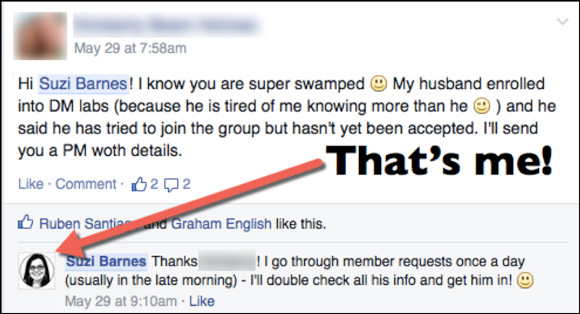
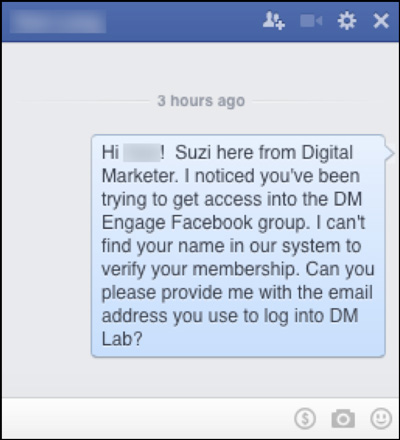
Private Facebook groups are private for a reason – not everyone can join. There are certain qualifications that have to be met before the admin clicks “approve” to the join request.
Having some sort of qualification for admittance to the group naturally builds a stronger community – people feel like they are a part of a special club. They know they are all a part of the group for the same reason. If you only let the best in, you’ll only get the best of communities!
Exclusivity occasionally requires a thick skin on the part of the admin. You can’t let just anyone in. You will have to have to turn people away, you will have to have uncomfortable conversations with applicants who don’t meet the access guidelines, and you will have to be consistent with your requirements. You’ll also need a system in place to remove those who no longer meet your qualifications of membership.
This keeps your member list nice and healthy.
manage-facebook-groups3
But the payoff is worth it – you will end up with a community that is bonded by common attitudes, interests, and goals instead of an aimless, eclectic group with a variety of motivations and reasons for joining.

2. Establish Rules in the Facebook Group

It’s important to give your group some sort of direction on what types of conversation are encouraged (or discouraged) in order to maintain a thriving community. Our rules are designed to keep our groups a safe space for people to ask questions, offer support and build relationships with our company and other members.
manage-facebook-groups4
The rules for our private Facebook groups are simple:

Be Respectful

Pretty self-explanatory. When you get a group of people together who are passionate about a particular topic, things can get heated from time to time. We want to make sure no one ever feels attacked for sharing in our groups.

No Pitching

Our groups are 99% business owners, and it can be all too tempting to gather leads from an aggregated group of marketing enthusiasts. Since we want our communities to help and support each other, we set this rule in place so our members aren’t constantly hit up with offers.

Keep It On Topic

Off topic conversations include: what you had for dinner, where your kids are vacationing this summer, and anything else that has absolutely nothing to do with digital marketing. Keeping conversations on topic helps build the community as a helpful place for marketers.

Enjoy!

We want you to like being a part of our groups. Questions, answers, jokes, and puppy pictures are always welcome. We place a high value on open conversations and encourage everyone to help each other out.
Will your rules look the same? Of course not. Take into account the goals and culture of your members and adjust accordingly.

3. Moderate Your Facebook Group

So what happens when someone breaks the rules? What if someone has a problem with another member? What happens when a member is unhappy with the group?
Moderating is vital to maintaining a healthy community – whether it is on Facebook or any other social media forum. If you don’t offer some sort of control over the conversation, others will control it for you.
With over 6,000 members in our DM Engage Facebook Group alone, rules are bound to get broken; and they are broken often. People get upset with other people and reach out for resolutions. Here’s the basics of how to handle it:
  • Delete posts that break the rules. Whether it is someone being rude or pitching their latest lead magnet, the post gets removed as soon as I (or someone on my team) sees it. Many times I am sent links to the offending post and asked to make the final decision. The point is that we try not to leave questionable posts up for long – often they are only visible for a matter of minutes. This keeps our threads healthy, and maintains that safe environment that our members enjoy.
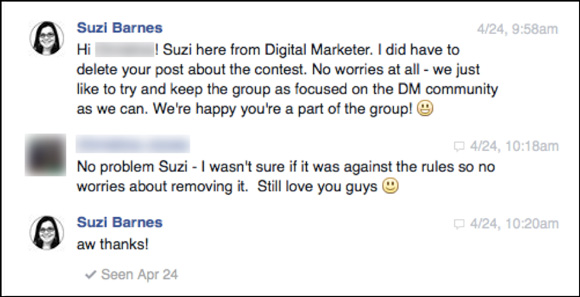
  • Handle sensitive issues in a private message. If I delete a post, I always send the author of the post a private message and explain why their post was deleted and make myself available to answer any questions. 90% of the time, they didn’t realize they were breaking any rules or they posted in the group by mistake. Be nice, be firm, and make sure they understand that you’re not trying to be mean or unreasonable, you’re just keeping the group on topic so that the experience is better for everyone.
manage-facebook-groups5
This also goes for members who are seeking a resolution to a problem with other members. I always move these conversations to private message – it gives the issue my undivided attention, and keeps the conversation between me and the involved parties. The last thing I want to encourage is a public argument where anyone can weigh in. Situations are much easier to resolve when it is between one or two people than between one and 6,000 people.
(Check out the member-exclusive webinar I gave on the process we use to build communities around our products and services –– now in DM Lab for just $1!)
CTA-Take22

4. Connect People With ___________

My role as Community Manager has three main functions:
  • connect people with content
  • connect people to people
  • connect people with products
The more you make connections for people, the more beneficial the group will be to your customers — and thus the organization.
Here’s an example of me connecting people to content.
manage-facebook-groups6
I actively set aside time each week go to through Digital Marketer’s content (and believe me, there is a lot of stuff to go through): blog posts, certifications, courses, webinars… you name it. The more familiar I am with our content, the better I can help people in our group.
Here’s how I keep myself organized so I can point our group members to the right content (in this case, our blog)…
manage-facebook-groups7
I also get obsessed with learning about our most active group members. I keep a spreadsheet of our most engaged members and note their industry and niche in order to tag them in when need.
manage-facebook-groups8
Lastly, in many cases our members ask which of our products they should purchase to solve an issue they are having.
I’m not a pushy salesperson by any stretch — but it is part of my job to be familiar with our products and services so I can assist with these queries.
manage-facebook-groups9

5. Open/Close Feedback Loops

Effective community management revolves around feedback loops – and these are particularly effective using the Facebook tagging system.
manage-facebook-groups10
I constantly keep an eye out for these loops. There are all kinds of feedback loops that occur in our groups: Technical Loops, Customer Service Loops, Content Loops… and I can easily tag another team member to “loop” them into the issue and get a resolution. It’s stellar customer satisfaction, plain and simple.
It also helps us identify content and product gaps for our business.
For example, we listened when some members told us that the amount of content in Digital Marketer Lab was overwhelming and they didn’t know where to start. We noticed that there was a content gap that we could fill, so we created this mind map to help our clients better navigate their choices.
manage-facebook-groups11

6. “Selling” Your Facebook Group

“Selling” is in quotes for a reason… You cannot sell access to your group. This is against Facebook’s Terms Of Service and will land you in Facebook jail.
Basically, you cannot make a business model around using Facebook’s services. If your group is found to be in violation of this, Facebook will not only remove the group but could very easily ban you from joining Facebook again. That would be highly inconvenient.
To address this hiccup, we position our private Facebook groups as free bonuses for paid content. Our members have a real product that they have purchased from us, and we use that purchase as the key to our (100% free) gated communities. Please, please, please don’t break Facebook’s rules. It will end badly.
Here’s a clip from the email we use to welcome our new customers to DM Lab and letting them know about the Facebook group…
manage-facebook-groups12
So how many people do you need to before you launch a private Facebook group? I hate to be vague, but there is no “magic” number – but I would say have a good 1,000 potential members before you look into establishing your online community.

Here’s the Numbers for Digital Marketer Engage…

Our private Facebook Group for Digital Marketer Lab has approximately…
  • 12,000 paying members
  • 50% have joined the private Facebook Group called Digital Marketer Engage
  • 19% – 20% of Engage members are actively involved in the group during any given week. (the rest don’t visit or, when they do, they just “lurk”)
So, based on these numbers, if you have 1,000 customers you’d like to pitch a group to, you can expect…
  • 500 to join the private group.
  • 95 to 100 people to like, comment, share and otherwise be involved in your group during a 7-day period.
Private online groups are a fantastic way to add value to customers and meet important business goals like reducing refunds and increasing retention.
Do you have a private Facebook Group for your products or services? Are you thinking of starting one?
To view the original article Click Here