Saturday, 28 November 2015

9 Social Media Tools Recommended by Marketing Pros

Are you looking for new social media tools?
Want to know what the experts are using?
We asked top social media professionals which social tools they’re using right now.
In this article you’ll discover nine social media tools to save you time and improve your marketing efforts.
nine social media tools from the pros
Discover 9 social media tools from marketing pros.

#1: Schedule Repins Using BoardBooster

holly homer
Holly Homer
I use BoardBooster to schedule Pinterest. There are several features I use daily within BoardBooster, but my favorite is the “looping” ability.
This feature lets you set a board to repin an older pin from that board, and then delete the original pin or the new pin based on which one performed better.
boardbooster feature
Use BoardBooster to schedule smarter repins.
This allows me to keep each of my boards active daily while repinning great stuff. I pinned it the first time, so I know it’s good!
Holly Homer created Kids Activities Blog and Business 2 Blogger, a company that matches bloggers with businesses that need them.

#2: Create Weekly Reports With Rival IQ

ian cleary
Ian Cleary
Over the last 6 months, I’ve started using Rival IQ to track competitors and analyze the results of social media marketing. It’s become a vital tool for weekly reporting.
Every week, Rival IQ emails you a PowerPoint to show how your social media accounts are performing, how this compares to your competitors, any changes competitors are making and“breakout posts.”
rivaliq feature
Rival IQ makes reporting and competitor research easy.
For example, I get notified if a competitor changes their profile information on their accounts or if one of their posts gets a lot more likes, shares and comments than other posts.
Ian Cleary is the founder of RazorSocial, one of the world’s leading marketing technology sites focused on social media and content marketing.

#3: Automate Evergreen Updates Using Revive Old Post

nathan chan
Nathan Chan
Hands-down my new favorite tool is the WordPress plugin Revive Old Post.
Install it and the plugin will pull from all of your existing blog posts and post them randomly to your Twitter, Facebook and LinkedIn accounts automatically.
Use it and you don’t have to worry about scheduling any of your latest or evergreen blog posts on social media at all anymore. Set it up and watch the traffic flow on automation.
Nathan Chan is the publisher and editor of Foundr Magazine, a digital magazine for young entrepreneurs.

#4: Access Images Everywhere With Google Photos

guy kawasaki
Guy Kawasaki
Install Google Photos on every computer and device that you own, then select the free option (up to 16 megabyte file size), and Google Photos will upload every picture it finds on your devices. It even works some magic and uploads a version of any RAW images it finds!
It took more than a week, but Google Photos uploaded more than 50,000 of my pictures. Some fantastic consequences include:
  • Automatically back up all of your pictures to the Cloud. I now have at least three copies of my photos: local Lightroom, Dropbox and Google Photos, so lots of things have to go wrong for me to lose a photo.
  • Move photos from one device to another. For example, if you have a photo taken with a camera, you can now easily download it to your phone from Google Photos, so that you can post it to Instagram. The opposite direction works well, too; a picture from your phone is available on your computer, so you can edit it easily.
google photos app list
Use Google Photos across all of your devices.
  • Google Photos takes its best shot to make animations, stories and collages. It helps you “rediscover this day” from years ago and helps you view pictures you probably would never have seen again. Think of all of those baby pictures! The results are delightful.
  • Search through your photos by faces and topics. For example, if I search “track,” I don’t have to add other keywords for the results to show images from railroads and track meets.
And remember, it’s all free. The only reason not to do this is if you’ve lost your mind.
Guy Kawasaki is the chief evangelist of Canva, an online graphic design tool.

#5: Broadcast Live Calls to Action on Periscope

john lee dumas
John Lee Dumas
Periscope is my new favorite social media marketing tool because it allows me to connect with my audience, invite them into my world and provide on-the-spot value anytime and from anywhere – live!
The power of Periscope continues to impress. What started out as a tool I thought would be fun to use as a way to connect with my audience has quickly become a major marketing channel for me as well.
Not only can you jump on and provide free, valuable content with the push of a button (think live Q&As or sharing lessons learned), you’re also able to leverage Periscope to make announcements, ask your audience questions, get feedback on ideas and invite people to things.
Here’s a quick example: Every time I’m setting up to do a Live Podcast Workshop, I hop on Periscope as I’m going live on the Workshop. Then, I invite people who are tuning in via Periscope to come join me on the Live Workshop via a URL. To date, we’ve hosted multiple Workshops where conversions can be tracked directly back to the invite from Periscope!
John Lee Dumas is the founder and host of EOFire, an award-winning podcast where he interviews today’s most inspiring entrepreneurs.

#6: Increase Related Posts’ Visibility With Contextly

neal schaffer
Neal Schaffer
There are many simple “related posts” plugins, but I’m thrilled about Contextly. Contextly makes it extremely easy to create and display three different types of related post widgets on your blog in less than a minute of your time!
The first widget is positioned below your blog post content, and the second, called the Sliderail, goes into your sidebar.
My favorite feature, though, is the In-Story module. This widget exposes your related content to those who don’t scroll down to the bottom of your page. So far, I’m getting double the click-through rate from this module than the one at the bottom of the content.
contextly in-story module
Use Contextly to serve related content to your readers.
With a single click in WordPress, you decide where and how to display this widget and which posts you want it to serve (if you don’t want to rely on Contextly’s algorithms).
Contextly also allows you to feature promo links for newsletter subscriptions, ebook downloads or webinar announcements inside your recommendation widgets.
Contextly is a paid service and the fee is based on your website traffic, but once you understand the potential ROI, I believe it’s a small price to pay.
Neal Schaffer is the founder of the Social Tools Summit, the Social Media Center of Excellence, Maximize Social Business and author of Maximize Your Social.

#7: Chat With Blog Visitors Using Zopim

sue b zimmerman
Sue B. Zimmerman
Zopim is a live website chat tool that lets you monitor blog visitors and engage with them via a real-time chat.
To use it, you simply embed the widget onto your website. You can then:
  • Chat with your customers via mobile or desktop.
  • Track your customers and add visitor notes.
  • View visitors by location, browser platform and device.
  • Chat in different languages. Zopim even detects and translates in foreign languages!
Zopim, compatible with iPhone or Android mobile devices, offers a free 14-day trial.
Sue B. Zimmerman is founder of Insta-Results™ and the author of Instagram Basics for your Business.

#8: Design Social Media Images With Pablo

syed balkhi
Syed Balkhi
Pablo 2.0 is a free app from Buffer that allows you to create engaging social media images in less than 30 seconds.
You can choose specific dimensions when you post to Instagram, Twitter and Facebook. The best part is that your images aren’t branded, unlike with other software out there.
Syed Balkhi is the founder of OptinMonster and WPBeginner.

#9: Socialize Broadcasting With Blab.im

joel comm
Joel Comm
While platforms like Periscope and Meerkat are great for broadcasting one-to-many, Blab makes social media truly social again by adding a conversational component.
Simply launch the site or app and you’re watching conversation take place; conversations you can participate in.
With its ease-of-use, intuitive interface and an iOS app to make blabbing on the go simple, content creators of all kinds are leveraging this powerful tool to engage others and build community.
blab broadcast screenshot
Blab.im brings the social back into social media.
More creative types are hosting their own shows, and some are using the platform to record their podcasts. For example, I’ve been broadcasting the Joel Comm Show on Blab.im for live viewing and uploading to YouTube for replays.
Apart from meeting others at a live event, Blab is the closest we can get to being face to face with others.
Joel Comm is the co-author of Twitter Power 3.0: How to Dominate Your Market One Tweet at a Time.

Who are these social media pros?

The social media marketing experts who contributed to this article are all speaking atSocial Media Marketing World 2016.
featured smmmw16 spearkersYou’ll hear from 100+ of the world’s top social media marketing pros as they reveal their newest social media marketing tips and practical, real-world, proven examples.
Join Guy Kawasaki (author, The Art of Social Media), Mari Smith (co-author,Facebook Marketing: An Hour a Day), Michael Hyatt (author, Platform), Chris Brogan (co-author, The Impact Equation), Jay Baer (author, Youtility), Amy Porterfield (co-author, Facebook Marketing All-In-One For Dummies), Mark Schaefer (author, Social Media Explained), Joe Pulizzi (author, Epic Content Marketing), Ann Handley (author, Everybody Writes), Michael Stelzner (author, Launch), Brian Solis (author, What’s the Future of Business?), Cliff Ravenscraft, Darren Rowse, David H. Lawrence XVII, Derral Eaves, Dorie Clark, Ian Cleary, Joel Comm, John Lee Dumas, John Jantsch, Jon Loomer, Kim Garst, Marcus Sheridan, Michael Port, Mitch Joel, Neal Schaffer, Pat Flynn, Peg Fitzpatrick, Robert Rose, Viveka von Rosen and experts from more than a dozen top brands as they reveal proven social media marketing tactics atSocial Media Marketing World 2016 — Social Media Examiner’s mega-conference in beautiful San Diego, California.
You’ll be able to take your Facebook, LinkedIn, Twitter, Pinterest, Google+, YouTube, blogging, podcasting, livecasting and video marketing to an entirely new level.
Join 3,000 fellow marketers at the mega-conference designed to inspire and empower you with social media marketing ideas — brought to you by Social Media Examiner.
What do you think? Do you use any of these social media tools? What’s working well for you today? Please share your thoughts in the comments below.
To view the original article Click Here

10 Years of Google Analytics… and 10 Features You’re Probably Not Using

Back in 2003 Google bought a company called Urchin Software, and subsequently launched the first free, commercial-grade analytics platform. How time flies!
Since then many of us have become seasoned users of Google Analytics, though it’s such a powerful, ever-evolving tool that I for one have still to get to grips with a bunch of the features. It turns out I’m not alone.
I spotted this post from Brian Clifton, who used to be Head of Web Analytics for Google Europe back in the day.
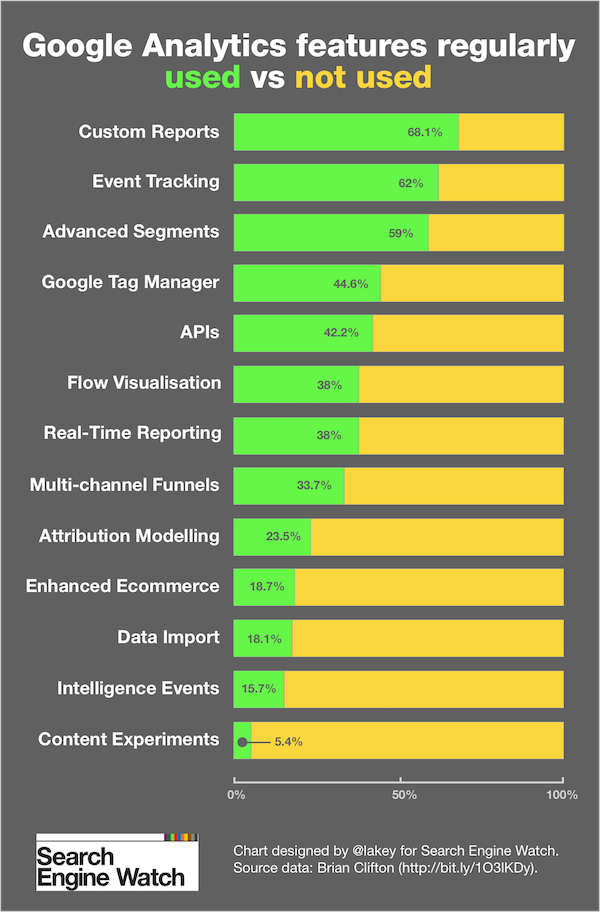
In it Brian references a survey that shows the relative adoption of 13 “essential” features, which he says are key to really understanding how people use your website.
The live survey is currently based on responses from around 200 people. It is still open and it would be good to grow the sample size, so if you use Google Analytics and can spare 30 seconds then pleaseaim here.
So how are people using Google Analytics? And what features are yet to be adopted by the masses?
google-analytics-features

Winning

More than two-thirds of Google Analytics users have set up Custom Reports.
There’s really no excuse not to try these out for yourself, given the amount of templates out in the wild for you to make use of, and the fast insight that Custom Reports can give you.
What else? Event Tracking and Advanced Segments are popular, but the rest of these features are only used by a minority of users.

Losing

Content Experiments is a major laggard, though it seems that this might be less to do with the adoption of A/B testing (or ‘multi-armed bandit experiments’, for that matter) and more linked to the difficulties in implementing Google’s kit.
The way Google Analytics is configured makes it tricky for marketing professionals to set up Content Experiments without the help of the tech team.
By contrast, other testing tools, such as Optimizely, are way easier to configure and continue to gain a lot of traction.
Other Google Analytics features such as Intelligence Events, Data Import and Enhanced Ecommerce are in need of more love, with fewer than one in five users bothering to make use of them.

Why the lack of traction?

I asked Brian for his thoughts on why some of the most powerful features are being ignored by analysts. The trouble, it seems, is that there aren’t actually enough analysts!
Organisations are simply not hiring dedicated analysts to work in this role. Even for very large brands spending a great deal of money online, what I find is that ‘analysis’ of their data is delegated to a person with other duties.
In other words, a non-professional analyst who may spend a couple of hours per week looking at reports. In that scenario, only the basic features are ever scratched.
It seems odd that, in 2015, there is a deficit of analysts, given that web analytics is a relatively mature space. The entry point for using analytics is essentially free, but there’s always been the need for humans to interpret the data, to provide real insight.
So are we just paying lip service to web analytics? Businesses of all shapes and sizes will be able to tell you how many visitors they have, but what else should they be looking at? Brian says:
Regardless of business sector or website type, all sites must get the following three things done right if they are going to use data to improve their business.
The first is Segmentation, as you really cannot perform any useful analysis if you are grouping all your visitors together.
Then there is Campaign Tracking. Although I don't list it as a ‘ground-breaking feature’ in my survey, getting Campaign Tracking right is fundamental to understanding which half of your marketing budget is going down the drain.
And third: Multi-Channel Funnels & Attribution Modelling. In other words, understanding your marketing mix (MCF) and their value to your business (AM).
Seems like most of us have work to do, and maybe some hiring too. Will 2016 be the year of advanced analytics? What do you think?
To view the original article Click Here

Friday, 27 November 2015

15 Tips to Help You Write Better Social Media Content

15 Tips to Write Better Social Media Content | SEJ
Is social media getting you down? Maybe you have a good presence there, but things just aren’t hot yet?
Don’t worry, this is something a lot of businesses go through.
One fantastic way to make a bigger impact and start to see awesome engagement is to make sure your social media content is on point. After all, your audience is human, and they’re reading (scanning) your content, right?
15 Tips to Write Better Social Media Content | SEJ

15 Tips to Write Killer Content for Social Media

Here are my top tips to help you put your best foot forward on social media with your written content.
I’ll break them down per social platform, starting with Twitter.

3 Must Have Twitter for Business Tips


You’re on Twitter, but what are some must have tips that can help you write better Twitter content? Here are a few to take with you as you tweet.
1. Add Images to Your Tweets for Maximum Interaction
Your content might be awesome, but if you don’t add images, you’re going to lose out major on engagement and interaction.
When Buffer started using more images within their tweets, they saw an 18% increase in clicks. As far as favorites, their tweets saw 89% more when they included images and they saw 150% more re-tweets.
Example of Buffer tweet + image:


The 5 Key Ingredients of Facebook Posts That Get Seen and Clicked: http://buff.ly/1iV63DM 
2. Understand the Difference Between Your Voice and Tone
Writing the right content means you also need to know the difference between what voice and tone mean. You need to have a consistent voice throughout your social media usage, but when it comes to the different channels, different tones can work. On Linkedin posts, for example, your tone may need to be a bit more serious. With Twitter, your tone should be more conversational and fun. Don’t change your voice, but change up your tone. Take a look at these two radically different “tones” from the awesome Mailchimp:
Tweet 1: Serious
More than 140,000 of our customers use MailChimp automation. Here are 3 ways we just made it better: http://blog.mailchimp.com/expanding-on-our-marketing-automation-features/?utm_source=Twitter&utm_medium=Social&utm_campaign=Expanding%20on%20Our%20Marketing%20Automation%20Features …
Tweet 2: Fun


Q: What's better than cats + hats? A: Cats + hats + gentle guitar. https://vimeo.com/52256072 
Don’t change your voice. Listen to your mother and change your tone to see some awesome results.
3. Write Tweets that are Perfectly Conversational
Keep things chatty (meaning conversational, not long) when you’re writing for Twitter. It is more of a laid back channel, which means keeping things in a conversational tone will help you bring about more engagement. 

Three Awesome Tips for Writing Excellent, Engaging Facebook Content

 Now, what about Facebook content? How can you get something that is outstanding and engaging?
4. Find and Use the Perfect Recipe for a Facebook Post
The first step to creating great Facebook content is to learn the perfect recipe for a post. Kevan Lee from Buffer gives an excellent recipe that can really help your social content be the best possible. He says that a great Facebook post:
  • Should be an actual link
  • Is brief (fewer than 40 chars)
  • Is published at times that aren’t peak
  • Is part of a regular content creation schedule
  • Is newsworthy and timely
And remember; don’t fear mixing it up a bit to find your own recipe that works for your brand.
5. Use Your Visuals on Facebook to Drive More Engagement
Visuals really are a huge part of social media content, no matter the channel. And Facebook visuals are a great way to have better content. Photos on Facebook get seven times the amount of likes, and 10 times the number of shares over content that only links to a page or is just written content. You can add text on photos, create collages, and use your images to break up all of the written content out there on Facebook. And remember, make sure your profile and cover photos are perfect to represent your brand while also helping you stand out.
6. Prepare to Write Some Excellent Long-Form Facebook Content
Get prepared to get a new angle on Facebook content. Instead of just making a simple little post, you will soon be able to write long form content. This is really going to help amp up your Facebook content game, and get you the engagement you are looking for on social media.

3 Excellent Ways to Use LinkedIn to Reach Out

LinkedIn is a great way to connect with other industry insiders and leaders, but how can you get great social media content on LinkedIn? Take a few of these tips with you.
7. Keep Your LinkedIn Audience in Mind, Crafting Perfect Content
LinkedIn has a specific audience and you need to know how to write for that audience. When you are writing LinkedIn content, make sure you are writing for that demographic, which is more professional. Write posts that you only post on LinkedIn and no other place.
8. LinkedIn Pieces Do Better When They are Shorter
The short versus long content debate is constantly raging on. And, while longer content does tend to prove to be the best bet for most blogs when it comes to LinkedIn, shorter is better. Since you are reaching a more business-oriented audience, you want to give them something easy and quick to read. Help make it easy for them to read your blogs by creating shorter pieces. Fellow SEJ contributor Amanda DilSilvestro suggests keeping your posts no longer than 800 words.
9. Post Throughout the Week, but Don’t Over Post
Keeping to a consistent posting schedule is also a great way to improve your LinkedIn content and the engagement you receive. When it comes to posting on LinkedIn, you should be doing so during the work week, Monday through Friday, to give your readers the chance to read your content. You can spend all the time you want to on your content, but if you don’t post it at the right time, it’ll be completely overlooked.

3 Stellar Tips that Can Help Improve Your Instagram Presence

Instagram is a great channel when it comes to using your visuals and adding personality to your brand. But how can you improve your content? Let’s take a look!
10. Make Sure Your Images are High Quality and Visually Appealing
The first step to great content on Instagram is to make sure your photographs are all high quality. This is the most important one. Your smartphone is an incredible camera already; you can easily take some time to practice your photography skills and get some excellent shots. Or, you can get some really awesome equipment, and take a killer shot—like @ocean did (theirs got a whopping 6,000+ likes):
Remember to make sure each and every image is visually appealing to generate likes and comments.
11. Interact With Others and You’ll Grow Your Following
Instagram is also about the interaction, and if you start browsing your favorite hashtags, you get the chance to interact and grow your following.
Margot da Cunha from Wordstream suggests following your followers and also seeking out people you’d like to give your brand a follow. Once you find them, then it is time to start interacting and building a relationship.
12. Use Those Hashtags
While other social channels need less or no hashtags to improve engagement, Instagram still benefits quite a bit from them. In fact, Instagram posts from users with fewer than 1,000 followers get more traction if they have 11 hashtags.
I’d limit your usage to 10-15 hashtags per post. Don’t worry about loading up on the right ones. Hashtagify.me is a great tool to see how popular a certain hashtag is, and what tags might be similar.
With an Instagram only a couple months old, we saw good traction on this post when we used a few top hashtags, like #instablogger:

3 Tips to Amp up Your Pinterest Game

Another great channel that is quickly on the rise for all sorts of businesses is Pinterest. Creating content for it is incredibly fun and here are a few things you should keep in mind to make the most of it.
13. Don’t Make Your Marketing Obvious, Make it Fun
When it comes to Pinterest, users don’t want to hear your sales speech.
Lauren Brousell from Cio says that you should leave the logos behind when it comes to your pins. And, if you do want to use your logos, make sure you put them on your own original photos and make them as subtle as possible.
You should link to things on your site, but you should also link to other websites and content to create a great variety of content for your users.
14. Share Fun, Relevant Gifs
Gifs are a huge part of the Internet right now, and you can easily incorporate gifs into your Pinterest strategy. Like this one.
You can create your very own gif board to share hilarious, fun, and relevant gifs or use relevant gifs that link back to your website. This is sure to help you stand out.
15. Create a Handful of Awesome Boards
Don’t go overboard when you create your boards. It is easy to create several boards, but you will want to stay away from creating too many.
Instead, brainstorm a handful of really great ideas and make your boards the best they can be.
As you pin to them, you can organize your pins, making it incredibly impactful. This will encourage people to follow you and keep an eye out for the things you pin.

These Tips Can Help You on the Way to Social Media Greatness

Following these tips is a great way to ensure you have some awesome social media content. Implement a few and see just how well your content starts doing. Thoughts or additional strategy tips to add? Let me know in the comments!
To view the original article Click Here