Sunday, 30 August 2015

7 Reasons to Start Your Own Twitter Chat TODAY!

twitter chat
By Aaron Lee, {grow} Community Member
What is a Twitter Chat?
To me, I like to think a Twitter Chat is like having a discussion over coffee, only online.
It’s quick, informal, and laid-back.
People meet at a certain time and discuss topics and questions set for the day. The only difference is that there are more people joining in the discussion.
Just imagine more than 50 people talking simultaneously. Good luck doing that over a small coffee table!
On Twitter, however, it WORKS!
Two months ago, Post Planner decided to start our own Twitter Chat and I was assigned to work with the team to organize it from scratch. It wasn’t easy to set up but it was worth it in the end!
Today we’re consistently receiving over 2000 tweets per chat. Just imagine what 2000+ tweets a week could do for your company’s visibility.
Twitter Chat is just too powerful to ignore!
Today, more companies are realizing the power of Twitter Chats. Companies like Expedia host their own Twitter Chat and it’s pretty awesome to see them sincerely engage with their audience.
If that’s not enough to convince you, here are a few of the key benefits Twitter Chats can provide:

1. Increase Brand Exposure

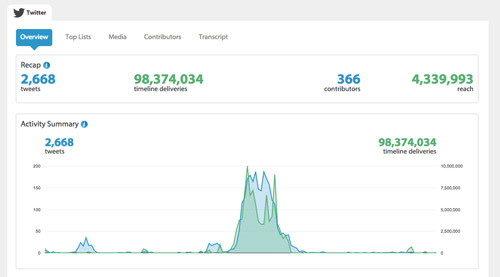
On average, Post Planner’s Twitter Chat, codenamed: #viralchat, gets about 2,000 tweets per chat. Since these chats are public, we’ve also benefited from hundreds of other people seeing the hashtag each week.
This all provides exposure for your company. We’ve even reached new people, since we’re getting exposure from our guests followers as well. Some of them subsequently started using our products after joining our Twitter Chat sessions.
Here’s an overview of one of our most successful Twitter Chats with social media author and educator Marsha Collier:
twitter chat

2. Humanize Your Brand

How often do you see brands come together with their fans to discuss a particular topic with them?
Not often. Twitter Chats are a great way to do just that, since it allows you to engage with your fans. This helps humanize your brand as you  engage with your community.
It’s a great way to engage with your fans who join such chats to listen to what you have to say.

3. It’s A Great Way To Listen

Okay, your company has tweeted enough! Those thousands of creative tweets need to take a back seat. Now it’s time to listen to your community.
Since your community will be online throughout the one hour of the chat, it’s great way to see how your fans feel about the topic.

4. Get Instant Feedback.

Ask and you shall receive! Remember, since Twitter Chats are a great way to listen, you can use this opportunity to receive important feedback from your audience.
Post a question about what you want to know and you’ll get instant feedback immediately!
How fast? About A MINUTE! That is how fast people are during Twitter Chats. It’s a great way to learn from your audience about what they love and what they don’t, use these feedback in your marketing.
twitter chat

5. Create A Loyal Community

Twitter Chats are also a great way to build a loyal community behind your company.
Since we started our chats, we’ve had many repeat visits from loyal people who continue to tune into our chat to learn and contribute their thoughts each week.
twitter chat

6. Add Value

A Twitter Chat is the best way to add value for your audience! I don’t think there is any better way to do this on Twitter. This is a platform where people tune in to learn and to share with each other.
One of our chats was led by the people behind Canva and they taught all of us how we can design better visuals. For someone like me who is a beginner, I found the session very insightful and had a lot of takeaways from it as I knew nothing about designs and color palettes.

7. New followers

Who doesn’t want more followers? Twitter Chats are one of the easiest ways to get them since you’re constantly gaining exposure from tweets people are tweeting during the chat.
To date, in just 8 weeks, we have nearly 600 followers on our Twitter Chat handle: @viralchat, and we used it almost exclusively for chats. No following, no tricks, no gimmicks.

Summing up:

I think Twitter Chats are one of the best ways to reach more people on social media! I think the pace, information and conversation is what drives its effectiveness.
While Twitter Chats may not be a new thing, it’s definitely not fully utilized.
I’m seeing a massive gap in many different industries and now is the time to start one– especially if your industry is fairly niche. Imagine being the go-to person for Twitter Chats for your industry.
What do you think?

To view the original article Click Here

Saturday, 29 August 2015

How To Achieve Explosive Growth on Pinterest

Before he became the co-founder of Pinterest, Ben Silbermann moved to California and started working for Google in customer support before eventually starting a business.
He says, of his then move from Des Moines, Iowa, to the Valley:
Being close to people that inspire you is a very good first step.
Fittingly, that’s exactly what his company, Pinterest, now makes possible:Allowing people to get close to the brands, products, and people that inspire them.
With Pinterest now accounting for 25% of retail referral traffic and driving 4x more money per click than Twitter, Pinterest has proven its power as a massively effective place to connect with your audience. And many brands are considering whether they need to give their Pinterest marketing a bit of a push.
Are you one of them?
I collected data on how best to answer the question of whether Pinterest is a good fit for you and, if it is, how to grow your brand visibility and audience reach through the platform.
Ready to start building your brand on Pinterest? Let’s talk about some ideas that may work for you.
pablo (3)

Is Pinterest the Right Social Media Fit for Your Brand?

Before we talk about growing your audience, however, one of the most important questions to ask for any business or brand is: Is our audience worth growing on Pinterest?
As of April 2015, Pinterest had 72.8 million users, with 85% of them being women. In fact, looking at the statistics, you can see why Pinterest is a social network that most businesses cannot afford to ignore and may even need to take precedence over all your other social media marketing.
  • Percentage of all US social media users that use Pinterest: 30%
  • Percentage of Pinterest users that are from outside the U.S.: 40%
  • Pinterest’s growth in users outside the U.S. in 2014: 135%
  • Average time spent on Pinterest per visit: 14.2 minutes
Here are some questions that might help in making that decision:

1. Are you already getting Pinterest traffic?

Before you do anything else, get a hold of your Google analytics traffic stats and look through quickly to see if you’re getting any referral traffic already through Pinterest.
A good way to to do this is to follow these steps:
  1. Log in to your Google Analytics account.
  2. Scroll down the left-hand menu and look for the option titled “Acquisition.” Click on it to open up a sub-menu.
  3. Select “Overview.” You’ll see a pie-chart detailing which percentage of your users is coming from Organic Search, Referrals, Direct, Social, etc.
  4. In the list at the bottom of the page, you’ll see all the different sources of your traffic. Click on Social.
  5. This will open up a another list that will show you, in numbers, how much referral traffic you received from each social media channel in the last month. Do you spot Pinterest anywhere?
You might be surprised by how many people are already pinning images from your website or blog.
While this is especially true for businesses that place a high value on images, such as those in retail, fashion, food, and travel, I was quite surprised to find that I already had a Pinterest audience in the high hundreds for my own business, which caters to freelance writers.

2. Do you have visual elements to your business or can you introduce some?

Like I mentioned above, Pinterest brings obvious benefits to businesses that are big on visual content, but creative and out-of-the-box thinking can help you find innovative ways of communicating with your audience even if you’re in the service sector or have a business (such as insurance) that doesn’t directly translate to a visual medium.
For instance, many authors create Pinterest boards with book cover images or images they find during research for their novels. Freelancers share neat home office spaces.

3. Do you have a constant stream of good images coming through or do you have the resources to create them?

Creating images centered around your brand takes time, focus, and a lot of thought. If you’re a one-person brand currently focusing on sales and strategy, it may not be the right time for you to be putting all that effort into creating original images.
Does your company have the resources to create a constant stream of images or the funds to hire out this part of the process? If not, it might be a better idea to wait until you do.
Here’s a handy list we put together of 23 tools and resources that will help you create images for social media.

4. How much do you care?

Finally, no matter your business—visual or not—if you’re interested in using the visual medium to further your brand, you can push through all the hurdles and bottlenecks and make your brand shine.
Good questions to ask are: How much time do you spend on Pinterest? Are you often curating images in your head? Do you look at boards from other brands and have ideas on how to make them better? If you answered yes to those questions, you should be on Pinterest.
12.03.13_pinterest-flowchart_FINALcopy-590x1736

How to Massively Grow Your Audience

1. Pin consistently and frequently

As with most other social networks, consistent and frequent sharing can often be the key to building an audience and keeping them engaged with your content.
Timing can be important, too, though with global audiences, it’s often better to spread your content out over a span of the whole 24 hours so you’re leaving out people in other time zones. This exposes you to more of your audience more frequently and often leads to more pins, shares, and comments as a result.
P.S. You can easily do all this and more with Buffer.
Buffer-for-Pinterest
With frequency, more is often better, we find, with 5x a day being optimal. Some experts recommend as much as 15-20x times a day, but if you’re a small company or brand, it’s better to pick a lower number and stay consistent than to do higher numbers intermittently.
Here’s an infographic we created that tells you, in a glance, what kind of frequency and topics you’d do well aiming for:
The-Science-of-Pinterest-Scheduling

2. Pin good quality images only

In 2013, Philadelphia-based startup Curalate, which calls itself “the world’s leading marketing and analytics suite for the visual web” did some intense number-crunching on a database of 500,000 images to try and figure out which images did well on Pinterest and why. On the request of Wired.com, they then undertook the massive task of finding the one perfect Pinterest picture that encompassed all the elements of a popular Pinterest image.
This image from cooking show host Paula Deen won out:
perfect-image
The image, called “Aunt Peggy’s Cucumber, Tomato, and Onion Salad” has been repinned 307,000 times, liked 8,000 times, and commented upon 300 times.
So, what makes a perfect Pinterest image? These are the winning characteristics:
  • No human faces
  • Little background
  • Multiple colors
  • Lots of red
  • Moderate light and color
  • Portrait style
You’re not always going to be able to create the perfect Pinterest image. But incorporate enough of these characteristics and you’ll frequently be able to create a viral one.

3. Write keyword-rich descriptions for pins and boards

Unlike Twitter and Facebook where content is shared quickly, read quickly, and disappears quickly, Pinterest boards are, for the most part, evergreen. What this means is that while you may create a board and pin an image today, it may still be relevant to readers, especially new ones, months and even years from now.
That does, however, depend on one crucial factor: You have to be found.
Three months from now, if a Pinterest user is looking for wedding dress ideas on Pinterest, will she come across your bridal boutique’s designs?
In order to make sure that she does, you’ll want to make sure that both your pins and your Pinterest boards are tagged with keywords and that the descriptions themselves are keyword-rich and specific. Optimize your pins. Don’t overthink this too much. Most people who search don’t go for fancy terminology. Instead, when we’re looking for something, we often go with the very basics: “white” or “lace” or “long train.”
wedding-dresses
Last year, Pinterest launched its Smart feed, which took away the chronological nature of pins. Much like Facebook, in order for your pins to reach the top, they now need to meet certain criteria. Peg Fitzpatrik outlines them in this brilliant post for Social Media Examiner:
  • Pin Quality: Your pins move to the top of the queue if they’re high-quality images with substance.
  • Source Quality: While it’s great to share pins from your own website, it’s an even better idea to pin images from other sources, especially high-quality websites. This gets your pins seen in ways and reach audiences that you otherwise couldn’t with your own website, especially if you’re still new and building your brand.
  • Pinterest Rating: According to Pinterest’s blog, your pins are likely to get more traction if they are high-quality images that are clear and relevant, have minimal text and no borders, and include great, helpful pin descriptions.
Similarly, you’ll want to make sure that your pinboards are organized. This not only helps with the optimization and finding of your pins but is also a great way to encourage Pinterest users to browse through specific boards that pique their interest. For instance, if you’re a travel company, consider adding boards for countries and specific locations, sure, but perhaps you could also create boards for “treehouse hotels” or “Not-to-miss train journeys.”
In a post that explains how she grew her Pinterest following from 1,000 to 4,000 in 3 months, blogger Dannielle Cresp writes:
I organized my boards into categories that are relatively narrow. I split the 4000 pins I had in “For the Home” into boards for each room type. It took 6 days, but my followers jumped after that. Make the board name clear, it can be a fun name, but make it easy for people to know what you’ll be pinning to it.”

4. Confirm your website

Confirming your website on Pinterest can be a good first step in building trust with your new audience. Once you’ve done this, you’ll be able to see your logo or profile picture on Pins that people saved from your site. You’ll also have access to web analytics in Pinterest Analytics.
To do this, follow the following simple steps:
  1. In your settings, click ‘Confirm website’ in the Website field.
  2. Follow the instructions on the next page. You can verify with an HTML file or a meta tag.
  3. Once your website’s confirmed, you’ll see your logo or profile picture on Pins that people saved from your site.

5. Use rich pins

Pinterest defines rich pins as
Pins that include extra information right on the Pin itself.
There are six types of rich pins:
  1. App Pins include an install button, so Pinners can download your app without ever leaving Pinterest. (For now, App Pins are compatible with iOS apps only.)
  2. Movie Pins include ratings, cast members and reviews to help Pinners learn about new flicks.
  3. Recipe Pins include ingredients, cooking times and serving info to get Pinterest cooks excited to hit the kitchen.
  4. Article Pins include headline, author and story description, helping Pinners find and save stories that matter to them.
  5. Product Pins include real time pricing, availability and where to buy. Pinners may also get notifications when prices drop more than 10%.
  6. Place Pins include a map, address, and phone number.
As you can tell, rich pins are a fantastic way to have your content stand out amongst the rest of the Pinterest crowd and give your products a bit of visibility and boost. It helps, of course, that the pins themselves catch a pinner’s eye because of their attractiveness and are very retail friendly, which means that in many cases, Pinterest users can interact with or buy your products right from Pinterest itself.
Pinterest rich pins

6. Optimize your website to be Pinterest friendly

Once you start getting serious about Pinterest, try to take steps to make your website Pinterest-optimized as well. The more you tell people about your Pinterest presence, the more likely they are to check you out there and follow you. Even regular Pinterest users need to be reminded, sometimes, of what you’re doing on Pinterest and doing so will encourage them to repin your content, as well as share and comment more.
The easiest way to start the engagement using your own website is to use these handy Follow and Pin It widgets that Pinterest offers. This ensures that when visitors to your website like something they like, it’s easy for them to pin it or share it simply and with the click of a button.
Another way to create user engagement from within your website is to promote individual boards by embedding them in blog posts and other content. It’s sometimes helpful to focus on getting followers for individual boards than it is for your entire account, so work on promoting your most popular boards to your audience.
On the Pinterest page itself, you might want to put your most popular boards on top so that website visitors who decide to check out your Pinterest page can see, at a glance, the boards that are most likely to interest them.
Random House pinterest

7. Build a community

Like with all other social networks, your brand on Pinterest will grow in proportion to the effort you put in towards becoming a part of the community. A good way to start doing this is by following other boards in your niche and forming relationships with the people and contributors behind them.
Further, try and take advantage of group boards, which are run by a single administrator but allow pins from multiple contributors on a subject. By harnessing the power of group boards, you can gain access to an audience that may be interested in your products and services, but that may not have heard of you before.
top-group-boards
Finally, take the time to comment on popular pins and repin others. Mention other brands and people by name when you can when pinning from their blogs. This puts into place the reciprocity effect in a way that introduces you to people positively and gives them the opportunity to further share your work.

8. Be useful

“Social” is a key component in any social media effort and Pinterest is no exception. Try and go in with the mindset of helping your users and customers and creating an amazing experience for them, visually and otherwise, and you can’t help but succeed.

Over to you

What have been your best Pinterest brand-building strategies?
I’d love to hear about what steps you’ve taken towards your own Pinterest marketing efforts and what has led to the most growth and success for you on the platform.
To view the original article Click Here

Daddy or chips? A/B Testing to Make the Right Ad Copy Decision

Remember the sweet little girl contemplating one of life’s toughest decisions in the iconic 90s television ad for McCain Oven Chips? Here’s the ad if you’re wondering what I’m going on about.
Daddy or Chips? A classic piece of advertising from the 90s

Daddy or chips?

As the advert shows, making decisions can be difficult; and the more people and opinions added to the process, the harder the decision becomes. You believe that putting 10% discount messaging in your ad headline will produce a higher CTR than in description line 1, but your client thinks otherwise. You feel that a short and punchy description line 1 and 2 will be more engaging to potential customers than utilising the entire character length, but your colleague disagrees.
More often than not, we choose actions and form opinions which are heavily influenced by emotions, memories and bias, but what if there were a superior way to better inform our decisions?
Fortunately, a more scientific method known as A/B Testing (occasionally referred to as split testing) takes the guesswork out of making these crucial decisions, by allowing you to put multiple ad choices in front of your audience to determine which ad customers find the most engaging, and thus which boost CTR.
So let’s get into the nitty gritty of A/B testing.

What Is A/B testing and why is it SO important?

A/B ad testing is the process of conducting an experiment where you test two different versions of an ad simultaneously. In PPC marketing, when you only have a limited amount of time to separate yourself from the competition in SERPs, it is vital to constantly be testing ad copy.
Chips, chips and more chips
By using systematic testing to collect real-world data, you can shed some light on which messaging works best for your brand and the products you sell. When you discover that the difference between putting your percentage discount in the headline and description line two is a CTR increase of 20 percent or more, while your quality score increases and your cost per click decreases, the thought of not using A/B testing becomes scary.

What are your goals in A/B testing?

Before an A/B test can be put into motion, knowing your desired outcome is essential. Arrange a meeting with your client to discuss the goals of your PPC campaign. This discussion should cover everything from USPs, competitor copy and special offers, to calls to action and message tone in compliance with brand guidelines.
Once your goals have been agreed, you can tailor ad copy tests towards the goal and have something concrete to measure success. At this point I recommend creating a Google doc with the ad copy you are looking to run, with columns that include the test stage, expected start date, messaging and test type, which you can share with your client for approval. This is beneficial for adding a level of transparency, reassuring clients that you have a solid action plan and for keeping yourself on track.

What can you actually A/B Test?

In PPC marketing, there are four basic components that you can change to create new ad variations: the headline, description lines 1 and 2 (also known as body text) and the display URL.
Once you have decided which variables you want to test, the next step is to list potential product features, CTAs and test ideas. When you have completed your brainstorm, weigh up your suggestions against your goals and delete where necessary. Once approved by your client, you will then have a solid list of CTAs and product features that you can combine to begin ad copy testing. I recommend creating a testing schedule and giving each ad a specific label. Here’s one I made earlier.
Bonus: Apart from changing the headline, body text and display URL to create new ad variations, there are a few additional things that can be tested. Don’t be afraid to be creative, extend your testing to include ad extensions, english vs. native language, location in headline vs no location, dayparting and more.

The 7 golden A/B test rules

Although there are endless variables that you can A/B test for PPC ads, there are a few vital rules to remember to keep you on track:
1. Don’t forget your goals - Despite outlining the importance of goals earlier in the post, they are so important I must stress it again! In order to be successful, knowing what success looks like is paramount. Select your quantifiable metric(s) and stay true to them throughout the test.
2. Test one thing at a time - When A/B testing ad copy it is very easy to become overzealous and throw multiple variations into your test at once, which can kill a test before it’s even begun. Fight the urge to do so and methodically work through testing one variable at a time. By doing so, you will know that when one ad outperforms another it is near certain that is is due to the variable that you have changed.
3. Run your test for an appropriate amount of time - It is important not to run your A/B test for too short a period of time, but it is just as important not to let the test run too long. If you do the former your results may produce inconclusive results, while doing the latter might mean that you miss the window for implementing real change.
The best way to ensure that your test comes to a natural end where a data-driven decision can be made is through statistical significance. Statistical significance is achieved when your ad copy test has matured and is accurately informing you which ad is better. This confidence level is usually set at 95%, signifying that there is a 5% chance that your test results are coincidence. For ease, some bid management platforms provide built in statistical significance calculators, however these calculators are readily available online -Cardinal Path has a great statistical significance tool, which gives you the option to change the confidence level and has the added benefit of showing the absolute difference between two ads’ CTR and CR, and points out if further testing is needed for clear cut results.
4. Use the correct ad settings - To set up a fair A/B test, ad impressions need to be divided evenly between your ads. Failing to do so could mean that your new ad may not even show.
To help ensure that the new ad variation gets a fair chance of showing as frequently as existing ads with history, (in Google) click the campaign settings tab then go to the adgroup which you are going to be testing is located and update the setting to ‘Rotate Indefinitely’. Bing also provides a similar setting to ‘Rotate Ads More Evenly’.
5. Do not make a golden ad for a bronze landing page - So you have found out which variables improve your CTR and have now created ‘the golden ad’. Why follow this up with a less than golden landing page? Make sure that your potential customers’ expectations are met by doing/offering/presenting what you have outlined in your ad, on the landing page. Don’t make them work hard for it, or you could lose your visitor just as quickly as you gained them. Where your ad sends visitors can have just as much impact on conversion as the ad itself.
6. Eat, sleep, rave, repeat -  Once you have completed your first round of testing and paused your underperforming ads in favour of the winner, your job is not done. The next step is to mark down the results of your test in your Google doc and move on to testing the next variable. It is essential to continuously test new ads in order to stay ahead of your competition.
7. Be patient -  It is unlikely that you will improve in leaps and bounds each time you run a test. Success can also be found in knowing what does not work for your business, as the point of testing is to learn and improve. As Benjamin Franklin said:
“I didn’t fail the test, I just found 100 ways to do it wrong.”

Final thoughts

To wrap up for those of you who looked at the post and thought TLDR (too long didn’t read), A/B testing is an integral part of PPC success.
Test results can be seen quickly at a minimal cost, providing invaluable real-world data about how potential visitors respond to different messaging. Creating one great ad is a fluke, but consistently creating engaging ads is an art which takes careful planning, vigilance for competitor strong points and a methodical testing schedule, which eliminates the feeling to ‘go with your gut’ or stalling on the testing process.
When you know which copy provides quantifiable results, it becomes easier to make better decisions, better advise clients who have a ‘gut feeling’ about copy and create an efficient strategy for future campaigns. Take full advantage of the options available to you when A/B testing, and remember to keep testing as what works today may not work in a few month’s time.
And by the way, it’s definitely chips...
If you have any anything to add or you think it's daddy please say so in the comments below. 
To view the original article Click Here

Friday, 28 August 2015

From SEO To SXO: Search Experience Optimization

future-search-box-ss-1920
How does one win at SEO now and in the future?
Some of the directives we have been hearing for years are truer than ever:
“Just create great content!”
“Content is king!”
“Build a quality site!”
But what is “great”? How do you measure “quality”?
You can’t evaluate content quality without considering the expectations of the user. It doesn’t matter how well the content is written if it’s out of sync with the user’s expectations. Great content, in the context of search, means you have moved beyond SEO to Search Experience Optimization (SXO).

The Search Experience Starts On Google And Ends On Google

Typically, user experience (UX) optimization focuses on optimizing success metrics. Perhaps those metrics are based upon converting users into buyers, gathering email addresses, generating page views or getting users to click on ads.
These are your metrics, not Google’s — they are your customers, not Google’s. With SXO, you need to focus on Google’s customer. This experience starts and ends on Google.
We have access to all sorts of metrics about our own site, some of them very clear (like a purchase) and some vague (like bounce rate). However, we have little access to how Google may be measuring results on their own site. It’s a deep black hole. To optimize the search experience, we must shed some light on that darkness!

You Can’t Always Get What You Want

We want users who are ready to buy, book, subscribe or otherwise take an action that’s good for our business. The following chart shows a hypothetical breakdown of how search visitors might interact with a website:
UserActions

In this case, 60% of the users never take a single action. Did they get what they want? Who are these people? Why are they landing on your site?
A mere 10% took an action that can reasonably be viewed as a successful visit (a sign-up or a purchase). What about everyone else? Even those who didn’t bounce? Did they walk away from the site frustrated or happy?
We don’t always get the visitors we want. Search Experience Optimization means optimizing the user experience for the users we get, as well as the ones we want! Not only will that align with what Google wants, but a better understanding of all our users will help our business objectives, as well.

What Google Wants: Provide An Answer!

Except for navigational searches, almost all searches are questions, even when they are not phrased as such. Very simply, Google wants to provide answers — as evidenced by the increasing number of direct answers appearing within search results.
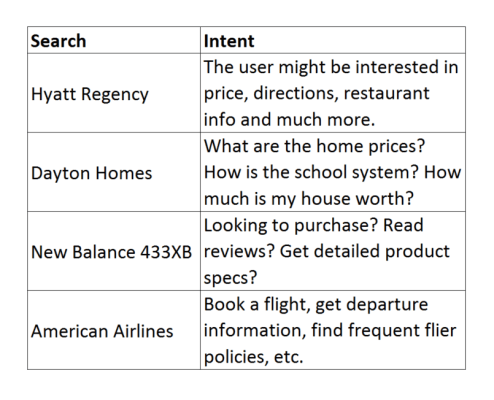
Consider the following searches:
search-intent-examples
Google is successful when it provides an answer — but how does Google know if it has done so successfully, especially when the query is not obviously a question?

How Does Google Evaluate?

Obviously, Google has its own internal metrics to measure the quality of its search results. Just like our own sites, Google must have metrics based on what users click on — in fact, Google recently confirmed this.
It makes sense that Google analyzes click behavior. Likely and oft-discussed metrics it is looking at include:
  • Short click. A “short click” is a quick return from a website to Google. Clearly, a very quick return is not a good signal.
  • Long click. This refers to a long delay before the user returns to Google. Longer is better.
  • Pogosticking. This is when a searcher bounces back and forth between several search results.
  • Click-through rate. How often users click on a given result compared with how often it is displayed (expressed as a percentage).
  • Next click. What a user clicks on after “pogosticking” back to Google (Either they click on an existing search listing or perform a new search).
  • Next search. When a user moves on to a new search.
  • Click rate on second search. When a previous page is elevated due to a personalized search and/or a previous click.

The Next Click

The most telling signal to Google may very well be the “next click.” If Google wants to provide the answer to a query, the next user click tells them what they need to know. Did the user find someplace to buy their New Balance running shoes? Or a review for the B&B in Napa?
If a user returns and clicks a different search result from the same query — or, upon a subsequent visit to Google, repeats the same query — that could be a signal that the initial search was not satisfied. If a user comes back and does a completely new search, that could mean the user was satisfied with the result.
Google has yet to confirm that click behavior directly influences rankings. It’s hard for me to imagine that it doesn’t. But even if it doesn’t affect rankings, Google likely uses it to influence and evaluate other changes to their algorithm. Either way, if the appearance of your site in Google’s SERP improves their metrics, that can only be fantastic for your organic search.

Kill The Search

Therefore, to optimize the search user experience, you must end the user quest and kill the search.
The user must have no reason to go back to Google and continue their quest for an answer. We will never know what that next click is. However, we can influence that next click by understanding our users.
To “kill the search,” we need to understand why users are landing on our page. What was the question or need that drove them to Google in the first place?
Consider a hotel site when a user searches for a specific hotel:
  • Are they price shopping?
  • Looking for reviews?
  • In need of driving directions?
  • Researching amenities?
Of course, we can make educated guesses. But we can do better.

Keyword Data

Keyword data is a good place to start. You can start by examining keyword data from Webmaster Tools (now rebranded as the Search Console) and looking for modifiers that reveal intent. Look at keywords for specific page types and high-traffic individual pages.
Many keywords will be vague and not reveal intent. If you are a travel site, for example, you might see “Hyatt Regency” 100 times with no modifiers and only 20 times with modifiers (such as “reviews,” “directions” or “location”). The frequency of those modifiers can give you a good idea of the broad questions users have when they land on your site.
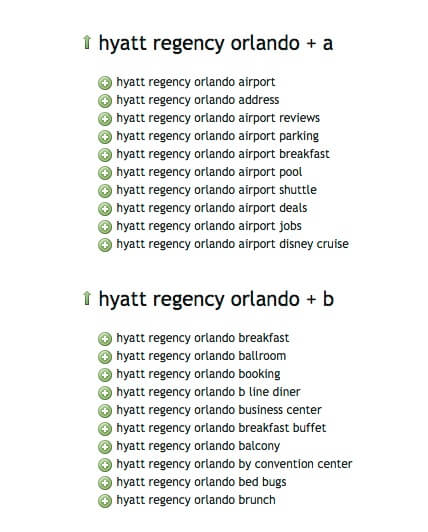
This is only a starting point. There might be many user queries about which you have no data, simply because you do not rank for those queries. That’s when you need to go to keyword tools like SEMrush or the Google Keyword Planner. I also like to use UberSuggest to get a good overview of what the user mindset is. (Although it does not have query volume, it catches many variations you don’t see in the other tools.)
UberSuggest
Keyword data is a good start toward getting into our users’ heads. But that’s only a start. Let’s take it further.

SEO Surveys

Surveys are fantastic tools to help you understand why people landed on your site. I’ve been doing SEO surveys for many years, using tools like SurveyMonkey and Qualaroo. Of course, surveys themselves are disrupting to the user experience, so I only keep them running long enough to reach statistical significance. I usually find 100 responses is sufficient. Things to keep in mind:
  1. You want to segment users based on search. This is an SEO survey, so it is only triggered for search visitors. (Of course, it’s useful to extend the survey to other segments, too.)
  2. The purpose of this survey is to understand why the user landed on your site. What was the question or problem that drove them to search?
  3. You need to trigger the survey very quickly. If you wait too long, you will have lost the opportunity to include the people who bounced very quickly (Those are particularly the people you want to catch!). Generally, I launch after 10 or 15 seconds.
  4. The surveys should be segmented by page type. For example, people landing on a hotel property page on a travel site have very different motives from those of people landing on a city/hotel page. For high-traffic content pieces, you want to survey those pages individually.
  5. Your survey segments should represent a significant portion of your SEO traffic.
Ask the users, “Why did you visit this site today?” and list different options for the reasons. Make sure you list an “other” to capture reasons you might not have thought of. For instance, on a real estate home sales site, I have asked if users were looking for:
  • A home to buy
  • A home to rent
  • Home prices
  • School information
  • A house estimate
  • Open houses
  • Maps
Based on your survey data, you can create a prioritized list of user needs. Often, you will find surprises which can also turn into opportunities. For example, suppose you survey users who land on your real estate site on a “home for sale” page, and you discover that 20% would also consider renting. That could be a great cross-marketing opportunity.

Statistical Significance

You want to satisfy your users, but you can’t please everyone. You will need to prioritize your improvements so that they meet the needs of as large a percentage of your visitors as possible.
For example, if 25% of visitors to a restaurant page want to make a reservation, and they can’t (either because the functionality isn’t there or due to usability problems), you have an issue. If only 1% want driving directions, that is a much smaller issue.

10 Seconds Is All You Get

UX expert Jakob Nielsen performed an analysis on a Microsoft Research study a couple of years ago that showed that the largest visitor drop-off came in the first 10 seconds. If you get past 10 seconds, then users will give your site a chance. This means you have a maximum of 10 seconds to convince visitors that you:
  • Have the answer to their question
  • Have an answer that they can trust
  • Will make it easy to get their answer
That’s a tall order, and your page design needs to balance many competing priorities. To design an effective landing page, you need to know what visitors’ questions are.

SEO Usability Testing

Usability testing is a great tool to help determine how successful users are at meeting all their goals. In 2015, it definitely should be considered part of an SEO’s role. If that task falls to the UX or product team, work with them to make sure your tests are covered. If not, then take the lead and feed the results back to those organizations.
For SEOs who don’t have experience with usability, I suggest Rocket Surgery Made Easy. Additionally, there are online services which provide valuable, lightweight and rapid test results. I’ve used both UserTesting.com (for more extensive tests) and FiveSecondtest.com for quick reactions from users. Here are some tips specific to SEO usability testing:
  • Create a good SEO user scenario. Set the context and the objective. Start them on a search result page so you can observe the transition from search result page to your landing page.
  • Focus your landing pages by using page templates that get the most traffic.
  • Focus on the dominant problems, and use cases that you have identified by keyword analysis and surveys.

Consistent Titles & Meta Descriptions

If every search is a question, every result in the search results is a promise of an answer. Please make sure your titles are representative of what your site provides.
If you have reviews on 50% of your products, only mention that in the title and meta-descriptions of products that actually have reviews. Otherwise, you will be getting bad clicks and unhappy users. Another example is the use of the word “free.” If you say “free,” you’d better have “free!”

An Improved Web Product

The role of a successful SEO has broadened, and it demands that we understand and solve our visitors’ problems. It’s a huge challenge for SEOs, as we need to broaden our skill set and inject ourselves into different organizations. However, this is much more interesting and rewarding compared to link building.
Ultimately, the role of SEO will become even more critical within an organization, as the learnings and improvements will broadly benefit a website beyond just improving SEO. The great thing about the transition from Search Engine Optimization to Search Experience Optimization is that the end result is not just more traffic, it’s a better Web product.
To view the original article Click Here