Sunday, 6 December 2015

6 Instagram Testing Strategies for Social Marketers

We constantly recommend testing your social content, but which attributes should you be testing against each other? If you’re looking for some new ways to test and optimize Instagram content, then you’ve come to the right place.
Specific Link in Bio vs. No Specific Link in Bio
Are you struggling to find a way to convert to get your Instagram followers to your website? Whether you sell sweaters or B2B software, this is likely a relevant concern for your brand.

Here’s one way to test how well Instagram is working as a website traffic driver for your brand.
For one week, post a different picture or video each day which directs followers to your Instagram bio, where you include the same Bitly link to a specific landing page for the entire week.
The following week, make the link in your Instagram bio a generic link to your brand’s main page.
Note the difference in traffic to the landing page from the first week to the second week, and use this as a starting baseline for growing your traffic from Instagram to your site.

Tags vs. New Followers
Instagram is a great place to encourage user-generated content, whether by contests, compelling content, or a mix of both. A lot of brands ask followers to “double tap” (Like) and tag their friends for a chance to win a prize.

This is a great way to gain brand awareness and, subsequently, followers — but only if it is tested well to make sure it’s effective.
Here’s what you should do to see if the the people being tagged in your comments actually become new followers: First, make a list of all Instagram users tagged in your Comments section.
Next, wait two weeks (you don’t only want to see how many new followers you’ve gained — you want to see how many you’ve retained) and then take a look at your follower growth over that time period, from the start of your contest on.
More specifically, dig into the data and come up with a list of all the Instagram handles of your new followers. Compare this list with the list of folks tagged in the Comments sections of your contest posts.
Come up with a ratio of people tagged: new followers. This will help you set a baseline for future benchmarking.

Product vs. No Product
Every brand active on Instagram should think about a test comparing posts which feature products and posts which don’t.

This is a test you can run over the course of two weeks. One week, post a picture or video of your product once daily. The next week, post a picture or video that doesn’t include or even reference your product at all once daily at exactly the same time of day.
Then, run a report to find out which week generated the most engagement, follower growth, engagement as a percent of audience, and/or other metrics you’re interested in. Pay particular attention to the highest performing posts in both the product and non-product categories.

One Product vs. Another Product
Another useful way to test product posts is by comparing one product against another product.

This is a test you can run over the course of weeks, months, or any other length of time which fits appropriately into a campaign cycle. During one time period, focus solely on one product. The next time period, post picture and videos that include the other product. Complete this for as many products as you wish to include in the test.
In your final chosen time period, post a medley of product pictures from each of the previous time periods.
Lastly, run a report to find out which week generated the most engagement, follower growth, engagement as a percent of audience, and/or other metrics you’re interested in.

This Day vs. That Day
You probably get the most Instagram engagement on the dates and times when you post hte most content.
Screen Shot 2015-11-03 at 2.51.52 PM
But are you missing a sweet spot for engagement on Instagram by not posting at the right times? The only way to find out is to test.

This test can be run over the course of one week, but it will require a lot of content. Post a photo or video once an hour, every hour, from 9AM-9PM, every day, for a week.
By finding the repeating spikes in engagement over time, you’ll be able to understand when your followers are most likely to engage with you and when they’re not paying attention.

This Takeover vs. That Takeover
This test is especially useful for brands who are trying to leverage influencers on Instagram.

If your brand does “takeovers,” where an influencer takes over your account for a day or week, then you should be testing your takeovers against one another. This will show you which kinds of influencers are most relevant to your Instagram audience.
Here’s what we recommend: run a period-over-period report for the two weeks that two different influencers took over your Instagram account. Look for strengths and weaknesses in both takeovers, and keep this in mind for future campaigns.

What Did We Miss?
Which testing strategies have you used on Instagram? Let us know on Twitter and download our 2015 Influencer Report below for a little extra food for thought.
To view the original article Click Here

12 Tips for Writing With Unforgettable Personality

Writing_With_Personality.jpg
The best writers aren’t necessarily the smartest, the smoothest, or those with the biggest vocabulary. The best writers are those that possess an unforgettable personality.
A writing personality is just as real, unique, and nuanced as your personality in everyday life -- expect you only release it when you create content. And if you can create content that brims with personality, I guarantee that people will love reading it. They’ll come back to it again and again. They will share it.
Your personality becomes your authentic signature, a trademark that appeals to your target audience. Not to mention, it'll serve as a source of incredible brand power and potential. 
Want to let yourself shine through in your writing? Check out these 12 methods for writing with unforgettable personality.

12 Methods for Writing With Unforgettable Personality

1) Embrace your (writing) personality.

The problem with a writing personality is that most people don’t realize that they should have one. Instead, they try to follow the rules and regulations handed down to them by a well-meaning 10th-grade composition teacher. Or, if they do realize the importance of a writing personality, they try to mimic someone else’s personality.
Neither of these is the right approach. You can’t “follow the rules” and expect to have an unforgettable personality. Nor can you try to force a personality that isn’t yours.
You have to discover and shape your own personality in your writing. It takes time and effort, but it’s possible. Each of these tips will help you do just that.

2) Pick a focus and stick to it.

To have a consistent writing personality, you need to start by having a consistent area of focus. This can be something broad like marketing or more specific like social media. The important thing is that you're not all over the place. 
After all, one of the basic tenets of content marketing is dominating a niche. This aids your SEO and your entire digital marketing effort.
Food blogger Ree Drummond is a great example of a writer who has a clear topic. She could write about anything and do a darn good job, however, she uses her writing personality to focus on one topic, and one topic only.
Pinoneer_Woman_2.png

3) Break grammar rules.

Some people are inveterate rule breakers. And that’s okay. While we don't recommend you throw grammar out the window, breaking a rule every once and a while can serve as a great way to amp up your personality.
What kind of grammar rules should you break? It depends. Here are some common ones:
  • Sentence fragments: “Seriously. I mean, people, really.”
  • Punctuation: “I. Just. Can’t. Even.”
  • Starting sentences with conjunctions: “But I’m okay with that.”
  • Using “like”: “It’s not like you’ve sinned.”
  • Using a preposition at the end of a sentence: “You’ve got to get your traffic up!”
Again, be careful with rule-breaking. If you’re frivolous with your grammar, people may start to suspect your intelligence rather than respect your personality.
I like what T. S. Eliot, an iconoclastic poet, wrote about rules:
TS_Elliot_Quote.png
Credit: AZ Quotes

4) Get to know your audience better.

The principal group of people who should shape your personality is your audience.
Why? Because they are the ones consuming, accessing, and subscribing to it. Make sure that your personality does not cross their boundaries of proprietary, offend their sensibilities, or rub them the wrong way.
Comedian Milton Berle used to tell five one liners at the beginning of each routine. Based on the laughter from each one, he would know how to shape the rest of his routine.
His overall personality was, of course, funny guy. But he tailored his funnies to the particular audience.
You can do the same thing with your writing. You don’t need to reshape your entire personality, but you should adapt it to your specific audience. And the better you get to know your audience through social media, blog comments, in-person interactions, and research, the better you’ll be able to tailor your personality to them.

5) Highlight a personality trait that you have in real life.

Your writing personality isn’t exactly the same as your real life personality. Writing and in-person interactions are intrinsically different. However, there is usually some overlap.
If you’re known as a smart and serious individual in person, then your writing can convey that. If people know you as “the funny guy,” then let your humor shine through in your writing.
It’s your personality. Own it.
Matthew Inman of The Oatmeal creates hilarious content and comics.
The_Oatmeal_Content.png
Credit: The Oatmeal
People expect Matthew to be a funny guy. And he is.
The lesson? If you find a way to infuse your writing with your real life personality, go for it. After all, people like reading content that feels like it has actually been written by a human.

6) Talk about yourself.

To truly own your personality, you have to talk about yourself. Many successful bloggers and writers aren’t afraid of using “I,” “me,” and “my.” It’s not self-centered. It’s just a natural way of communicating.
Michael Hyatt runs a successful blog that reaches tens of thousands of people. His writing is personal, and he refers to himself.
Take this recent post as an example. He refers to himself seven times in the first few sentences.
Robert_Di_Niro_Leadership.png
While this is a great way to show off your personality, it's important that you also remain focused on your readers. And their wants. And their needs. Inserting yourself into your work makes it easier for people to connect with you, but at the end of the day, you're creating content for them, not you. 

7) Write like you talk.

Writing like you talk is generally a good idea. Obviously, you want to cut out useless filler words. “Um” and “uh” aren’t necessary in writing.
At the same time, your style of speech is a mark of your personality. If you’re sarcastic, gentle, incisive, crude, bombastic, or use outrageous expressions, shake a little bit of this into your writing.

8) Stay organized.

Don’t allow your personality, whatever it is, to throw off your organization.
Good writing is inherently organized. If you have a disorganized and scatterbrained personality in real life, don’t try to import this into your writing. People don’t like to read scattered and disorganized content. Create an outline and stick to it.
Tim Ferriss is an example of someone who writes brilliant content. Often, his articles are far-ranging, discussing things like chickpeas and angel investing (like this one).
Tim_Ferriss.png
However, Ferriss maintains a well-ordered structure in each article. His personality is evident in the way that he can move from subject to subject while keeping his outline intact.

9) Find a trademark technique.

To create personality, find a trademark technique that you can use every time you produce content. One of my trademarks is asking a question at the end of every article. 
James Clear’s trademark is starting each article with a true story from history.
James_Clear_Article.png
Here’s one of Clear’s articles, in which he tells the story of Robert Wadlow:
Robert_Wadlow_James_Clear_Article.png
Clear’s next article starts with a story, too.
James_Clear_Article_Story.png
And so on…
Clear’s readers have come to know and expect this style. It’s his consistent trademark, and an excellent facet of his writing personality.

10) Write in a way that you enjoy.

When you enjoy the way that you write, you know you’re hitting a personality stride.
Blogger Crystal Paine explains in her book, Money Making Mom, that when she wrote about her daily life, challenges, and similar topics, she found fulfillment and joy.
Her readers could tell a difference, too, and they responded with strong affirmation.
While Crystal still posts about daily deals and giveaways, her best posts are the ones that are filled with her personality.
A post about daily stress garnered lots of shares:
Crystal_Paine_Social_Shares_1.png
But a post about a daily deal was less impactful:
Crystal_Pane_Social_Shares_2.png

11) Be authentic.

If you’re forcing it, people can tell.
A personality can’t be forced, so use your normal personality to infuse your writing.
Ramit Sethi is completely authentic in his writing. His personality is everywhere. You read a single post, and you practically feel like you know him.
I_Will_Teach_You_to_Be_Rich_1.png
If Ramit wants to swear, he swears. If he wants to be rude, he’s rude. If he wants to tell someone off, he does it.
I_Will_Teach_You_To_Be_Rich-1.png
This is his personality, and he’s being authentic. While this might not work for every business or industry, inserting a bit of authenticity into your writing can help to make it more relatable. 

12) Commit to your style.

Once you get into the groove of your personality, don’t change it. Your audience expects you to be a certain way, write a certain way, and convey information in a certain way.
Seth Godin is a brilliant writer. Even though a lot of conventional content marketing wisdom says to create long-form, image-heavy content, Godin doesn’t go for it.
Instead, he creates bite-sized articles with no images.
Seth_Godin-1.png
Is that okay? Yes. Because it’s his style.
(Besides, Seth Godin is basically the king of marketing, so he gets to write some of the rules.)
Finding your style and sticking with it will serve you much better than flitting off to create a new personality, even if it does seem better.

Ready to let your personality shine?

You won’t write like Seth Godin, James Clear, Tim Ferriss, or Crystal Paine. That’s okay.
You are you, and your writing needs to have your fingerprints, timbre, voice, and personality all over it. Unleashing that personality in your writing starts with knowing it, owning it, and not being afraid to let it loose.
What’s your writing personality? How does this impact your writing? 
To view the original article Click Here

Saturday, 5 December 2015

10 Things I've Learned While Learning Facebook Ads

I've been obsessed with Facebook Ads for the past few years. It probably didn't hurt that the first test campaign we ran earned an excellent $0.04 cost-per-engagement from a $10 budget.
I'm obsessed because I'm convinced Facebook Ads are one of the most powerful tools we currently have as digital marketers. Whether you're looking to spend $200 a month advertising to a single zip code or $20,000 a day reaching sports fans, you can reach the ideal target audience for your organization with targeting criteria that no other ad network, search engine, or social network can match.
With that in mind, I'm going to share the 10 biggest quirks that have caught me off guard since I started learning Facebook Ads to help you avoid some of the same mistakes.
I'd really love for this to become a go-to resource for people learning Facebook Ads, so if you have tips of your own, please leave a comment!

Quick Guide:

#1 - Your ad image must contain less than 20% text.
#2 - Split test your bid models between CPC, CPM, & Engagement.
#3 - Targeting options utilize both AND operators and OR operators.
#4 - Selecting Location doesn't necessarily mean people who live there.
#5 - Facebook's third party data goes far beyond the things you think Facebook knows about you.
#6 - There are 4 ways to access Facebook ad management, with varying levels of difficulty.
#7 - It's tempting to prefer desktop over mobile, but do your research first.
#8 - Get your pixels straight before you start running ads.
#9 - Segment your creative!
#10 - Start using good naming conventions now.
Add your tips for learning Facebook Ads in the comments

#1 - Your ad image must contain less than 20% text.

If there's a single most-common reason that my ads get denied, it's because I forget to check text coverage on images for my sponsored organic posts.
Whether you're promoting organic Facebook posts on your page's feed or running pure ads, Facebook is very picky about how much text you can display inside of your ad creative.
This is Facebook's way of making sure that your ad images aren't covered in obnoxious calls-to-action, over-sized logos, and other excessively commercial elements.
Official 20% Rule Page: https://www.facebook.com/business/help/468870969814641
Facebook provides a tool for checking how much of your image is covered in text, which you can test for yourself at https://www.facebook.com/ads/tools/text_overlay. When you click the grid cells that contain text after uploading your image, you can see the percentage of the image that contains text.
Here's an example of two image variations you might test, but only the option on the right would be usable in a campaign:
facebook-20-percent-image-rule
The fastest way to avoid the 20% rule is to automatically produce all of your social media imagery with the 20% rule in mind — or produce a separate set of images just for Facebook.
When we create social media graphics, we have a transparent grid saved as a PNG file that we paste into a layer of the image we're working on. You can copy & paste the image below, or download templates for Illustrator, InDesign, Powerpoint, and Photoshop from our blog: Facebook Ads 20% Text Grid Templates.
Facebook Ads 20% Image Grid Template

#2 - Split test your bid models between CPC, CPM, & Engagement.

Facebook offers a few different ways to structure your bid model, which is the basis for how you're billed. For example, here are the bid models available for a sponsored organic post:
facebook-ad-bid-models
Each one may offer a better pricing structure depending on the audience you're targeting, the goal of your campaign, and the ad content that you're using.
In my experience, there is not a single best model for everyone. For example, if I put out a really interesting post and my goal is clicks, I might get the best results by using CPM bidding that gives me a much lower CPC than actually using CPC bidding. However, if I put out a somewhat boring post and my goal is clicks, I might be better off just paying for the clicks with CPC bidding, since it will require a lot more impressions to generate the same amount of clicks. Every situation is different, so like everything else in PPC, you have to test test test for yourself.

#3 - Targeting options utilize both AND & OR operators — and those targeting options are changing.

There are a ton of Facebook Ad targeting options available — that's where the power in Facebook Ads comes from. We put together an enormous Facebook targeting guide if you want to see all of the options available.
But, sometimes the targeting options don't act the way you think they'd act, and they're changing as I write this post.
The most common targeting mistake I see when someone runs their first Facebook Ad is thinking that when you target 2 interests, you'll only reach people who like both of those topics.
Historically, that type of interest overlap is difficult to target, and Facebook's functionality only allowed you to target users who like Topic 1 OR Topic 2, but not Topic 1 AND Topic 2.
Here's how Facebook targeting has worked for the past few years:
facebook-interest-targeting
facebook-interest-targeting-category
BUT — that targeting model is changing.
As of October 2015, Facebook has been testing a new feature called Detailed Targeting that does allow us to target 2 sets of interests.
Here's a screenshot of how the existing ad targeting is laid out:
Here's a screenshot of the new targeting structure from Power Editor:
I've edited in Photoshop slightly to show you all features in a single screenshot. The color-coded dots show you where the old targeting options show up in the new Detailed Targeting section, and the yellow highlighting shows you the two new detailed targeting options to Narrow Audience or Exclude Audience.
While this is currently only an option in Facebook's Power Editor, I'm willing to bet this new targeting structure will be rolled out to the normal ad manager in the near future, because of how granular it will allow us to get with our audiences.

#4 - Selecting Location doesn't necessarily mean people who live there.

Let's say you want to target people who live in New York City. You might type "New York City" into the Locations box, leave it at the default 25-mile radius, and keep moving.
facebook-location-targeting
But, if you did that, you might miss the small drop down menu at the end of the screenshot that says "Everyone in this location."
See it now? Well, if you click on that drop down, you'll find out that Facebook's Locations targeting gets way more granular:
facebook-location-targeting-traveling-vs-resident
That's right — not only can you target actual residents whose home is in the selected area, but you can target people currently visiting New York City who live more than 100 miles away, and people recently in New York City.
As an example, a 25-mile radius for New York City shows 10,000,000 audience members for "Everyone in this location," but only 9,500,000 audience members for "People who live in this location." That's 5% of the default audience that is irrelevant if you're only trying to reach residents — which means you could have been wasting 5% of your ad budget.

#5 - Facebook's third party data goes far beyond the things you think Facebook knows about you.

Shopping for a new car? Ever input your household income during a survey? Have a tendency to buy expensive stuff online?
Companies like Acxiom collect this data on you from tons of websites and resell it to companies like Facebook as "Data Enhancement" so that Facebook can offer better targeting options to us, the advertisers. If I wasn't so excited about the cool things this allows me to do as an advertiser, it might worry me as a consumer.
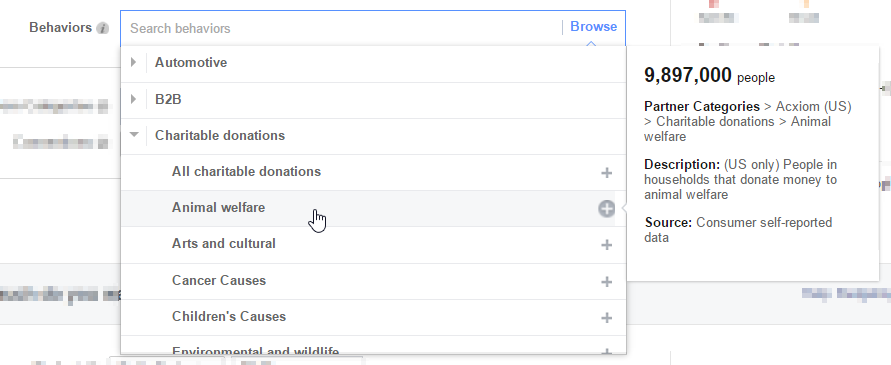
Most of what you'll find under the Behaviors targeting category is actually third party data from Acxiom, Datalogix, and Epsilon. You can either search for a Behavior by typing, or click the box to start browsing. Hovering on categories will give you a more in-depth description, as well as the data source:
facebook-third-party-data-providers-behaviors

#6 - There are four main ways to access Facebook ad management, with varying levels of difficulty.

A - Boost Post
facebook-boost-post-button
(Found on posts and your business page)
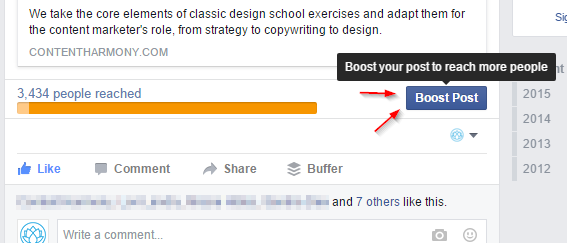
The first is what most small business owners see — the Boost Post button. In the past, using the Boost Post button was generally overpriced and much like Adwords Express, you traded simplicity for limited control and a higher price. I haven't used the Boost Post button in a couple years, so that may no longer be the case, but regardless, I would suggest you spend 30 more minutes learning the next option instead.
B - Facebook Ad Manager
facebook-ad-manager
Find it at: https://www.facebook.com/ads/manager/
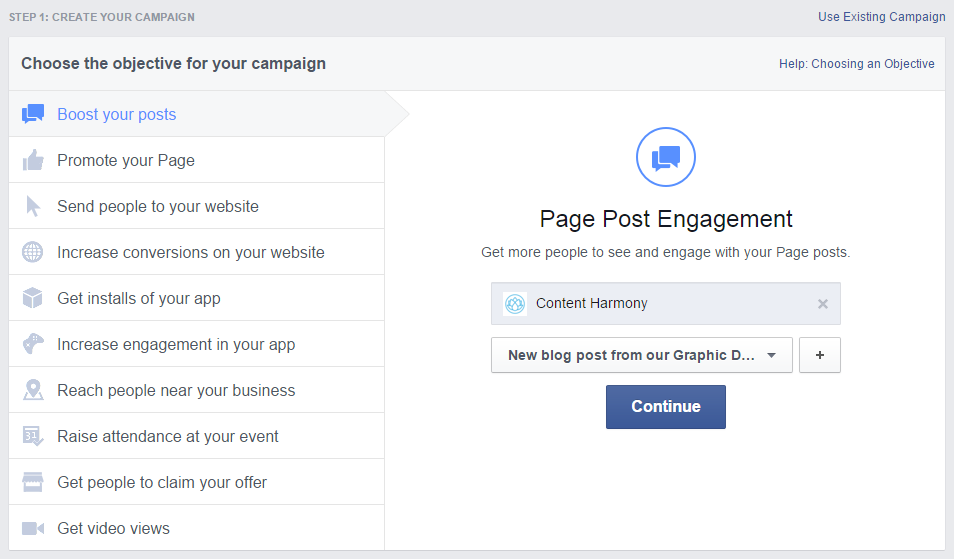
The second is the normal ad editor. This interface is fairly straightforward to begin using and offers a lot of control over ads that you might run once in awhile. If you're just a casual Facebook advertiser, this offers the best combination of price, functionality, and ease-of-use.
C - Facebook Power Editor
facebook-power-editor
Find it at: https://www.facebook.com/ads/manage/powereditor/
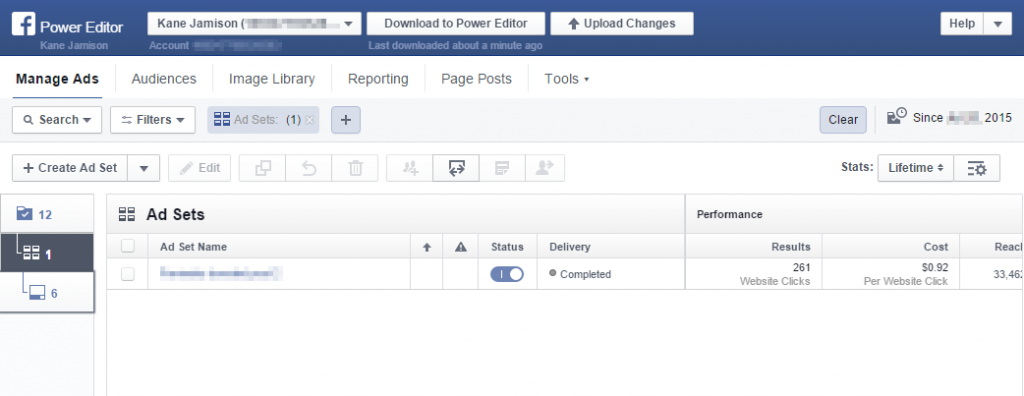
The third, and most advanced, is the Power Editor. Facebook Power Editor is not a good choice for beginner-level Facebook Advertisers and requires some training to get started with it.
However, for those willing to learn how to use it, there are a number of Power Editor features that are not available in the normal editor (like Import/Export so you can edit campaigns in a spreadsheet), and Power Editor users typically see new ad features months before the normal Ad Manager, likeInstagram Ads & Product Ads.
D - Facebook Advertising API & Facebook Ad Management Tools
The fourth level of accessing Facebook Ads would be through their advertising API. I haven't labeled this as advanced since I believe most advertisers using the API will be using third-party tools, like those found in the Facebook Partner Directory, rather than connecting to the API themselves. Like with Power Editor, API users often get advanced functionality earlier than normal ad editor users. There may be other benefits that I'm not aware of, so please feel free to mention those in the comments.

#7 - It's tempting to prefer desktop over mobile, but do your research first.

Even in the mobile-first marketing era that we live in, you might be surprised that 44% of Facebook users under age 35 only access Facebook from mobile devices. That's right — zero desktops or laptops in the past 30 days.
Regardless of the age or demographics of the audience you're targeting, don't assume that they're scanning through a laptop Facebook feed just because you're on a laptop all day while editing ads.
The vast majority of Facebook users are on mobile apps, and many of your ad sets may never get a click from desktop users.
2015-04-15 20_36_01-Audience Insights -18-35 versus average user by device
To get a better idea of your audience's device habits, take a look at the Audience Insights tool to gather market research, and use the ad builder tool to get a better estimate size of a more defined audience.

#8 - Get your pixels straight before you start running ads.

Facebook offers a variety of functions that require tracking pixels to be added to your website. The most common examples include building Custom Audiences to retarget users who have visited your website, tracking conversions from users who have seen your Facebook ads, and even using conversion pixels to stop showing ads to users who have already converted.
Recently, Facebook has released "one pixel to rule them all" simply called the Facebook Pixel, but we weren't always so lucky, and there are still some single-purpose pixels in the editor that you'll find marked as "(Old)." Make sure you install the new one, which is multipurpose and loads faster, and go through the process of upgrading any old pixels you currently have installed on your site.
An example of the Facebook Pixel code, found in Facebook's documentation. The red section 2 is the Facebook Pixel code, and the green section 3 is event code that needs to be customized, similar to Google Analytics' event and e-commerce tracking features.


#9 - Segment your creative!

Make sure the creative imagery and copy is tightly targeted to your audience. Instead of targeting an audience of 2,000,000 people, find a way to break them into smaller, more specific groups, and show them customized copy and graphics that will appeal to them.
For example, let's say you're advertising in the sporting goods market and your biggest audiences are runners and cyclists. One approach would be to show generic outdoorsy sports photography to both groups. But, in my experience, you'll probably have better luck by running separate ads with product photography highlighting each group individually.
learning-facebook-ads-segment-your-creative
A cyclist won't care about a photo of a runner, and the skateboarder wouldn't care about photos of a rock climber, so why would you show them the same ad?

#10 - Start using good naming conventions now.

In the beginning, it's easy to start using the generic names that Facebook autogenerates for campaigns, audiences, and other groupings. But, fast forward a couple years (and a couple of new ad managers or agency staffers), and things can get a little confusing.
Best practices are to start a naming convention now. Here's an example of how I might set up naming conventions for an auto dealership covering campaigns, ad sets, and audiences:

Campaign Menu Showing Multiple Clients:

Syntax:
  • "Client Name - Year-Month - Campaign Name"
Campaign Examples:
  • "Acme Auto Sales - 2015-10 - Fall Football Test Drive Promos"
  • "Acme Auto Sales - 2015-11 - November Charity/Giving Back Awareness"

Ad Set Within a Campaign:

Syntax:
(Note: This will vary a lot between campaigns — what's important is to customize and standardize it for your team and clients.)
  • "Campaign Title - Modifier 1 (eg Ad variation) - Modifier 2 (eg Location)"
Ad Set Examples:
  • "Fall Football Test Drive - Toyota Prius Kids Ad - Seattle"
  • "Fall Football Test Drive - Toyota Prius Pets Ad - Seattle"
  • "Fall Football Test Drive - Toyota Prius Kids Ad - Portland"
  • "Fall Football Test Drive - Toyota Prius Pets Ad - Portland"

Custom / Saved / Lookalike Audiences:

Syntax:
(Note: This will vary a lot between campaigns — what's important is to customize and standardize it for your team and clients.)
  • "Client Name - Custom/Lookalike/Saved - Primary Description - Modifiers"
Audience Examples:
  • "Acme Auto Sales - Custom - Moms - Yoga Fans"
  • "Acme Auto Sales - Custom - Moms - Dog & Kids"
  • "Acme Auto Sales - Custom - Sports Fans - Seahawks Fans"
  • "Acme Auto Sales - Custom - Sports Fans - Sounders Fans"
  • "Acme Auto Sales - Lookalike - Test Drive Conversions - Hybrids"
  • "Acme Auto Sales - Lookalike - Test Drive Conversions - Pickups"
When you take the time to set these up and maintain them, it makes life easier — especially when you're running ads for 20 clients or juggling dozens of customer segments.

Add your Facebook Ads tips to the comments!

Are You a Facebook Ads Veteran?
Please take the time to share a tip in the comments for anyone else still learning Facebook Ads.
Still Learning Facebook Advertising?
Let us know in the comments what questions you have!
To view the original article Click Here